
Quick answer
An email drip campaign is a set of automated emails sent to a subscriber in a specific order after they take an action, like signing up for a list, abandoning a cart, or making a first purchase. Each email has one job; the send times are built around that job rather than a calendar, and the goal is to move the subscriber to a conversion without a person manually hitting send. Welcome series and cart abandonment sequences are typically the two highest-performing drip types for ecommerce brands.
What Is an Email Drip Campaign?
An email drip campaign is a series of pre-written, automated emails that get triggered by a specific subscriber action and sent out over a defined period, rather than all at once.
The trigger might be:
- Joining an email list or newsletter
- Leaving items in a cart without checking out
- Making a first purchase
- Going inactive for a set number of days
- Downloading a lead magnet or attending a demo
Once triggered, the emails go out on a schedule you set in advance, spaced days or weeks apart depending on the goal. A welcome series might send an email immediately, then again on day three, then day seven. A cart abandonment email workflows moves faster, often sending the first reminder within a few hours of the trigger.
The word “drip” describes the pacing. Instead of dumping everything a new subscriber needs to know into one long email, you drip the information out over several messages, each one focused on a single idea and a single next step.
Drip Campaign vs. Newsletter
A newsletter goes to your entire list on the same day regardless of where each person is in their relationship with your brand. A drip email campaign only reaches people who triggered it, and the content is written specifically for that trigger. That’s the core difference marketers run into when they’re deciding which format fits a given message.
How Drip Campaigns Work
Every drip campaign runs on three components: a trigger, a sequence, and a schedule.
| Component | What it does |
| Trigger | The subscriber action that starts the sequence, joining a list, abandoning a cart, completing a purchase, going inactive for a set number of days |
| Sequence | A set of pre-written emails, each built around a single job, that build on each other rather than repeating the same message |
| Schedule | Timing set in advance and tied to the trigger, not the calendar, so cart abandonment can move within hours while a welcome series spreads across days |
Drips operate at every stage of the funnel, from a welcome sequence right after signup, to a lead-nurture series months into a sales cycle to a cart abandonment reminder sent within hours.
A few traits hold across every drip campaign, regardless of trigger or industry:
- Only opted-in subscribers enter a drip: Nobody receives a sequence without first taking the action that triggers it.
- Content is personalized to the trigger, not just the subscriber’s name. A cart abandonment email references the actual item left behind.
- Unsubscribe rates tend to run lower than standalone campaigns, since the content is relevant to something the subscriber already did.
- The sequence stops or branches based on behavior. If a subscriber converts partway through, most platforms remove them from the remaining emails.
Why You Need a Drip Campaign
An email drip campaign changes the odds of instant deletion because it meets someone at the exact moment they’ve shown interest, whether that’s the second they sign up or the moment they leave a full cart behind.
A few concrete reasons why email drip campaigns are one of the most widely used forms of email marketing automation:
- Higher engagement per email: Automated email flows regularly outperform one-time campaigns on open and click rates because the content matches subscriber intent.
- Recovered revenue: Cart abandonment sequences convert shoppers who already showed buying intent, which is a warmer audience than a cold send.
- Lower manual workload: Emails are written once and triggered automatically, so your team isn’t drafting a new message for every new signup.
- Better segmentation over time: Behavior inside the drip, opens, clicks, purchases, tells you who to move into a more advanced email workflow.
- Reduced list churn: Targeted, relevant content produces fewer unsubscribes than a generic blast sent to the whole list.
Klaviyo’s 2026 benchmark report, based on data from more than 183,000 customers, shows just how wide that performance gap has grown. All automated email workflows, including drip and nurture flows, perform better against one-time campaign sends.
| Metric | Campaigns | Automated flows |
| Click rate | 1.69% | 5.58% |
| Placed order rate | Baseline | 13x higher |
| Revenue per recipient (RPR) | Baseline | ~18x higher |
| Share of total email revenue | ~59% | ~41% (from just 5.3% of sends) |
Core Types of Email Drip Campaigns
Welcome email series:
These automated emails are sent immediately after subscriber sign-up or first purchase to introduce your brand story, set expectations, and deliver promised incentives across 3 to 6 emails.
Cart abandonment email:
Triggered within 48 hours after someone adds products to their cart but leaves without checking out to recover lost revenue. It reminds customers what they left behind, addresses friction points (shipping cost or complex checkout processes), and often includes an incentive to complete the purchase.
Win-back / re-engagement email:
Sent to inactive subscribers or customers to win back their interest through rewards, product recommendations, and other benefits.
Post-Purchase, Cross-Sell, and Upsell Emails:
After completing a purchase, customers receive post-purchase emails sharing order confirmation, shipping info, and payment details. Brands can also suggest complementary products or upgrades to increase customer lifetime value.
Lead Nurture / Educational Email:
Sent on a drip schedule of weeks to months to subscribers, sharing tips, guides, or use cases that build authority and trust.
Loyalty or Rewards Email:
Lasting a full quarter or longer, these emails provide redeemable rewards, early access, and exclusive sales to existing customers, encouraging retention and brand loyalty.
Promotional Emails:
Automated campaigns pushing sales, seasonal promotions, or flash deals to drive immediate sales.
Product Launch Emails:
A sequence of 3 to 5 emails built around a teaser, product launch, and follow-up reminders to create anticipation and drive first-wave sales for new products.
Event and Webinar Emails:
For upcoming live events, webinars, or conferences, these 2 to 3 emails include an initial invite, reminders, confirmations, and follow-ups.
Email Drip Campaign Examples and Use Cases
Here’s what a few common email campaign types look like in practice, along with what we’ve seen work for clients running them.
Welcome Email Series
The first welcome email should arrive immediately after signup, while the subscriber’s interest is highest. A short welcome series, built once, can carry a disproportionate share of total automation revenue.
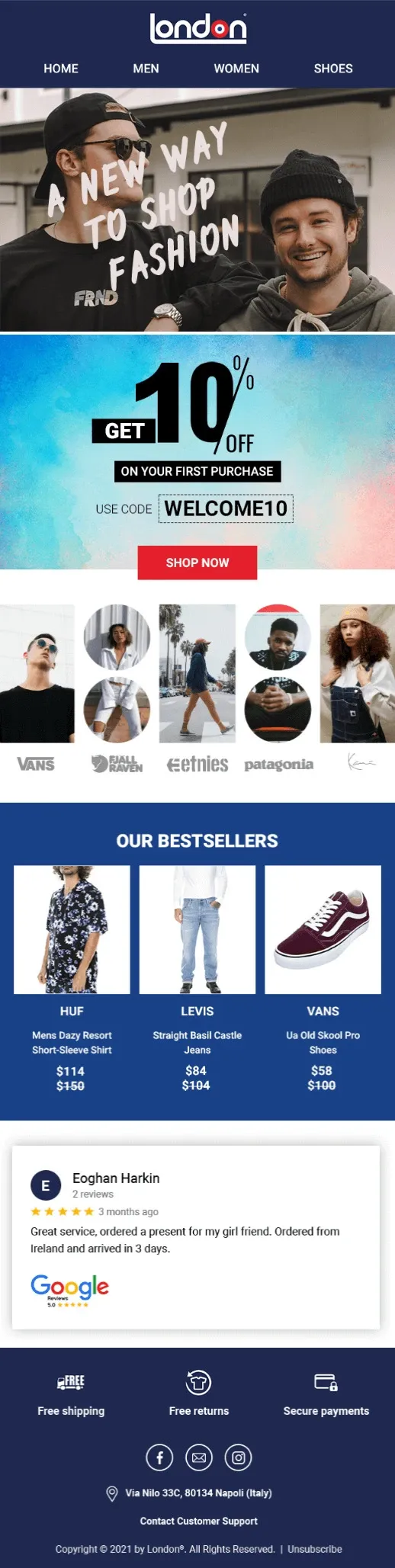
For our client London Store, we built a two-email welcome series run separately across each of their four markets. Welcome automations accounted for 39 percent of London Store’s total automation revenue.
| Region | Welcome Email Revenue |
| Italy | 19% |
| US | 5% |
| UK | 7% |
| EU | 8% |
What made it work:
- Localized content per market rather than one generic version translated four times
- Just two emails, keeping the flow simple to maintain and easy to test
- A clear next action in each email rather than a broad brand overview
Cart Abandonment Emails
This category consistently returns more than almost any other drip type, since the subscriber already showed real intent to buy before leaving. A strong cart abandonment sequence usually
- Sends the first reminder within a few hours of abandonment
- Shows the exact item left behind, not a generic product grid
- Addresses the most likely objection (price, shipping cost, uncertainty about fit) directly
- Increases urgency or incentive in the final email if the first one or two didn’t convert
For RCJuice, the five-email version of this sequence drove the 400 percent monthly revenue increase.
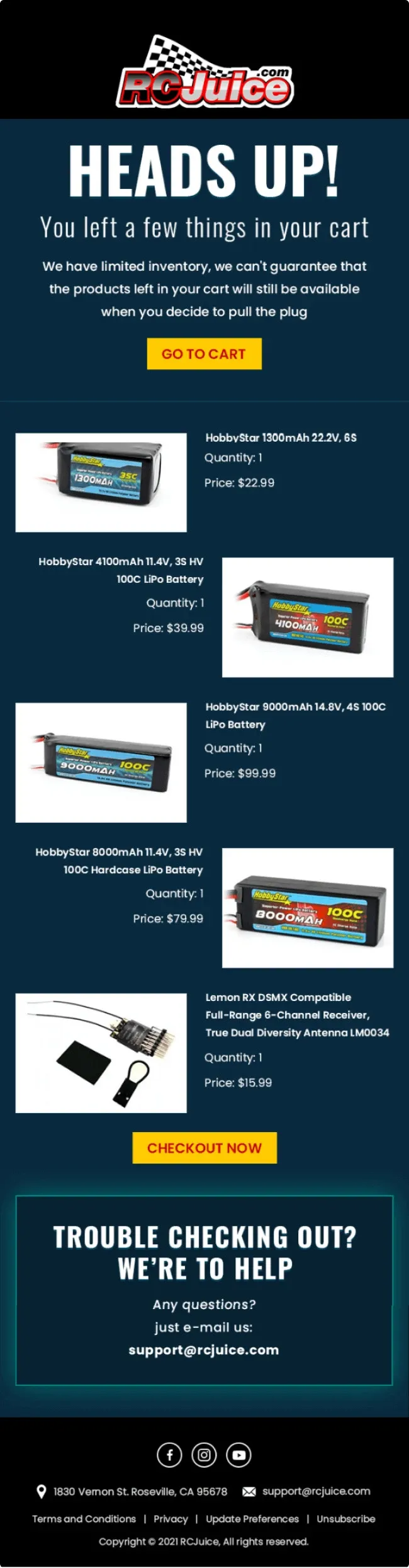
During the strongest single month we tracked for London Store, June 2021, welcome and cart abandonment automations combined accounted for 72 percent of total email-driven revenue. Even during the more competitive December 2021 holiday period, those same two automations still accounted for 61 percent of London Store’s total email-driven revenue.
Win-Back / Re-Engagement Emails
Sent to subscribers who’ve gone quiet, typically after 30, 60, or 90 days without opening or clicking. These work best when they lead with a genuine incentive or update rather than a guilt-driven message and when the list has been properly maintained so the email automation workflow isn’t wasted on addresses that will never re-engage.
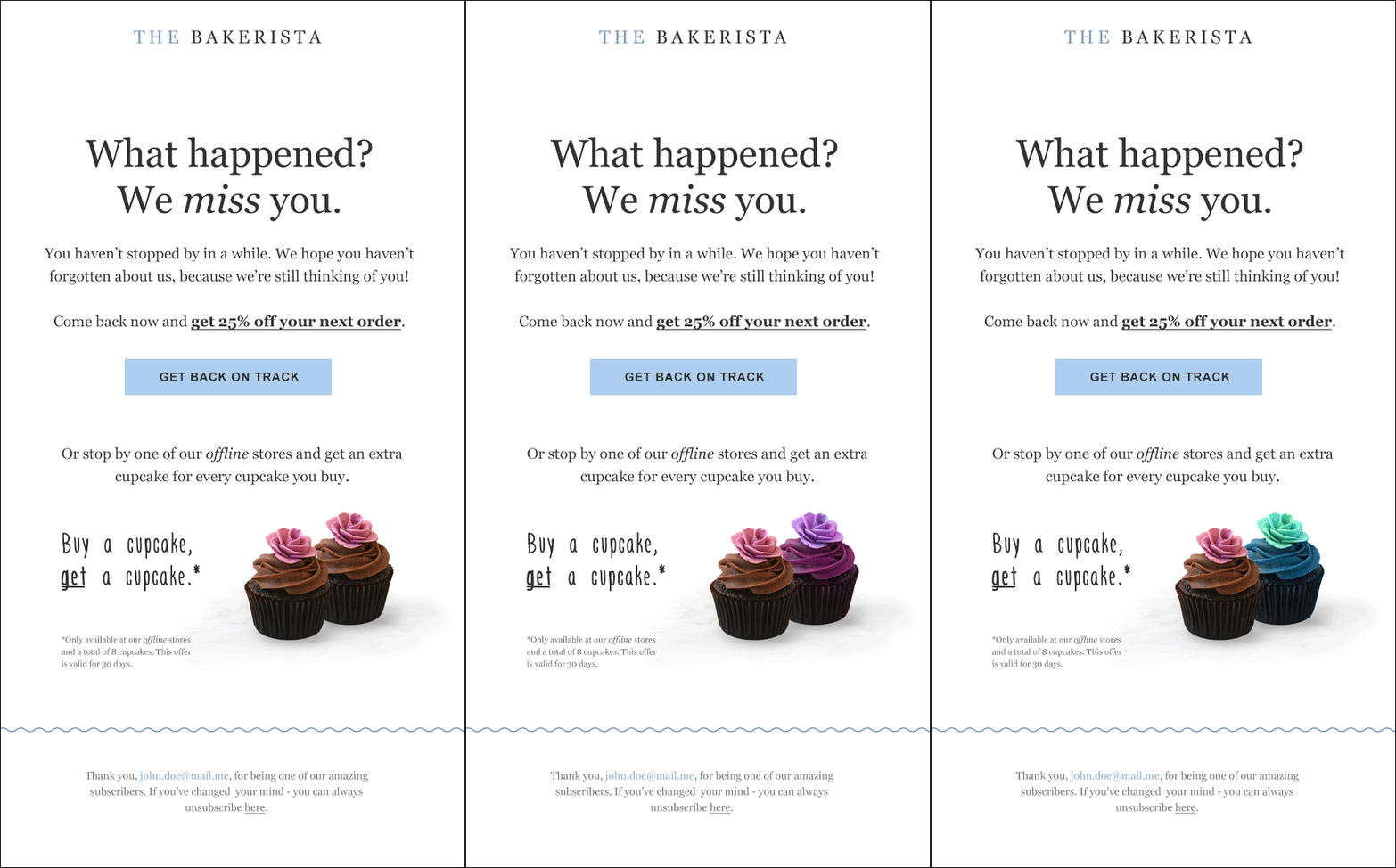
The Bakerista‘s win-back email template pairs a discount code and a product photo with copy that has real personality, all built around a 25 percent off offer.
Post-Purchase, Cross-Sell, and Upsell Emails
The first email after a purchase should be a straightforward order confirmation. It confirms what was bought and when it’s arriving and gives the customer a receipt they can reference, nothing more.
The emails that follow can do more work. Sent after an order confirms, these emails can request a review, recommend a complementary product, or preview what’s shipping next for subscription customers. Keep the ask small. A simple, low-friction review request tends to outperform a heavier, multi-step post-purchase flow.
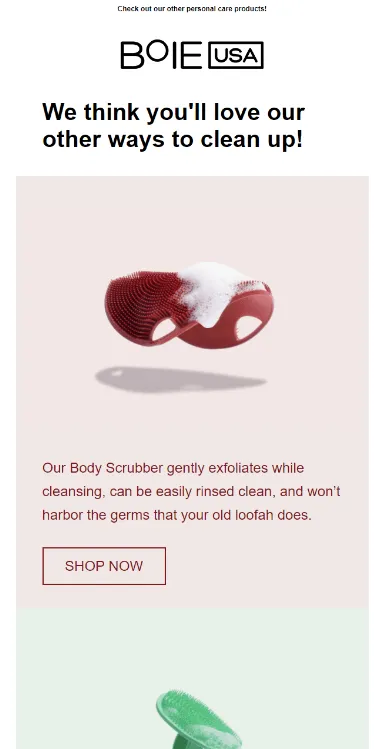
For our client Boie, we worked from a simple theory: anyone who bought one of Boie’s four products was already interested in hygienic care and quality grooming, which made them a reasonable audience for the other three. We built a cross-sell automation that sent each customer an email promoting the products they hadn’t yet bought, going out 30 days after the original purchase.
| Metric | Result |
| Open rate | 36% |
| Click rate | 1% |
| Conversion rate | 0.1% |
Educational / Lead Nurture Emails
Educational drip campaigns are popular in SaaS and B2B, where the buying decision takes longer and trust needs to be built before a sales pitch lands. These email automation workflows perform best when each email teaches one specific thing and links back to a product feature or use case, rather than trying to cover the entire product in a single send.
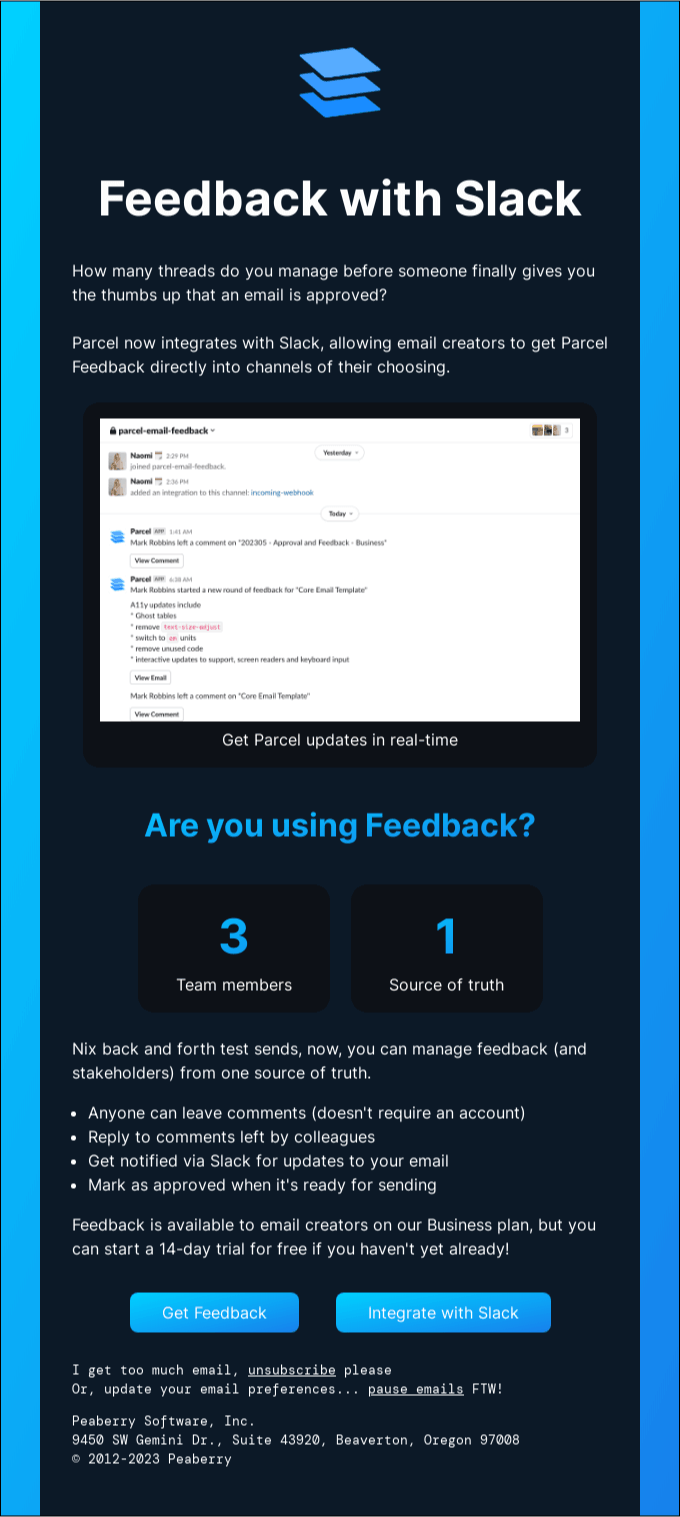
Parcel’s email works as a product update and a lesson at once, using screenshots so the reader sees the tool in action.
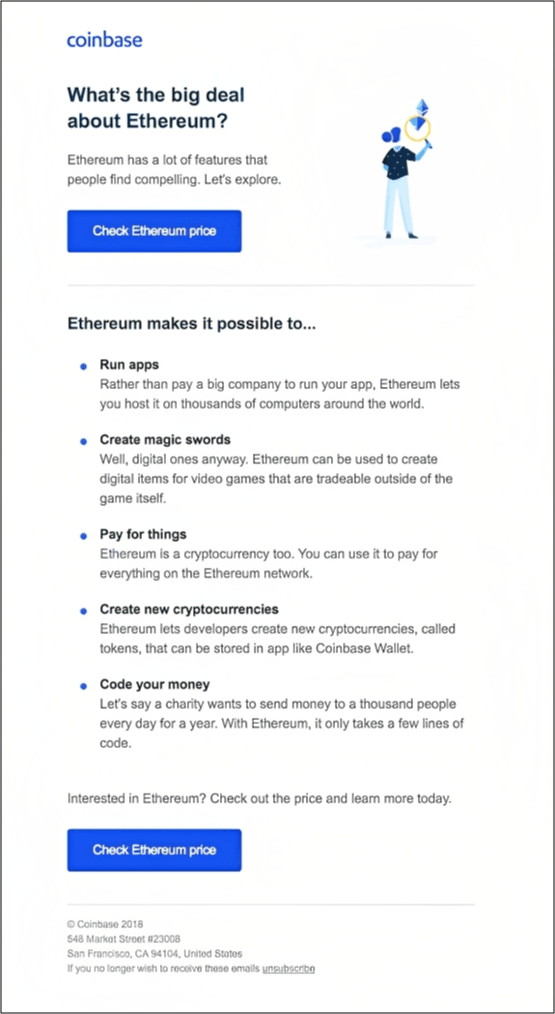
Ethereum is a genuinely confusing topic for a lot of readers. Coinbase breaks it down in plain language and saves its ask for the very end, a soft CTA to check the current price.
How Long Should an Email Drip Campaign Be?
There’s no single correct length for a drip campaign across industries and regions. It depends entirely on what the sequence is trying to accomplish.
| Drip Email Campaign type | Typical duration |
| Welcome email series | 7 to 14 days |
| Cart abandonment email | Within 48 hours of the trigger |
| Lead nurture / educational email | Several weeks to a few months |
| Win-back / re-engagement email | 10 to 14 days |
| Loyalty or rewards email | A full quarter or longer |
A cart abandonment email sequence needs to move fast because purchase intent fades quickly once someone leaves your site. A lead nurture email sequence for a B2B or SaaS product can stretch across weeks or months because the buying decision itself takes longer, and pushing too hard too early tends to backfire.
The safest approach is to work backward from the customer’s actual decision timeline for that specific action rather than picking a duration first and forcing content to fill it.
How Many Emails Should Be in a Drip Marketing Campaign?
Most effective drip email campaigns fall between two and seven emails, though the right number shifts by category.
| Category | Typical email count |
| Welcome and onboarding emails | 3 to 6 emails |
| Nurture, reactivation, re-engagement emails | 2 to 3 emails |
| Educational emails | 3 to 5 emails |
| Cart abandonment emails | 2 to 5 emails |
| Product launch emails | 3 to 4 emails |
| Events and webinars emails | 2 to 3 emails |
| Post-purchase and upsell emails | 1 to 3 emails |
| Seasonal and special offers emails | 1 to 3 emails |
We built a five-email cart abandonment automation for our client RCJuice, and the longer sequence gave us more room to work with, addressing objections in one email, offering an incentive in the next, and making a second and third attempt before letting the subscriber go. That automation increased their monthly revenue by 400 percent, and combined with a new welcome series we built alongside it, RCJuice’s overall email marketing revenue grew by 300 percent.
More emails aren’t automatically better. Adding sends past what the goal actually requires tends to raise unsubscribe rates without adding meaningful conversions. Start with the shorter end of the range for your category and only extend the trigger email sequence if your data shows people converting from the later emails.
Email Drip Campaign vs. Nurture Campaign
Drip campaign and nurture campaign get used interchangeably, but they describe different mechanics.
| Drip Marketing campaign | Nurture campaign | |
| Trigger | Fixed schedule after an initial action | Ongoing subscriber behavior |
| Timing | Set in advance (day 1, day 3, day 7) | Adjusts based on what the subscriber does next |
| Personalization | Based on the trigger event | Based on continuously updated behavior data |
| Best for | Welcome flows, anniversary emails, short educational courses | Lead scoring, long B2B sales cycles |
| Flexibility | Emails go out on schedule regardless of engagement | Sequence can branch depending on opens, clicks, or purchases |
A drip campaign is scheduled: a subscriber joins the flow, and the timing of every email is already decided.
A nurture campaign is reactive: what gets sent, and when, depends on what the subscriber does after each previous email.
In practice, most mature email programs run both, using scheduled drips for predictable moments like welcome and anniversary emails, and behavior-triggered nurture flows for anything where personalization based on live activity matters more. Cart abandonment is a good example of a sequence that can be either: a simple three-email reminder sent on a fixed schedule is a drip campaign, while a version that branches based on whether the shopper opened the first email or keeps browsing the same product has moved into nurture territory.
Successful Email Drip Campaigns: Elements & Best Practices Based on Our Experience
We look at the same handful of components on every email drip campaign we build for a client, regardless of the industry.
A single, clear goal per sequence:
A welcome email series shouldn’t try to sell, educate, and collect reviews all at once. Pick one job for the sequence: convert a new signup, recover a cart, win back a dormant subscriber, and build every email around that job.
A trigger tied to real intent:
The trigger has to reflect a moment where the subscriber is actually paying attention: list signup, cart abandonment, first purchase, or a defined period of inactivity. A trigger with no behavioral signal behind it just becomes another cold email.
Segmentation based on subscriber data:
Not every new subscriber should get the same welcome email flow. Purchase history, browsing behavior, and stated preferences all let you send a more relevant version of the email workflow to different segments of the same list.
Personalization beyond a first name:
Real personalization means referencing what the subscriber actually did, the product they viewed, the cart they left, the plan they’re currently on. That level of specificity is what separates a drip email from a mass send with a merge tag.
Easy-to-read copy:
Keep paragraphs short and get to the point quickly. Most subscribers scan an email rather than read it word for word, so the offer and CTA need to be obvious even to someone skimming.
Mobile-responsive design:
More than half of email opens happen on a phone, so a sequence that renders poorly on mobile is losing conversions before the copy even gets read. Test every email on a phone screen before it goes live, not just on desktop.
Ongoing A/B testing:
Subject lines, send times, and CTA copy are all worth testing on a rolling basis, not just once at launch. Small changes to the first email in a sequence, since it usually gets the highest open rate, tend to produce the biggest lift
One clear CTA per email:
Every email in the workflow should point to a single next action. Multiple competing CTAs in one email tend to reduce the click rate on all of them.
Consistent brand voice and design:
Subscribers should recognize the sequence as coming from the same brand, email to email, even as the content and CTA shift.
A tracking plan set up before launch:
Decide which metrics you’ll watch before the first email goes out, not after the sequence has been live for a month.
How to Set Up a Drip Campaign
Here’s the process we walk clients through, from planning to launch.
Step 1: Define your target segment
Decide exactly who enters this sequence. That could be new blog subscribers, first-time buyers, trial users, or anyone who abandoned checkout in the past 48 hours. The narrower and more specific the segment, the more relevant you can make the content.
Step 2: Set a single campaign objective
Write down the one outcome this sequence needs to drive, whether that’s a completed purchase, a free-to-paid upgrade, or a re-engaged subscriber. Every email in the sequence should serve that objective.
Step 3: Choose your trigger
Common triggers include a form submission, joining a list, an abandoned cart, a completed purchase, or a set number of days without activity. Most email platforms let you combine conditions, for example, triggering only if a cart sits abandoned for more than an hour and the subscriber hasn’t purchased in the past 30 days.
Step 4: Map the sequence and write the content
Sketch out how many emails you need and what each one covers before you write a word of copy. A typical structure looks like: email one delivers the core message or offer, email two addresses objections or adds urgency, email three closes with a final incentive or deadline.
Step 5: Set your timing between sends
Space emails out enough that subscribers aren’t hit with three messages in one day, but not so far apart that they forget the context. Cart abandonment usually starts within a few hours. Welcome and educational sequences typically leave a day or more between sends.
Step 6: Launch and monitor
Once live, check performance weekly rather than letting the sequence run untouched for months. Look at open rate, click rate, and conversion rate for each individual email in the flow, not just the sequence as a whole, since that’s how you spot which email is underperforming.
Step 7: Test and refine
A/B test subject lines, send times, and CTA copy on an ongoing basis. Small changes to the first email in a sequence, since it usually gets the highest open rate, tend to produce the biggest lift.
FAQs
How is a drip campaign different from an autoresponder?
A drip marketing campaign starts from a specific action and often adjusts based on what the subscriber does next. An autoresponder is typically simpler and fixed, sending the same email automation workflow to everyone regardless of behavior.
What tool or software tool do I need for running drip marketing campaigns?
Any email service provider or marketing automation platform with trigger-based sending and segmentation will work. Look for support for behavioral triggers (signup, cart abandonment, inactivity), conditional logic for branching a sequence based on subscriber actions, and reporting broken out by individual email rather than just the sequence as a whole, since that’s what makes it possible to see which email in the flow is underperforming.
Do I need a different email automation workflow for every segment of my list?
Only for segments with meaningfully different intent. A first-time buyer and a returning customer aren’t the same audience, and treating them identically in a post-purchase flow tends to show up in the conversion numbers within a few sends.
What metrics should I track for a drip campaign?
At minimum: open rate and click-through rate per individual email, conversion rate per email and end-to-end for the full sequence, unsubscribe rate, revenue recovered or attributed (especially for cart abandonment and win-back flows), and list engagement over time to catch dormant segments before they affect deliverability for the whole list.
Can a drip marketing campaign hurt my email deliverability?
Yes, if it’s poorly targeted or too frequent. A spike in unsubscribes or spam complaints usually means the wrong audience is receiving the sequence, or the emails are arriving faster than that audience can tolerate. Watching engagement and unsubscribe metrics closely, and adjusting segmentation or timing when they move in the wrong direction, is the best way to protect your sender reputation.
What’s the ROI of email marketing?
Estimates vary, but the Data & Marketing Association has cited a potential return of $42 for every $1 spent on email, among the highest of any marketing channel. Automated flows tend to outperform that average further, since they’re triggered by real intent rather than sent cold.
What’s a good conversion rate for a cart abandonment email?
Averages cited in industry reports run around 17 percent, well above what most standalone campaigns achieve, since the recipient already showed intent to buy before leaving.