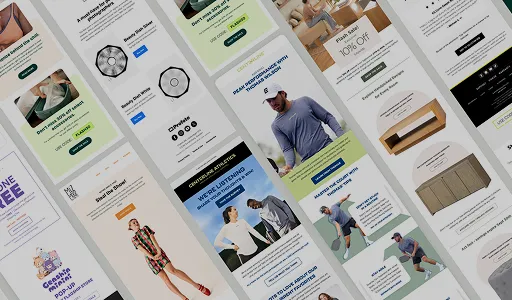

Quick Overview
A post-purchase email is any email a brand sends to their customers after they purchase a product or service. Most post-purchase email campaigns include a thank-you email, transactional emails (order confirmation, shipping, or delivery confirmation), educational emails, product onboarding emails, loyalty program emails, referral emails, check-in emails, review request emails, and cross-sell emails. First-time and repeat buyers need different messaging, so do VIP customers. Segmentation by customer status, purchase value, and product category needs to be locked in before a single email gets written. Loyalty and referral emails extend the email engagement beyond the second purchase to support long-term retention. Revenue per recipient is the metric that tells you whether the whole program is actually working.
At InboxArmy, we build post-purchase emails for ecommerce brands across nearly every category, and the pattern is always the same. Brands pour their budget into acquisition, land the first sale, then send a confirmation email and go quiet. That silence right after checkout is where retention dies. This guide walks through the post-purchase email flows we actually build for clients, the segmentation logic behind it, the additional email types worth layering in, and where most brands go wrong before we get involved.
What is a Post-Purchase Email
A post-purchase email is the email you send out to customers after they buy a product or service. These post-purchase emails include order confirmations, shipping confirmations, delivery confirmations, and reminder emails.
Beyond sharing order information, brands can include thank-you emails, review request emails, referral emails, loyalty program emails, and educational emails to improve customer relationships. They can encourage another purchase and improve retention with cross-selling events and product recommendation emails.
Post-purchase emails can be used to:
- Ease any buyer’s remorse before it settles in
- Reinforce that the customer made a smart decision
- Build genuine affinity with your brand
- Help the customer get real value from what they bought
- Set up the second purchase
- Generate reviews, testimonials, and user-generated content
Where Post-Purchase Emails Fit in the Customer Lifecycle
A post-purchase email doesn’t operate on its own. It sits between the welcome series and the win-back campaign, and each of those has a different job to do.
The welcome series runs before a purchase happens, warming up a subscriber who hasn’t bought yet. Cart abandonment catches someone mid-decision, still on the fence. Post-purchase emails pick up the moment checkout is complete and carry the relationship through onboarding, review requests, and the first cross-sell attempt.
Once a customer goes quiet for an extended stretch without ordering again, win-back takes over, trying to pull them back with a different set of triggers entirely.
Each stage needs its own logic, content, and timing, even when the same brand voice runs through each. Order confirmation must go immediately after a purchase, whereas review request emails need to wait for the product to be delivered and used.
InboxArmy’s ecommerce email marketing agency team builds these as one connected system, so a customer can seamlessly move from welcome series to post-purchase to loyalty program, and brands never miss a step or duplicate efforts.
Why Send Post-Purchase Emails?
Post-purchase emails enable brands to engage with established customers. They’re an opportunity to improve the customer journey, boost retention, and cross-sell products or services.
Higher Engagement Than Standard Campaigns
Post-purchase emails consistently outperform standard campaigns on opens and clicks. The customer just spent money with the brand and is actively watching for confirmation, tracking updates, or anything related to that purchase, so attention is already there without a subject line having to earn it the way a cold campaign does. That window closes fast, though, which is exactly why the timing throughout the post-purchase email flow matters as much as it does.
Reduced Buyer’s Remorse and Fewer Returns
The post-purchase confidence gap, that stretch of second-guessing right after checkout, resolves faster when a brand stays present through it. A customer who hears from the brand with useful onboarding content and reassurance is less likely to talk themselves into a return before the product’s even arrived. Fewer unnecessary returns means less reverse logistics cost and fewer refunds eating into the margin on an order that was already profitable.
A Direct Path to Repeat Purchases
Acquisition cost eats most of the margin on a first order. The second order is usually where a brand starts actually making money on that customer, and a well-timed post-purchase email is the mechanism that gets a customer there faster than waiting for them to think of the brand on their own.
Stronger Reviews and User-Generated Content
Timing the review to once the customer has actually used the product produces reviews that read as genuine rather than rushed. Those reviews then feed straight back into the top of the funnel, since new visitors trust recent, specific reviews far more than a generic star rating. An email that skips the check-in step and jumps straight to the review ask usually gets worse reviews, not fewer, because the customer hasn’t formed a real opinion yet.
Higher Lifetime Value Per Customer
A post-purchase email is one of the more direct levers available for moving retention numbers, since it’s reaching a customer at the exact moment they’re deciding whether the brand is worth sticking with. Customer lifetime value compounds from there: a customer retained through one well-run email tends to be more receptive to loyalty programs, referral asks, and future product launches down the line.
Protection Against Negative Word of Mouth
Post-purchase emails give a brand an early channel for catching problems before they go public. A customer whose issue gets resolved quickly and well often ends up more loyal than one who never had a problem at all, which flips what looks like a risk into a retention opportunity, provided the email catches the issue early enough to act on it.
Key Elements Every Post-Purchase Email Needs
Regardless of where a post-purchase email sits in the sequence, a handful of elements separate the ones that convert from the ones that get deleted unread.
| Element | Why It Matters |
| One clear purpose | An email trying to say thank you, request a review, and sell a second product at once ends up doing none of those well |
| Timing tied to actual usage | Sending based on days-since-purchase alone ignores that a skincare routine and a mattress have completely different usage timelines |
| A single, obvious CTA | Multiple competing buttons split attention and lower click-through on all of them |
| Personalization beyond a first name | Referencing the specific product purchased signals the email was built for this customer, not pulled from a generic template |
| Mobile-first formatting | Most post-purchase emails get opened on a phone within an hour of sending, so anything requiring pinch-to-zoom loses the reader immediately |
| A real reply-to address | A no-reply address on a check-in email tells the customer their feedback isn’t actually wanted |
| Brand voice consistency | A cold, transactional tone in email one followed by a suddenly casual one in email four reads as two different companies. |
How to Segment Your Post-Purchase Emails
Skipping segmentation is how brands end up sending tone-deaf emails to the wrong people. Before writing a single subject line, lock in your splits.
New vs. Returning Customer
This is the split that shapes everything downstream. New customers need the full reassurance arc: brand story, onboarding, patient timing on the review ask. Returning customers can skip straight past the reassurance emails into product recommendations and loyalty content, since they’ve already answered the trust questions a first-time buyer is still working through.
Purchase Value-Based
A customer who spent $20 and a customer who spent $2,000 shouldn’t get identical treatment after checkout. Higher-value orders often justify a more personal touch: a note referencing the specific purchase, faster access to support, or an invitation into a VIP tier. Lower-value orders can run through a more automated, lighter-touch version of the same sequence without losing effectiveness.
Product Category Targeting
A consumable that gets reordered every 30 days needs a completely different rhythm than a durable good someone buys once every few years. Segmenting by category lets the onboarding content, the review timing, and the cross-sell recommendation all stay relevant to what was actually purchased instead of running one generic template across a catalog that doesn’t behave the same way across categories.
Post-Purchase Flow filters worth building in from day one, regardless of segment:
- Exclude anyone who’s placed another order since entering the flow
- Exclude anyone who’s canceled an order since entering the flow
- Exclude anyone who’s received a refund since entering the flow
Without these, a customer who places a second order three days into a first-purchase flow keeps getting first-time-buyer content on a purchase they’ve already moved past, which reads as careless even when the automation logic underneath is sound.
A short note from a founder or a real team member in the first few days after purchase tends to land well. Reviews and testimonials early in the sequence reinforce the decision the customer already made. If the product needs setup, get instructions in front of them before it even arrives, and always run a support check before asking for a review, so problems get caught privately instead of surfacing in a public star rating.
Types of Post-Purchase Emails
| Email Type | Purpose |
| Order Confirmation | Confirm the order went through and set delivery expectations; first email opened, often within minutes, so it’s a high-attention moment to reassure the customer. |
| Shipping Confirmation | Sent when the order leaves the warehouse; delivers a working tracking link and sets expectations on delivery windows. |
| Delivery Confirmation | Confirms the package arrived and captures feedback while the product is still fresh, timed carefully against the courier’s own delivery notice. |
| Thank You | A tone-focused touchpoint separate from logistics; lets the brand’s voice show up and can introduce loyalty or referral programs. |
| Product Onboarding | Helps the customer set up and use the product correctly; determines whether they stick around or quietly churn. |
| Educational / How-To | Builds retention by teaching practical use, since the biggest churn risk is a customer who doesn’t know how to use the product. |
| Review Request | A frictionless, low-effort ask for a rating or short review once the customer has formed an opinion. |
| Cross-Sell / Upsell | Introduces a genuinely complementary product or upgrade when it makes sense for the original purchase. |
| Loyalty Program | Invites repeat buyers into a points system or membership tier after a second or third purchase. |
| Referral Program | Asks a satisfied customer to bring in someone else, timed after a positive review or check-in response. |
| Return/Refund Confirmation | Confirms a return or refund request was received and processed, with clear status and timing, to reassure the customer and reduce support inquiries. |
Post-Purchase Examples from Real Brands
Transactional Emails
The best-performing accounts we manage treat every transactional touchpoint as a branding opportunity. These basic post-purchase automation emails include order confirmation, shipping details, and delivery confirmation.
Purchasers expect brands to keep them updated on product, payment, delivery, and support details throughout the post-purchase journey.
Order Confirmation Emails
This is the first email a customer opens after checkout, often within minutes. People are actively looking for reassurance that the payment went through. We’ve seen brands leave this as a bare-bones receipt, wasting the highest attention moment in the entire customer journey.
What actually works: order number and itemised summary up top, estimated delivery window stated clearly instead of buried further down.
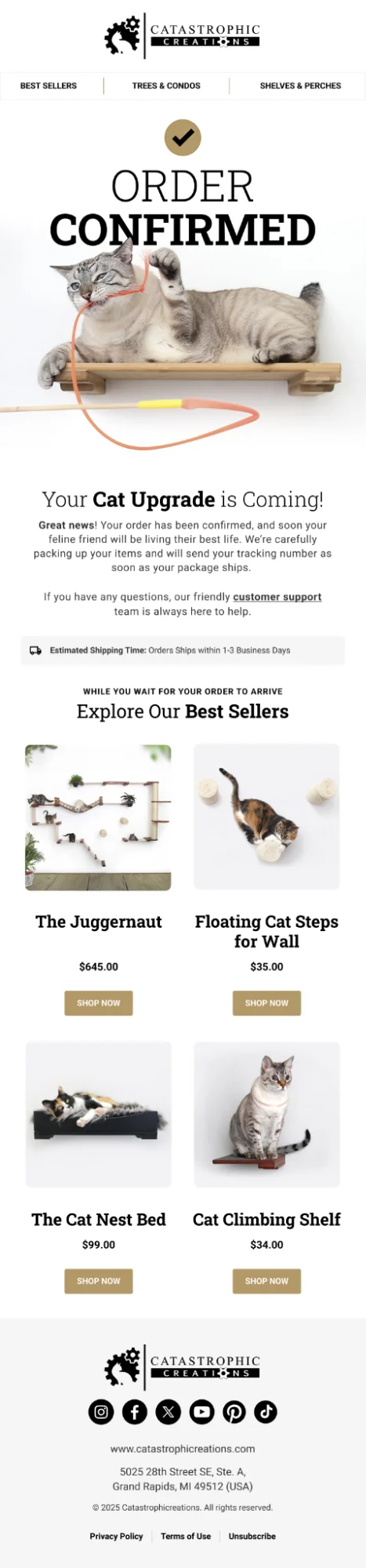
Order Confirmation Email Example – Catastrophic Creations
The confirmation copy stays brief and gets out of the way fast, handing off almost immediately to a “Best Sellers” carousel while the customer waits on shipping. This is an aggressive edge case worth A/B testing, not standard practice, since it runs against the ‘wait for a positive experience’ guidance above.
Shipping Confirmation Emails
Shipping confirmation emails are sent the moment the order leaves the warehouse. The most important element here is the tracking link, and it needs to work on the first click. Beyond tracking, this is also a good spot for setting expectations on delivery windows and, if relevant, any signature or delivery instructions.
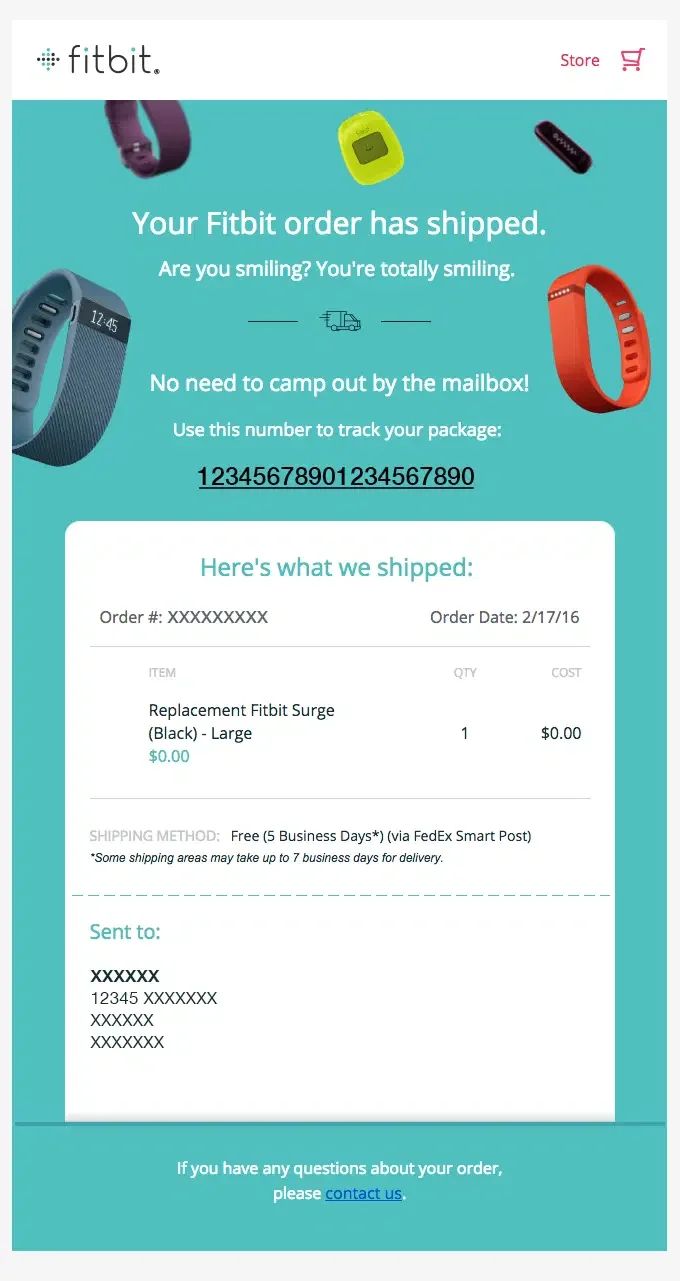
Shipping Confirmation Email Example – Fitbit
Fitbit keeps the email short and straightforward. People are scanning for one thing: when this is arriving.
Delivery Confirmation Emails
Underused, and one of the easier wins we implement for clients. A short note confirming the package arrived, paired with a soft nudge like “how’s it looking?” or a review request, captures feedback while the product is still fresh in the customer’s mind.
Timing matters more here than anywhere else in the sequence. Fire it too early, before the courier’s own delivery confirmation lands, and customers get confused. Fire it a day or two late, and the email feels like an afterthought.
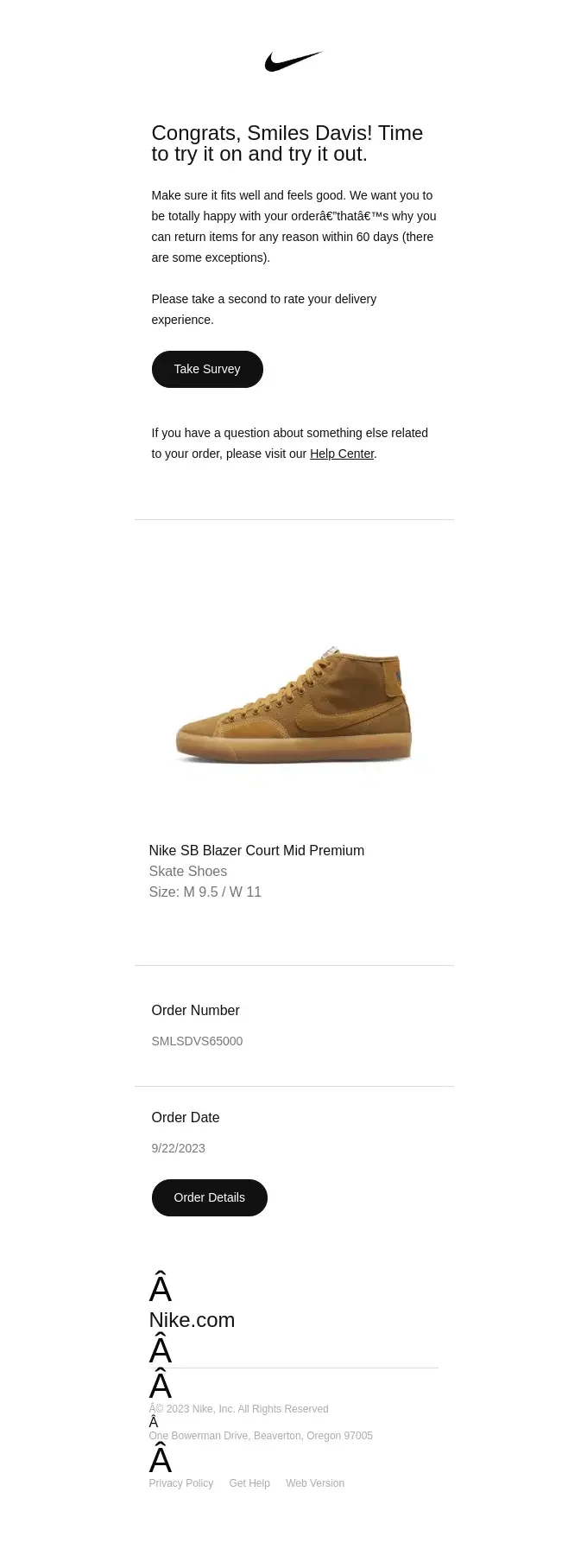
Delivery Confirmation Email Example – Nike
Beyond delivery details, Nike’s post-purchase email also gives customers a chance to rate their experience.
Thank You Emails
Distinct from the order confirmation, and worth sending as its own touchpoint rather than folding it in. This one is about tone, not information. It’s where a brand’s voice actually gets to show up: no logistics, no tracking numbers, just genuine appreciation. Loyalty program invites, referral prompts, or a first look at what’s coming next all sit naturally here. Brands that skip this step and go straight from shipping confirmation to marketing blasts tend to see higher unsubscribe rates on the next campaign send because the relationship never got a chance to warm up.
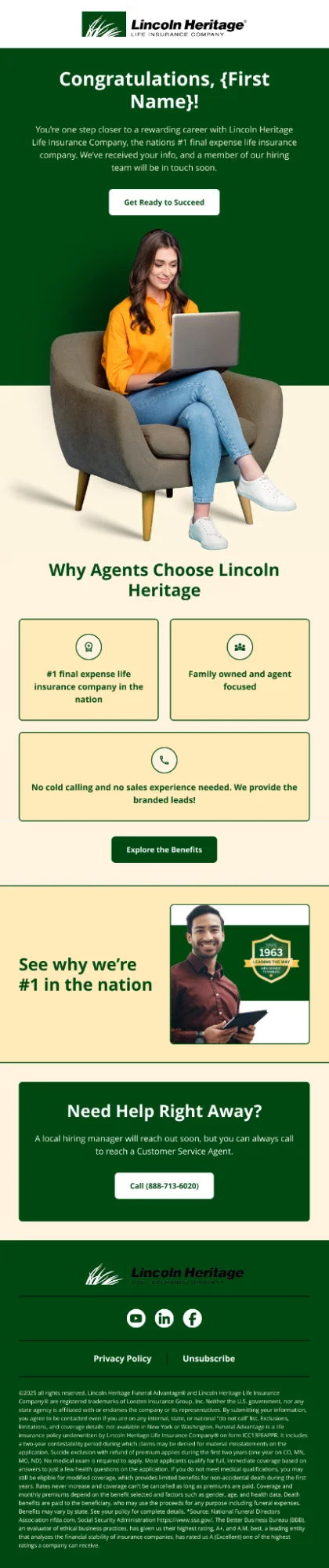
Thank You Email Example – Lincoln Heritage
Three short trust badges do the reassurance work before the recipient has to scroll for it. It’s a smart move for a category where skepticism is the default reaction.
Product Onboarding Emails
This applies mainly to anything with a learning curve: software, appliances, skincare regimens, subscription boxes, and supplements taken on a schedule. If a customer needs to build a habit or learn a process to get value from what they bought, onboarding emails are what determine whether they stick around or churn quietly in month two.
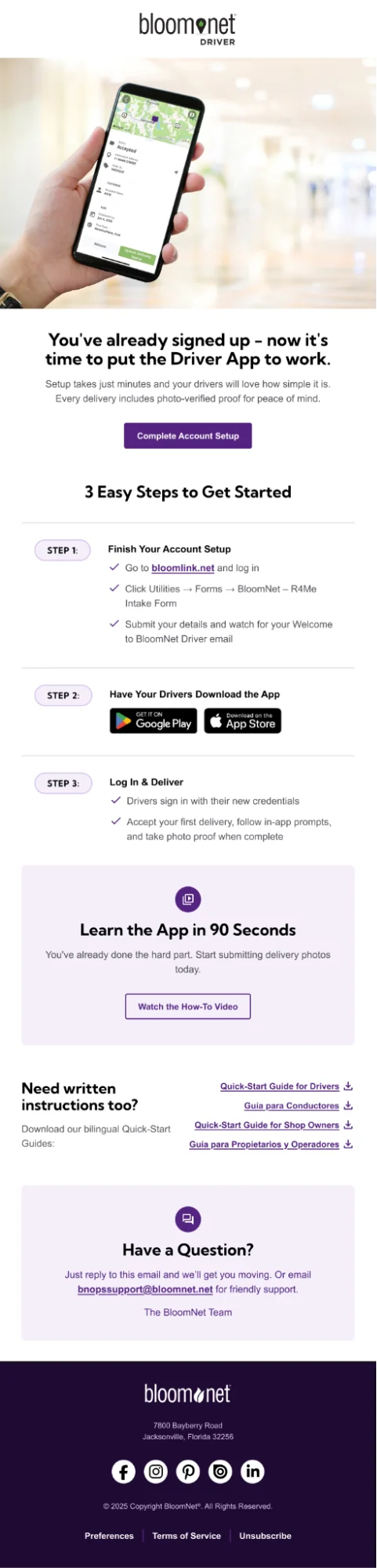
Product Onboarding Email Example – BloomNet
Three numbered steps, each with its own checklist, turn what could be a dense setup email into something closer to an instruction manual than a marketing message. A “Learn the App in 90 Seconds” video block sits underneath for anyone who’d rather watch than read, and bilingual quick-start guides are tucked in near the bottom for drivers who need them. That layered approach, quick steps up top, deeper resources below, suits a product with real functional complexity behind it.
Educational or How-To Post-Purchase Emails
Once a product arrives, the biggest churn risk isn’t a bad product. It’s a customer who doesn’t know how to use it properly and quietly gives up. We’ve run this play for skincare, supplement, and home goods clients with consistent results: a short “getting started” email sent two to three days after delivery, focused on one or two practical tips rather than a full manual.
Trying to sneak a discount code into this email undermines the “we just want you to succeed with this” tone that makes it work in the first place. Save the offer for a later email in the sequence.
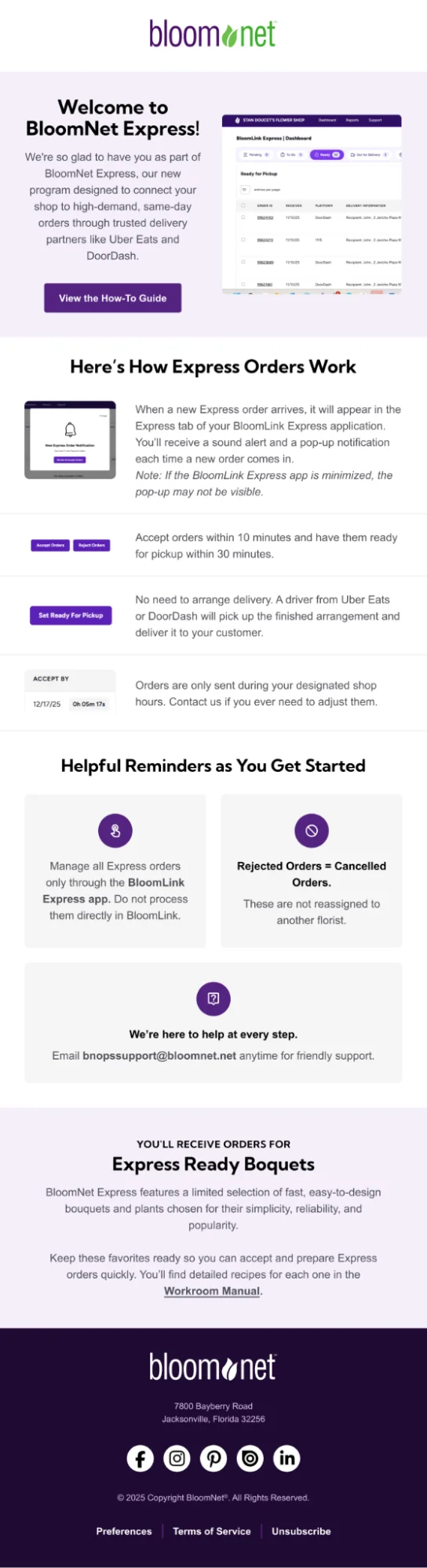
Educational / How-To Email Example – BloomNet
BloomNet’s post-purchase email offers their customers a quick overview of BloomNet Express, access to a how-to guide, and support information.
Feedback Request Emails
Different from the review request tucked into a delivery confirmation, this is a dedicated ask, usually sent a week or two after delivery once the customer has had real time with the product. The mistake we see most often is brands sending these emails too early, asking for feedback before the customer has had a chance to form an opinion.
Keep the ask small. One question, maybe two, with a simple star rating or a short text box. Every extra field you add can reduce completion rates. If a client wants both a rating and a written review, we usually split that into two emails rather than cramming both into one form.
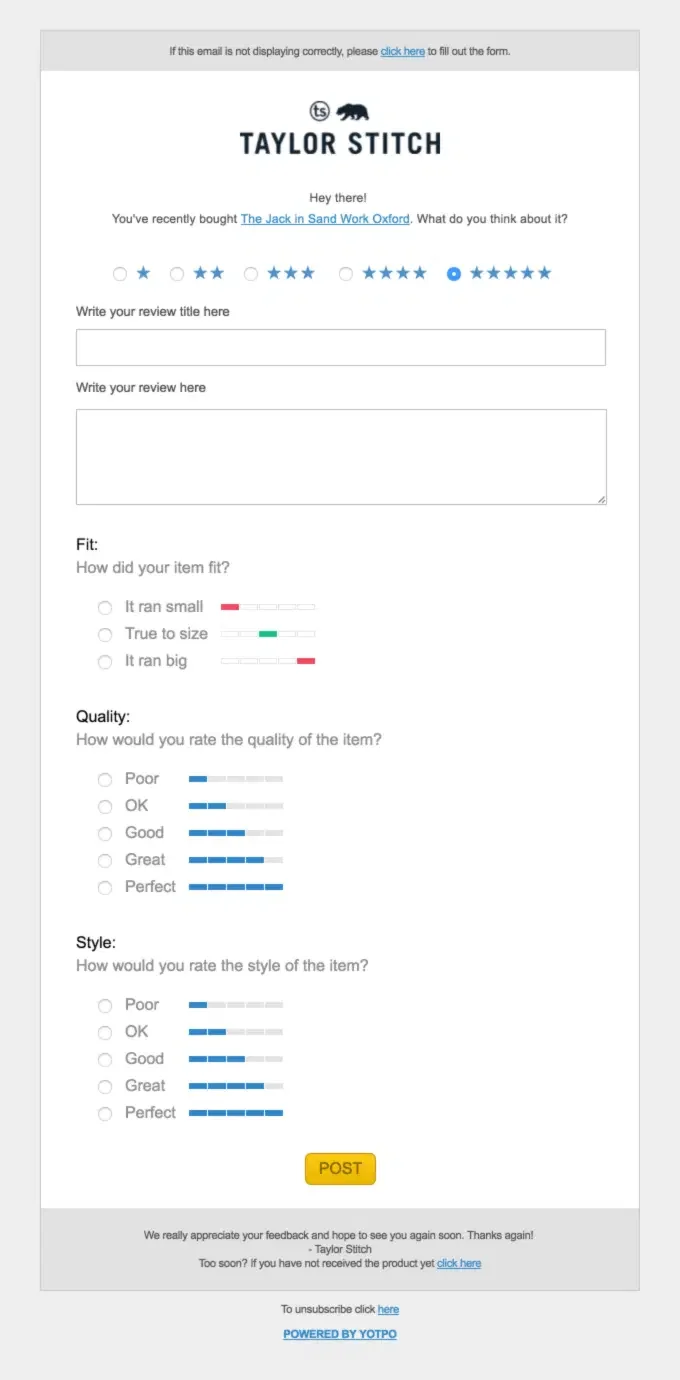
Feedback / Review Request Email Example – Taylor Stitch
Instead of a single star rating, this one breaks the ask into fit, quality, and style separately. Splitting feedback into categories like this also hands the brand more usable data than a flat five-star system ever would, and a small note near the footer (“if you have not received the product yet, click here”) quietly protects against a review request landing before delivery.
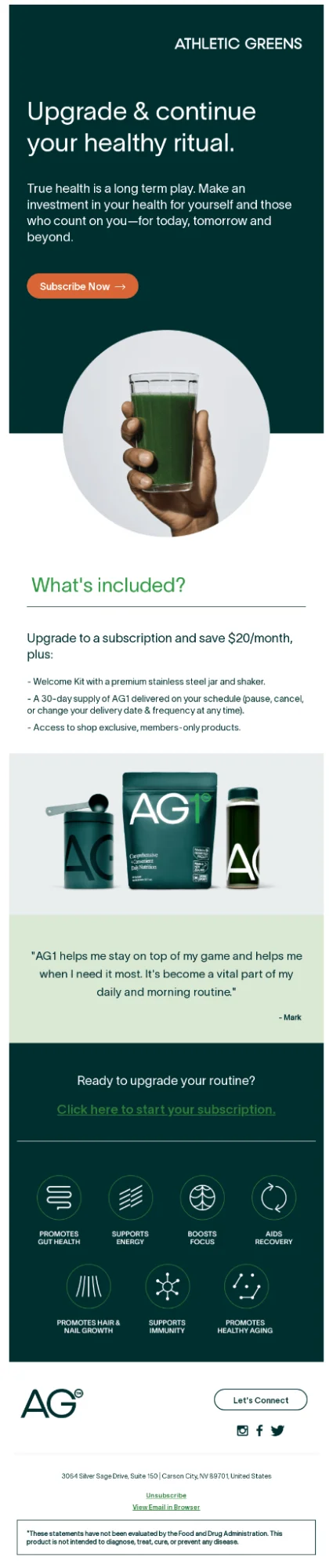
Upsell Email Example – Athletic Greens
The pitch here is subscription economics dressed up as a health commitment, “Upgrade & continue your healthy ritual,” with the $20/month savings stated plainly rather than buried in fine print. We added a customer quote, a product shot, and the benefit icons, doing the trust-building work a features list alone can’t.
Extending Post-Purchase Emails: Cross-Sell, Loyalty, and Referral Emails
Apart from transactional and educational post-purchase email flows, brands can use the engagement window to encourage repeat purchases and bring customers into loyalty and referral programs.
Cross-Sell and Upsell Emails
Cross-sell and upsell emails recommend a genuinely complementary product when the connection to the original purchase is obvious or offer an upgraded version of something the customer already owns. A customer who bought running shoes and responded well to a recommendation for moisture-wicking socks makes sense. A customer who bought running shoes getting a pitch for kitchenware doesn’t, regardless of margin.
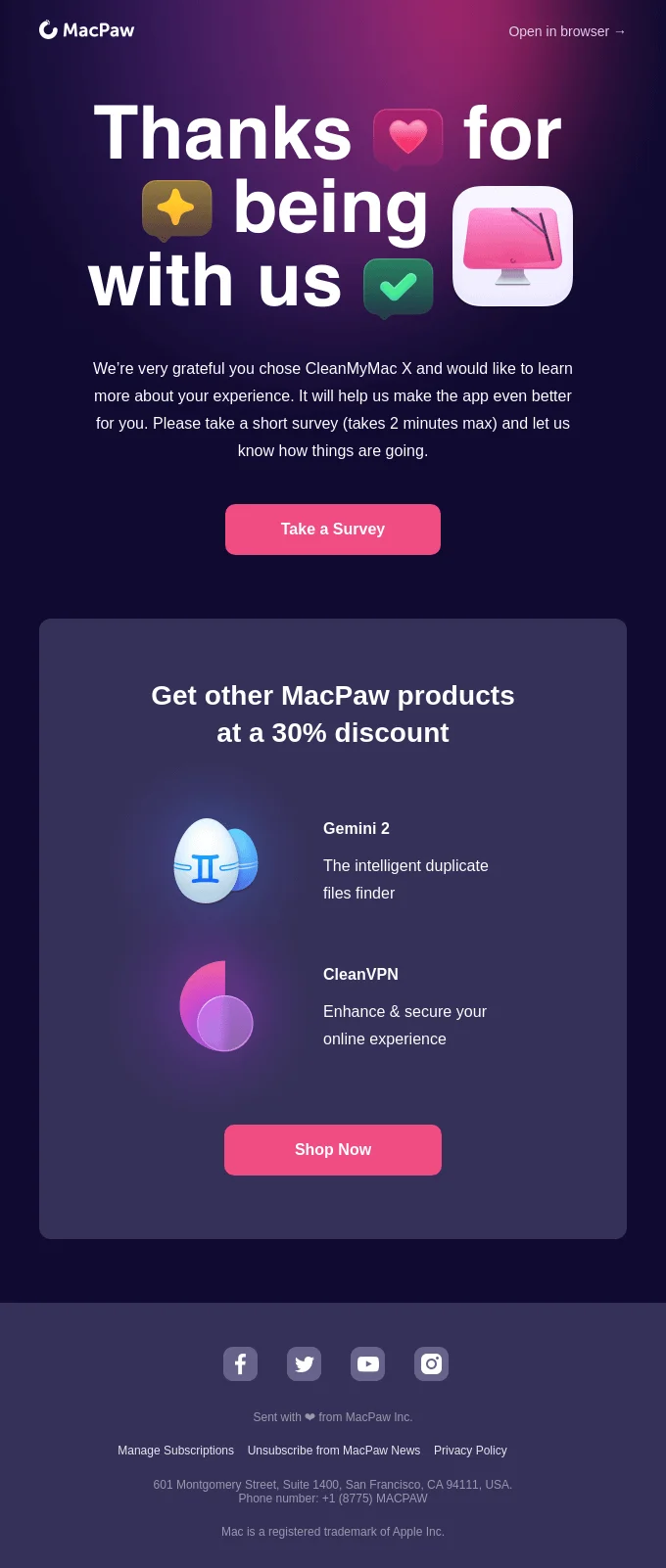
Cross-Sell Follow-Up Email Example – MacPaw
MacPaw’s cross-sell email runs two asks in a single email without either one crowding the other: a two-minute survey up top, then a 30% discount on complementary products. We named the actual products by function, not just by brand name, which means the recipient understands the pitch before clicking through. Pairing a low-effort feedback ask with a separate, clearly labeled discount block is a cleaner way to combine two goals than most brands manage. This is an exception rather than the rule: the two asks work here because the survey is low-friction and the discount is clearly separated from it.
Loyalty Program Emails
These post-purchase emails invite a customer into a points system, tiered membership, or early-access club after they’ve shown they’ll buy more than once. These work best triggered off a second or third purchase, since a loyalty pitch to someone who’s ordered exactly once reads as premature.
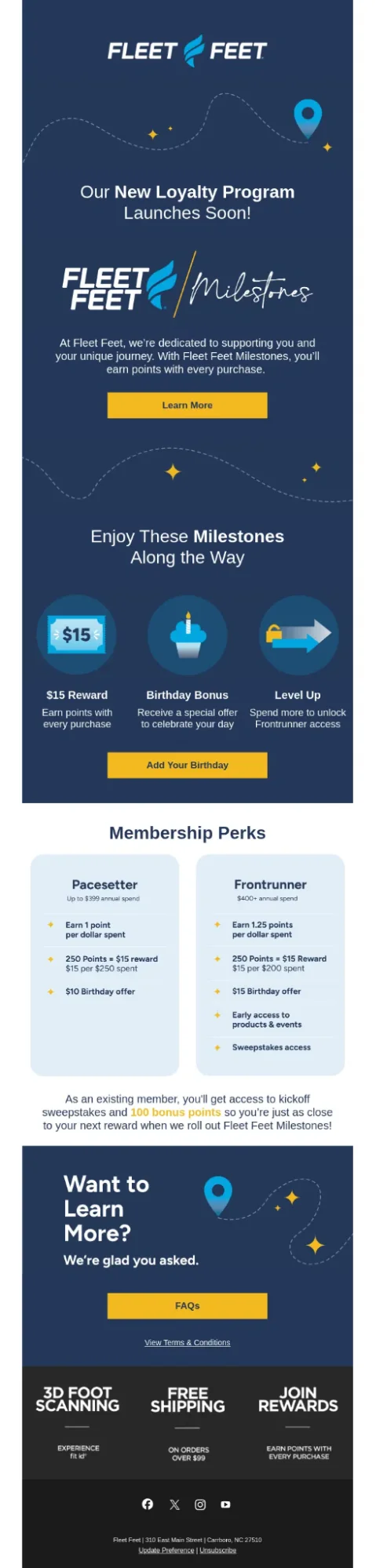
Loyalty Program Email Example – Fleet Feet
The two-tier comparison table underneath we added for the loyalty email lets a customer immediately see what spending more actually unlocks. Handing existing customers 100 bonus points before the program even goes live is a smart retention move: it removes the “starting from zero” friction that usually makes loyalty program launches feel like a reset rather than a reward.
Referral Program Emails
Referral emails ask a satisfied customer to bring in someone else, usually with an incentive on both sides. The timing matters here too: a referral ask lands better after a positive review or a strong check-in response than it does immediately post-purchase, when the customer hasn’t had time to actually vouch for the product yet.
Referral Program Email Example – Purple
The referral email we built for Purple spends most of its length reinforcing the sleep trial results and a five-star customer quote before ever circling back to the referral mechanics. Product education fills the middle, which works because a referral is a harder ask than a repeat purchase and benefits from re-selling the product’s credibility first. The referral CTA at the very top and the FAQ-style “quick links” near the footer bookend the proof points in the middle rather than repeating the same pitch twice.

Return / Refund Confirmation Emails
Easy to treat as pure admin, but this is one of the few post-purchase touchpoints where getting it wrong actively damages trust. A customer requesting a return or refund is already a little frustrated; a vague or delayed confirmation makes that worse. What actually works: confirm the request was received immediately, state clearly what happens next (inspection window, refund timeline, exchange vs. credit vs. refund), and give a direct way to reach support if something’s unclear.
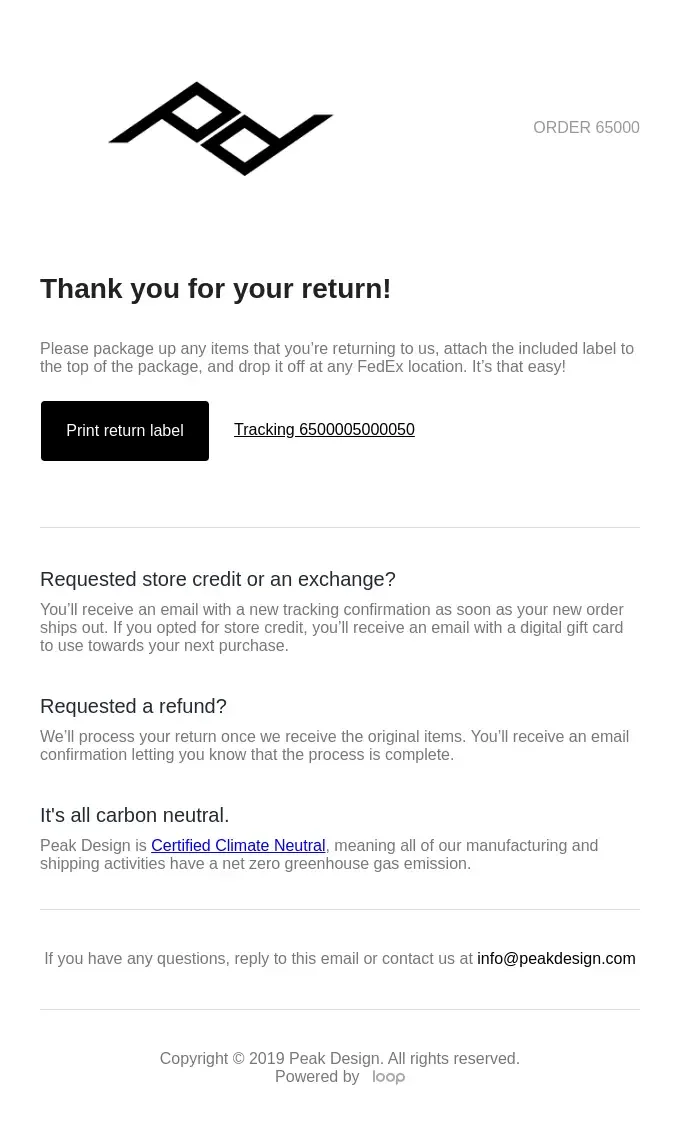
Return Confirmation Email Example – Peak Design
Peak Design’s return confirmation email spells out next steps clearly, including store-credit and refund options.
When Cross-Sells Work (and When They Torch the Relationship)
A cross-sell right after checkout feels pushy because the customer hasn’t experienced anything from the brand yet that would justify the ask. They’re still working out whether the first purchase was smart, and asking them to spend again at that exact moment tends to undo whatever trust the order confirmation built.
Wait for a genuinely positive experience with the first product, and even then, the recommendation needs a clear logical connection to what was already bought. A complementary product that solves a related problem reads as helpful. A “customers also bought” block full of the highest-margin SKUs reads as exactly what it is, and shoppers pick up on that faster than brands expect. If the connection can’t be explained in one sentence, leave the recommendation out.
Post-Purchase Email Mistakes
Auditing other brands’ post-purchase emails, the same issues show up again and again:
- Selling too early. Pitching the next purchase before the first one has even arrived signals that the customer is seen as a transaction.
- Generic recommendations. Pushing bestsellers at everyone regardless of purchase history erodes trust fast. Someone who bought a yoga mat doesn’t want a protein powder ad.
- Ignoring negative feedback. A bad review met with silence, or worse, a cross-sell email the next morning, tends to be the last email that customer ever opens.
- One email for everyone. First-time and repeat buyers need different messaging, not a slightly adjusted version of the same email.
- Review requests sent too soon. Asking before the product’s been used rarely produces a useful review and often produces none at all.
- Cramming every ask into one email. A single email asking for a review, pushing a cross-sell, promoting a loyalty program, and asking for a social follow accomplishes none of it well. Give each email one job.
Post-Purchase Email Best Practices
How the post-purchase email sequences get built, tested, and maintained determines whether that content actually reaches the right person at the right moment.
A few things worth locking down when the post-purchase email flow is built, not after:
- Exit conditions on every email. A customer who cancels, refunds, or places another order should immediately exit the post-purchase email flow, not finish receiving emails meant for a purchase they’ve moved past.
- Send-time optimization. A 9 am send might work for one segment and land in a dead inbox slot for another; testing this per segment pays off.
- A/B testing on subject lines and timing windows, particularly around the review request email, since a two-day shift in send timing can noticeably change response rates.
- Monthly review of email performance, not a set-and-forget approach. Revenue per recipient, open rates, and click rates by email position all shift as product mix and customer base change.
- Consistent design system across every email, so a customer receiving email six still recognizes the brand from email one.
- Email marketing compliance and consent. Any email carrying marketing content, a cross-sell, loyalty pitch, or referral ask needs a working unsubscribe link and accurate sender details under CAN-SPAM, and international lists may need GDPR/CASL-compliant opt-ins.
The workflow also needs someone actually reviewing the data. An email built well in month one can quietly degrade by month six if seasonal buying patterns shift or a new product line changes what “usage time before onboarding” should look like for that segment.
Why Marketing Automation Is Essential for Post-Purchase Email
A brand with a few hundred orders a month could theoretically send these by hand, but the moment volume grows past that, manual sending becomes the bottleneck that kills the whole strategy.
Automation platforms like Klaviyo handle the parts that would be impossible to manage manually: triggering email two exactly 24 to 48 hours after email one regardless of what day or hour that lands on, checking in real time whether a customer has placed a second order before sending the next scheduled email, and applying the conditional splits between first-time and repeat buyers without someone manually sorting a list every morning.
Every open, click, and purchase inside the email feeds back into the customer’s profile, which is what makes the next email, whether that’s a winback campaign or a loyalty invite, more targeted than it would be otherwise. A manually run sequence loses that feedback loop entirely, since there’s no system tracking individual behavior across months of interactions.
The thinking behind timing, segmentation, and messaging still has to come from someone who understands the customer. Automation just makes sure that thinking gets applied consistently to every person who enters the email.
How to Track the Success of Your Post-Purchase Email Strategy
Revenue per recipient, tracked per person over time, is the metric we watch most closely with clients. If it climbs month over month, the personalization and timing are doing their job. If it flattens or drops, something structural in the email needs a rebuild, not just a subject line tweak.
| Metric | What It Tells You |
| Revenue per recipient | Whether the program is compounding over time or flatlining |
| Repeat purchase rate | The percentage of customers who come back for a second order |
| Customer lifetime value | Total revenue a customer generates across the full relationship |
| Returning customer AOV | Whether repeat customers spend more per order than first-timers |
| Net promoter score | How likely customers are to recommend the brand |
| Customer satisfaction score | How customers rate specific interactions |
| Return rate | How often products come back |
| WISMO ticket volume | How many “where is my order” questions are coming in, often a sign of gaps in shipping communication |
Post-Purchase Email FAQs
What is the purpose of a post-purchase email campaign?
Post-purchase email sequences exist to turn a single transaction into an ongoing relationship. Beyond confirming an order, the campaign reduces buyer’s remorse, helps the customer get real value from the product, collects reviews, and sets up the conditions for a second purchase.
What is the difference between a cross-sell email and a post-purchase email?
A post-purchase email is the broader category: any email sent after checkout, including thank-yous, onboarding content, and review requests. A cross-sell email is one specific type within that sequence, focused on recommending a complementary product or upgrade.
When should you send post-purchase emails?
The thank-you email goes out immediately after checkout. Everything after that should be timed off delivery and product usage rather than a fixed count of days since purchase: onboarding content typically follows within 3 to 5 days of delivery, the check-in comes once the product has actually been used, the review request usually follows 10 to 14 days after delivery, and the cross-sell only after the customer has had time to experience the original purchase.
What should be included in a post-purchase email?
Each email should have exactly one clear purpose, a single obvious CTA, personalization tied to the specific product purchased, mobile-friendly formatting, and a reply-to address a customer can actually use if they have a problem.
How often should you send post-purchase emails?
Most effective sequences run 4 to 6 core emails over roughly two weeks, with additional loyalty, referral, or cross-sell emails triggered afterward by specific behaviors. Each email should have a clear reason for being in the sequence.
Should I cross-sell in my post-purchase email?
Yes. Recommend a product only when it has a clear connection to what the customer already purchased. A complementary product that solves a related need is more relevant than a generic bestseller or high-margin recommendation.
When should I send a review request after the purchase?
For most products, send the review request 10 to 14 days after delivery, giving customers enough time to use the product and form an opinion.
Should first-time buyers and repeat customers get the same post-purchase email?
No. First-time buyers need more reassurance and education. Repeat customers already know the brand and product, so they can move faster into product recommendations, referrals, and loyalty content.