

What Are Email Deliverability Tools?
Email deliverability indicates how consistently your emails land in your subscribers’ inboxes rather than being filtered into spam or other folders.
Most email service providers include basic deliverability features: authentication setup, some reputation reporting, and standard bounce tracking. That is enough to get started. It is not enough to diagnose a real inbox placement problem or recover from one.
Specialized deliverability tools go deeper. They test where your mail actually lands across providers, monitor how your domain and IP reputation look from the outside, identify authentication gaps before they affect delivery, and give you the data to fix problems rather than guess at them.
The tools in this guide cover five distinct functions:
Inbox placement testing: sending test emails to seed accounts across Gmail, Outlook, and Yahoo to see exactly where messages land before a real campaign goes out.
Email warm-up: building sender reputation on new or damaged domains by simulating natural engagement patterns gradually.
List validation: scrubbing addresses for spam traps, invalid syntax, and disposable domains before they generate bounces.
Reputation and blacklist monitoring: tracking IP and domain health and coamplaint rates between sends.
Spam content analysis: scanning copy and HTML for elements that trigger spam filters.
The right tool depends entirely on which of these problems you are facing. That is what this guide is built around.
How We Tested These Email Deliverability ToolsWe evaluated each tool between April and June 2026 using: • Gmail, Outlook, Yahoo, and business inboxes • New and established sending domains • SPF, DKIM, and DMARC scenarios • Inbox placement tests across seed accounts • Authentication, blacklist, and reputation checks Each platform was tested hands-on by the InboxArmy deliverability team. |
Best Email Deliverability Tools: Quick Comparison
| Tool | Inbox Placement | Spam Testing | Auth/DNS Check | Reputation Monitoring | Email Validation |
| GlockApps | Yes | Yes | Yes | Yes | No |
| Validity Everest | Yes | Yes | Yes | Yes | No |
| Folderly | Yes | Yes | Yes | Yes | No |
| Warmy | No | No | No | Yes | No |
| Warmup Inbox | No | No | No | Yes | No |
| InboxAlly | No | No | No | Yes | No |
| ZeroBounce | No | No | No | Yes | Yes |
| MXToolbox | No | Yes | Yes | Yes | No |
| Google Postmaster Tools | No | No | No | Yes | No |
| Mailgun | No | No | Yes | Yes | Yes |
| Mailtrap | Yes | Yes | Yes | No | No |
| Smartlead | No | No | Yes | Yes | No |
How to Choose the Right Email Deliverability Tool
Before looking at any specific tool, get clear on which problem you are actually trying to solve.
| Your Situation | Start Here |
| Emails landing in spam or promotions | GlockApps or Validity Everest |
| New domain or IP with no sending history | Warmy, Warmup Inbox, or InboxAlly |
| High bounce rates are hurting reputation | ZeroBounce |
| Unclear what providers see when your mail arrives | MXToolbox or Google Postmaster Tools |
| Sending transactional or programmatic email at scale | Mailgun or Mailtrap |
| Running cold outreach at volume | Smartlead |
Most teams end up combining two or three tools. A common pairing: ZeroBounce for list hygiene, GlockApps for placement testing, and Google Postmaster Tools for ongoing Gmail monitoring. The warm-up tools only enter the picture when you are starting something new.
Best Free Email Deliverability Tools
Not every deliverability problem requires a paid subscription. Several tools on this list offer genuinely useful free tiers that cover the most common diagnostic needs.
Google Postmaster Tools is completely free with no paid tier at all. It gives you direct Gmail reputation data, spam complaint rates, and authentication reporting straight from Gmail’s infrastructure. For any program sending primarily to Gmail addresses, there is no reason not to have it running from day one.
MXToolbox offers a free plan that includes blacklist lookups, SPF, DKIM, and DMARC verification, and basic DNS diagnostics. For a quick infrastructure check or a one-off blacklist scan, the free tier covers most of what smaller programs need.
GlockApps includes two free spam test credits and 10,000 DMARC messages on its free plan. Enough to run an initial placement diagnosis before committing to a paid tier.
ZeroBounce provides 100 free validation credits per month alongside one inbox test, one email server test, and blacklist monitoring. For smaller lists or occasional validation checks, the free tier is a reasonable starting point.
If you are just beginning to audit your deliverability and want to understand the problem before spending anything, start with Google Postmaster Tools and MXToolbox. Both are free, require no credit card, and between them cover Gmail reputation monitoring and infrastructure diagnostics, the two most common starting points for a deliverability investigation.
Best Email Inbox Placement and Spam Testing Tools
These three answer the same question: Where does this email actually land, and why?
1. GlockApps
Best for: Inbox placement testing and spam filter analysis
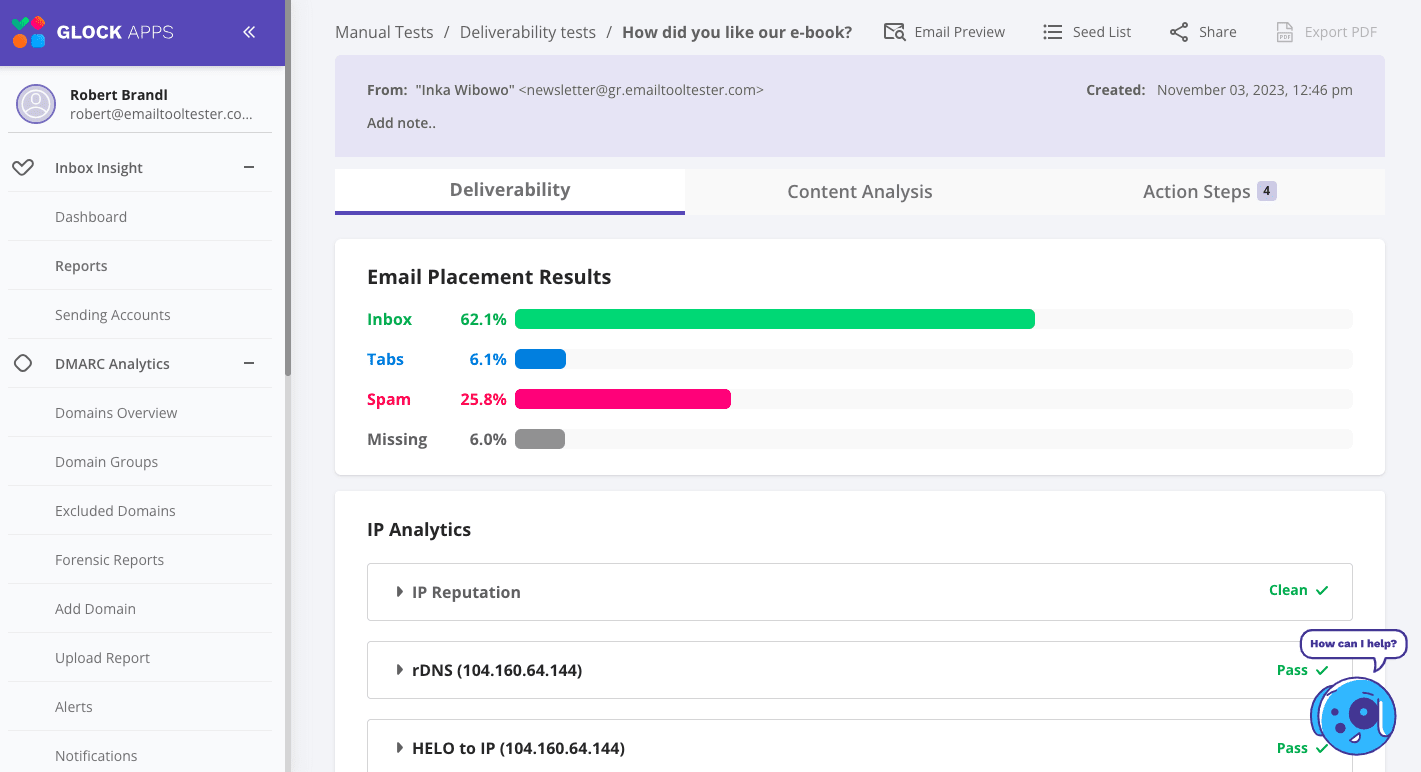
GlockApps is an email deliverability testing tool that I reach for first when a client cannot explain why their open rates are dropping. It sends test emails through a seed list to major providers (Gmail, Outlook, Yahoo) and tells you exactly where each one landed: inbox, spam, or another tab.
Beyond placement, it also runs messages against major spam filters, including Google’s filter, Barracuda, and SpamAssassin; produces a spam score; checks SPF, DKIM, and DMARC; and tracks IP and domain reputation against blocklists.
What our testing showed
| Overall placement | 41.51% inbox, 17.61% spam — Overall score: LOW |
| Gmail | Score: HIGH — Inbox 100%, Spam 0%, Security: Passed |
| Yahoo | Score: LOW — Inbox 73.33%, Spam 26.67%, Security: Passed |
| Authentication | SPF: Passed (89/89), DKIM: Passed (89/89), DMARC: Not set |
| SpamAssassin score | -5 (clean) |
The Gmail and Yahoo results from the same send diverged significantly: 100% inbox on Gmail and 26.67% spam on Yahoo. That provider-level separation is what makes GlockApps useful for diagnosis.
A clean Gmail result masking a serious Yahoo problem would be invisible in aggregate open rate data. GlockApps surfaces the gap immediately, alongside the missing DMARC record that was contributing to the Yahoo filtering.
The SpamAssassin score appearing as a separate data point from placement made it possible to confirm the problem was authentication and reputation, not content.
What Makes GlockApps Different
The combination of placement testing, spam filter scoring, and authentication checks in a single platform makes it one of the more complete mid-market options available. Most teams can start diagnosing a problem without switching between tools.
| “GlockApps explains deliverability issues in a way that makes sense even if you’re not a technical person. The Inbox Insight is super helpful. When something is off with authentication or content, the tool doesn’t just throw an error message at you, it also shows where it fails, and gives recommendations on how to fix it. It feels like having a mini deliverability laboratory built into the dashboard.” G2 User Review |
GlockApps Key Features
- Inbox placement testing across Gmail, Outlook, Yahoo, and others
- Spam scoring against Google, Barracuda, and SpamAssassin filters
- Content and formatting issue identification
- IP and domain analytics, including sender score and blocklist status
- SPF, DKIM, and DMARC authentication checks
GlockApps Pricing
| Plan | Price | Includes |
| Free | $0 | 2 spam test credits, 10,000 DMARC messages |
| Essential | $59/month | 360 credits |
| Growth | $99/month | Higher testing limits, additional sending accounts |
| Enterprise | $129/month | 1,800 credits, expanded monitoring |
GlockApps: Worth Knowing
The seed list is smaller than that used by some enterprise platforms. Unused credits do not roll over, so occasional testers can end up paying for capacity they never use.
2. Validity Everest
 Best for: Enterprise-level deliverability analytics and inbox placement
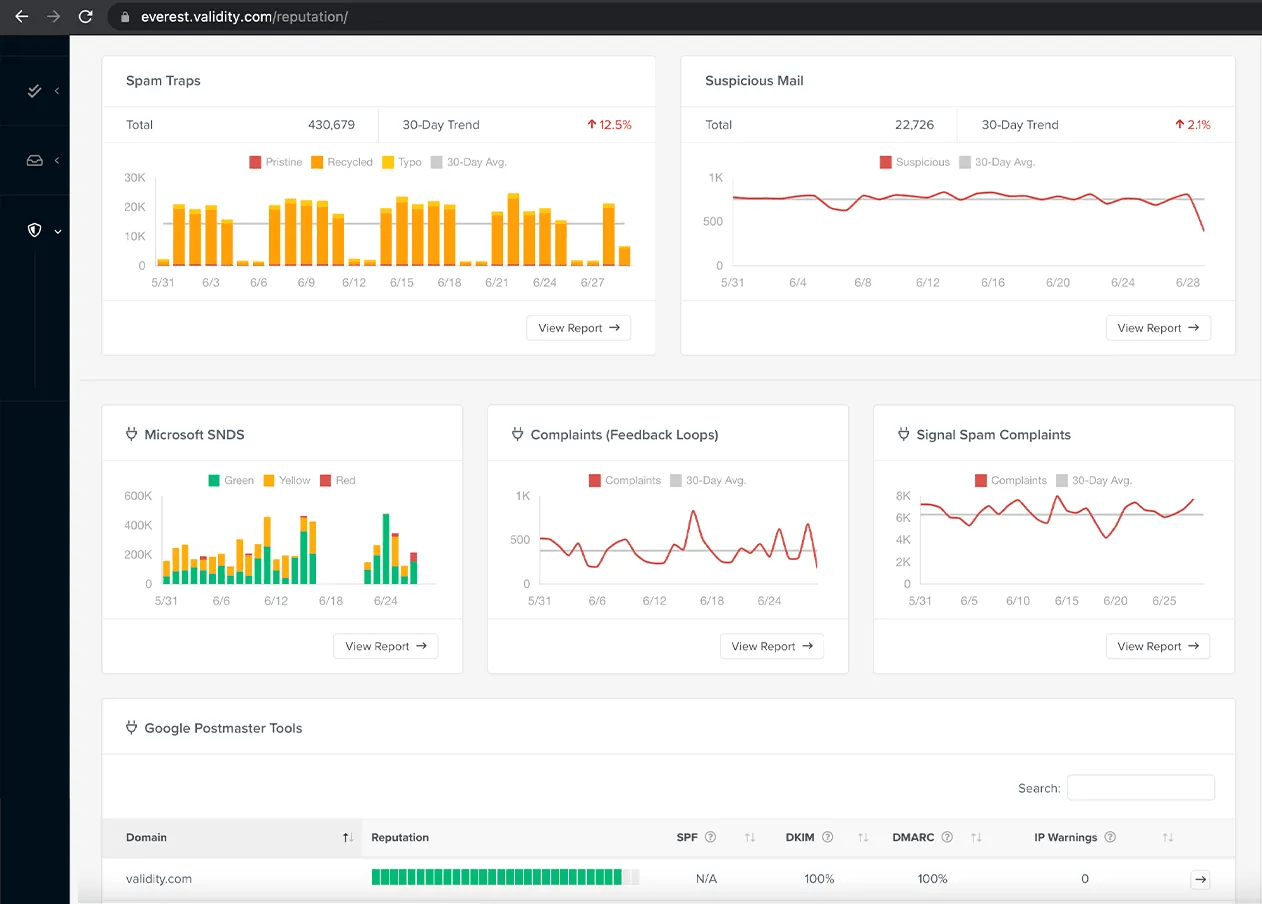
Validity Everest is the enterprise end of this category. It was built from three acquisitions (BriteVerify, Return Path, and 250ok) and is now part of the Litmus product family. It runs placement tests across major providers; monitors authentication; tracks reputation and blocklist status; and adds engagement analytics, including open times, device usage, and audience behavior.
For large programs that need competitive benchmarking and detailed ESP integrations alongside placement testing, it is the most complete option available.
What our testing showed
| Spam traps monitored | 430,679 total — 30-day trend up 12.5% |
| Spam trap breakdown | Pristine, Recycled, and Typo categories tracked separately |
| Suspicious mail | 22,726 flagged — 30-day trend up 2.1% |
| Feedback loops | Complaints and Signal Spam tracked as separate streams with 30-day averages |
| Microsoft SNDS | Green/Yellow/Red IP status tracked across date range |
| GPT integration | DKIM 100%, DMARC 100%, IP Warnings: 0 |
The dashboard consolidated data streams that would otherwise require separate tools and logins: spam trap monitoring by trap type, SNDS IP status, feedback loop complaints, Signal Spam complaints, and Google Postmaster Tools data, all in one view with trend lines running across each. A sender auditing these sources manually would be visiting five or six separate platforms. Everest pulls them into a single view with trend data, which is where the enterprise pricing justifies itself.
What Makes Validity Everest Different
The engagement analytics layer sets it apart from GlockApps. Seeing open times, device split, and audience behavior patterns on top of placement data is useful when you are trying to understand not just where mail lands but how subscribers interact with it. Professional and Enterprise plans also include sender certification, which matters for programs with B2B deliverability requirements.
| “What I like most about Everest by Validity is that it helps your emails get delivered and stay out of the spam folder. This is really important for anyone sending email campaigns. The platform has tools that make sure your emails actually reach people’s inboxes instead of getting lost as spam, which is a big plus.”
G2 User Review |
Validity Everest Key Features
- Inbox placement testing across major mailbox providers
- SPF, DKIM, and DMARC monitoring
- Sender reputation tracking and blocklist monitoring
- Engagement analytics (open times, device usage, audience behavior)
- Custom dashboards and performance reports
- ESP integrations
- Sender certification on higher plans
Validity Everest Pricing
| Plan | Price | Includes |
| Elements | $20/month | Limited placement testing, basic reputation monitoring |
| Elements Plus | $525/month | Full placement testing, design checks, ESP integrations, engagement analytics |
| Professional | Custom | Competitive intelligence, APIs, send-time optimization, sender certification |
| Enterprise | Custom | Full platform access, advanced support |
Validity Everest: Worth Knowing
The features that make Everest worth considering do not appear until Elements Plus at $525/month. Below that price point, GlockApps covers most of the same ground for a fraction of the cost. The jump is only justified once you genuinely need the engagement analytics and ESP integrations.
3. Folderly
Best for: Ongoing deliverability monitoring and pre-launch spam detection
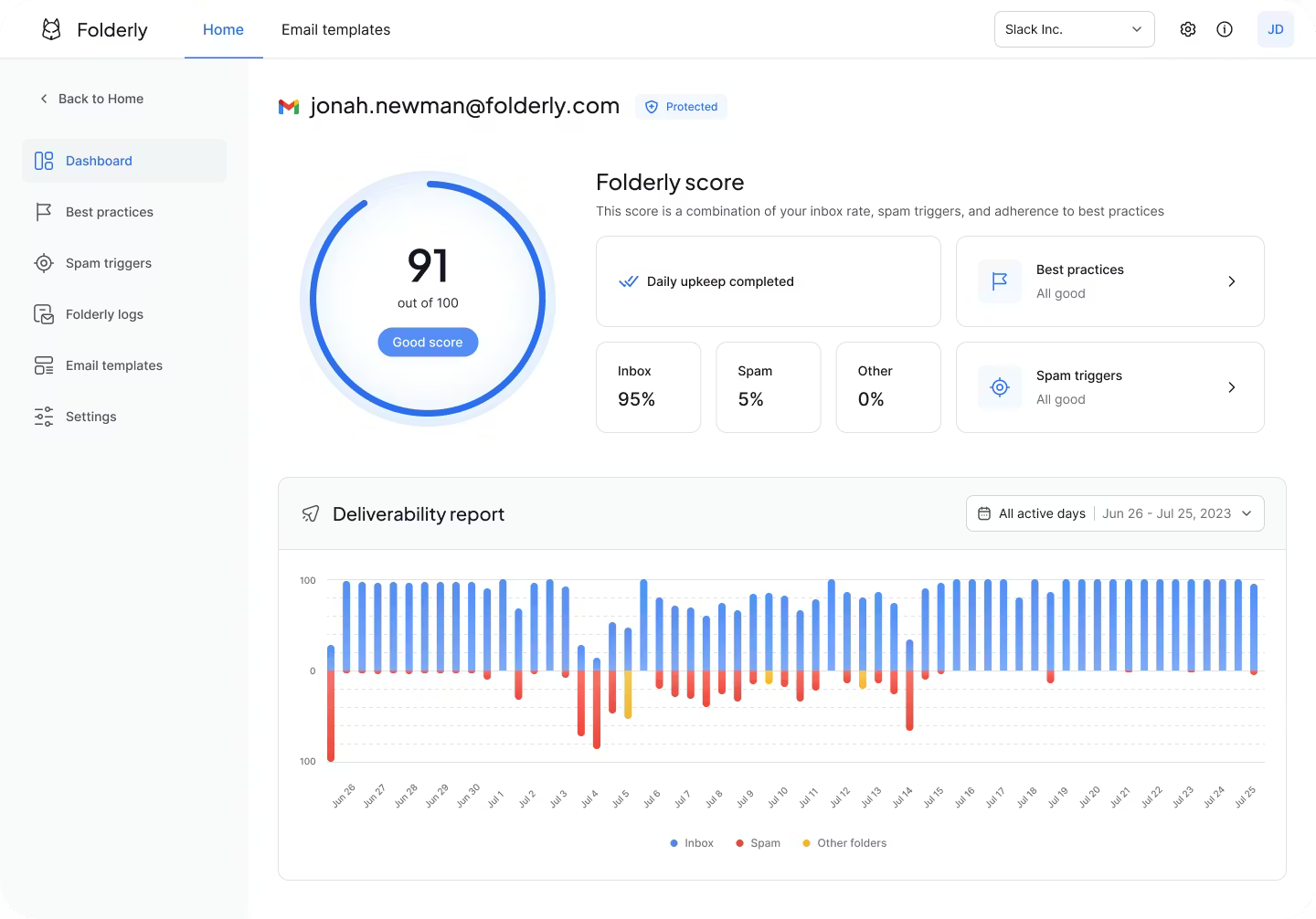
Folderly works differently from the other two. Instead of testing a specific send, it runs continuously: analyzing DNS records, sending behavior, content, and domain reputation on an ongoing basis. It flags spam triggers before a campaign goes out and sends real-time alerts when something changes, with recommended next steps attached rather than just a raw diagnosis.
What our testing showed
| Folderly score | 91/100 — Good |
| Inbox placement | 95% |
| Spam | 5% |
| Other folders | 0% |
| Best practices | All good |
| Spam triggers | All good |
| Monitoring period | Daily across 30-day report |
The deliverability report chart across the monitoring period showed predominantly inbox placement with intermittent spam spikes on specific days, the kind of pattern that a one-off placement test on a clean day would miss entirely. A one-off test shows where the mail landed the day you ran it. Folderly shows the days when it did not and surfaces them before the next send goes out, rather than after engagement data reflects the damage.
What Makes Folderly Different
Folderly catches problems before launch rather than diagnosing them after. For agencies managing multiple client domains, the multi-domain view and proactive alerts reduce the gap between spotting an issue and resolving it significantly.
| “I use Folderly for business email deliverability, and it gets my business emails to target inboxes instead of spam. I really appreciate the great people, technology, and support. It just works perfectly, and my deliverability score is now at 98%! The technology ranks my emails higher and makes them acceptable with email services that let my emails through. The initial setup was made very easy with their help, taking less than an hour.”
G2 User Review |
Folderly Key Features
- Ongoing inbox placement and deliverability monitoring
- Pre-send spam trigger detection
- DNS record, IP reputation, and domain health analysis
- Real-time alerts with recommended fixes
- Multi-domain view for agencies
- API and SMTP integrations with major ESPs
Folderly Pricing
Not published. Plans are quoted based on business needs. Expect a more involved setup process than a one-off placement test and pricing that reflects the ongoing monitoring model.
Best Email Warm-Up Tools for New Domains and Inboxes
A new domain or freshly configured mailbox has no sending history. Mailbox providers do not know whether to trust it yet. These three tools build that history before anything important goes out.
4. Warmy.io
Best for: Automated email warm-up with AI-driven engagement simulation
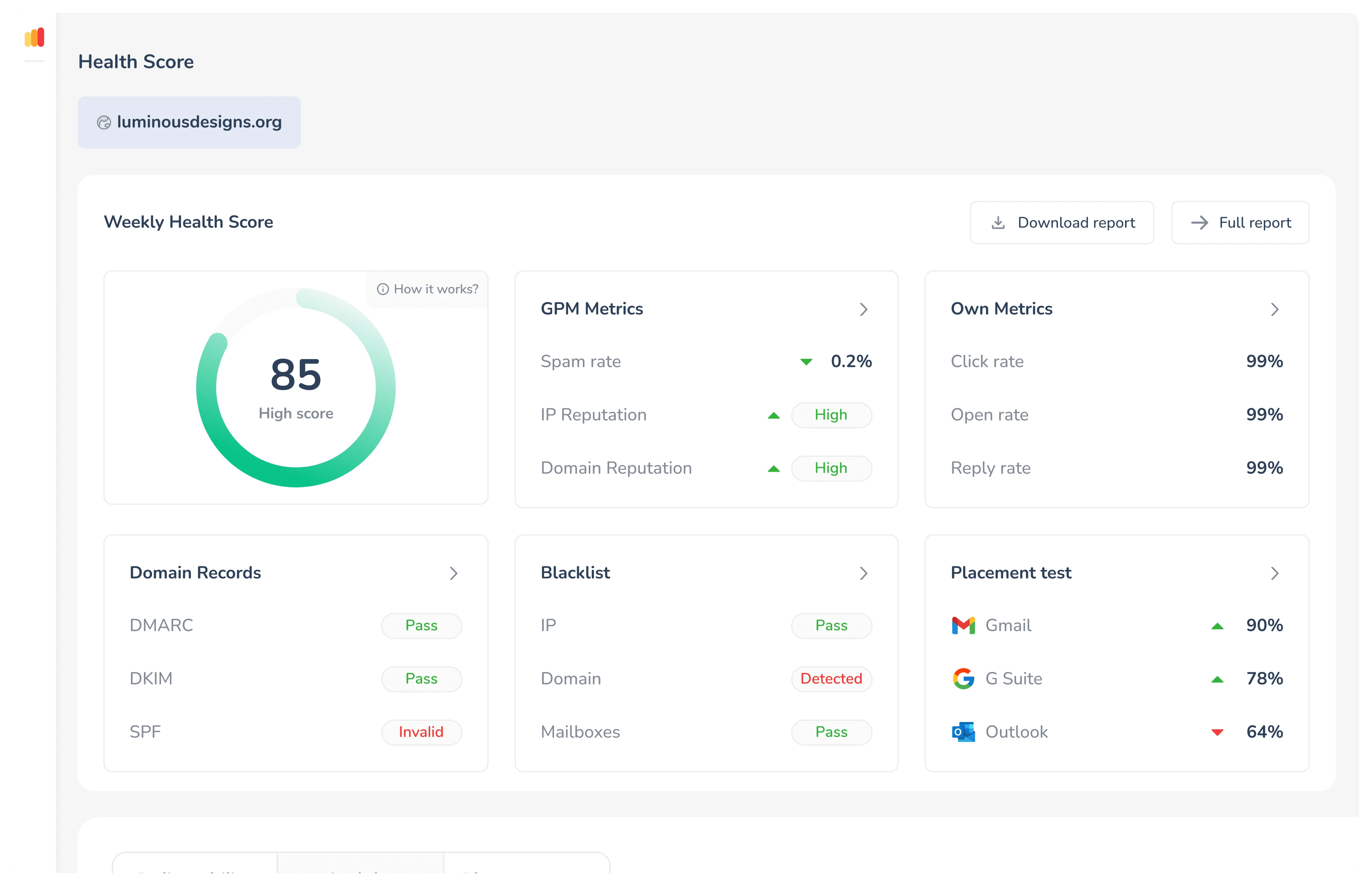
Warmy runs automated warm-up using AI-driven engagement patterns across a network of real inboxes: opens, replies, marking messages important, and moving them out of spam. It pairs that with deliverability monitoring, spam score analysis, and a Google Postmaster integration that gives visibility into how Gmail is reading the domain as reputation builds.
It also supports more than 30 languages, which matters if you are warming domains for international sending.
What our testing showed
| Overall health score | 85 — High |
| IP Reputation | High |
| Domain Reputation | High |
| Gmail placement | 90% |
| G Suite placement | 78% |
| Outlook placement | 64% |
| DMARC | Pass |
| DKIM | Pass |
| SPF | Invalid |
| Blacklist — IP | Pass |
| Blacklist — Domain | Detected |
| Blacklist — Mailboxes | Pass |
The dashboard displayed authentication status, blacklist status, Google Postmaster metrics, and inbox placement by provider in a single view, updated on a rolling basis as the warm-up progressed.
Authentication pass/fail appeared as a live status panel rather than a one-time check, meaning any record that breaks during the warm-up process is flagged before it undermines the reputation being built.
The SPF invalid flag and domain blacklist detection in our test are exactly the kind of issues a warm-up alone cannot fix. Warmy surfaces them clearly rather than letting the process run against a broken foundation.
What Makes Warmy Different
The AI-driven variation in engagement patterns is what separates Warmy from simpler warm-up tools. The activity looks more like real human behavior than generic automated sends, which reduces the risk of providers flagging the warm-up traffic itself.
| “As someone deeply involved in applied AI research, I am genuinely impressed by the Adeline AI engine. It doesn’t just send random pings, It creates contextually relevant interactions that actually mirror human behavior. The Email Deliverability insights are technically robust, providing the kind of granular data I need to ensure our outreach remains high-signal.”
G2 User Review |
Warmy Key Features
- Automated warm-up across a network of real inboxes
- AI-driven engagement patterns (opens, replies, inbox moves)
- Deliverability monitoring and spam score analysis
- Google Postmaster Tools integration
- 30+ language support for international domains
- B2B, B2C, and enterprise plan options
Warmy Pricing
Warmy offers a 7-day free trial with no credit card required. Paid plans are quote-based across B2B, B2C, and enterprise tiers. Getting a number requires booking a demo.
Warmy: Worth Knowing
Pricing scales per inbox and gets expensive quickly past a handful of accounts. If you are managing more than five inboxes, get the quote before committing.
5. Warmup Inbox
Best for: Single-inbox warm-up at an accessible starting price
Warmup Inbox connects your account to a peer-to-peer network of more than 30,000 real inboxes. The network sends, opens, and replies automatically, simulating natural engagement behavior. It monitors account health and generates reports and recommendations over time.
Setup is simple, and integrations cover Gmail, Outlook, Zoho, and SendGrid, among others.
What our testing showed
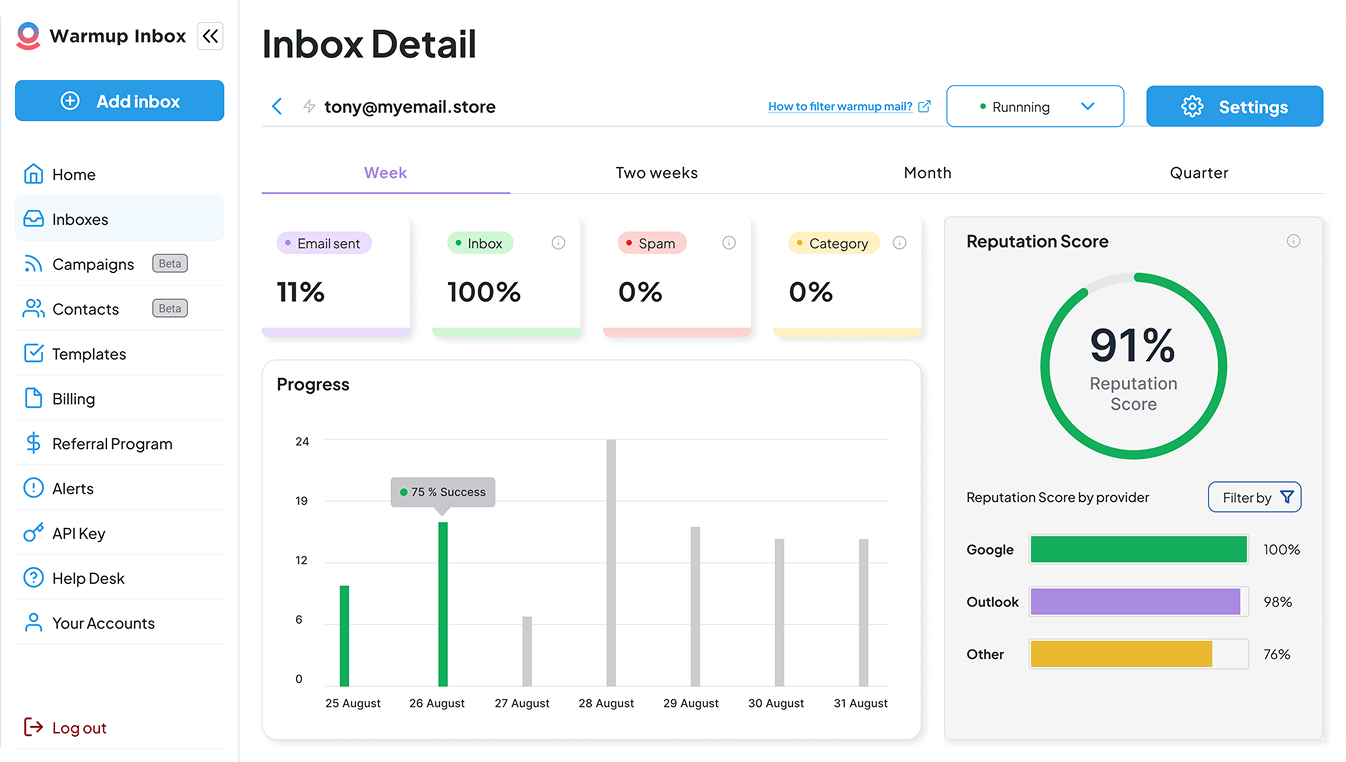
| Overall reputation score | 91% |
| Inbox placement | 100% |
| Spam | 0% |
| Category | 0% |
| Google reputation | 100% |
| Outlook reputation | 98% |
| Other providers | 76% |
The reputation score was broken down by provider rather than returned as a single aggregate; Google, Outlook, and Other were tracked separately alongside a day-by-day progress chart for the period.
That provider-level separation matters: a single overall score would not show whether an Outlook problem was developing while Google remained clean. The 76% on other providers reflects the broader diversity of that category and is consistent with expected warm-up behavior at this stage of the process.
What Makes Warmup Inbox Different
It is the most affordable entry point in this category for a single inbox. The large real-inbox network produces engagement signals that look natural to mailbox providers without requiring any manual management.
| “Warmup Inbox does exactly what they say they will do. They increase your email reputation scores on Google, Outlook, and other providers. Prior to using them, I was having significant issues with deliverability and open rates for my newsletter and email communications. Clients weren’t receiving daily communications, or they were going to spam. By using Warmup, I saw huge increases in open rates, dramatic drops in emails being marked as spam and my reputation scores are now in the 90’s.”
G2 Review |
Warmup Inbox Key Features
- Automated warm-up via a 30,000+ real inbox network
- Simulated opens, replies, and spam removal
- Sender reputation monitoring and deliverability reports
- Inbox placement checks
- Integrations with Gmail, Outlook, Zoho, SendGrid, and others
Warmup Inbox Pricing
7-day free trial, no credit card required. Paid plans are priced per inbox on annual billing.
| Plan | Price | Daily Warm-up Emails |
| Basic | $15/month per inbox | 75 |
| Pro | $49/month per inbox | 250 |
| Max | $79/month per inbox | 1,000 + SPF, DKIM, DMARC checks |
Warmup Inbox: Worth Knowing
It stops being the budget option once you are managing more than one or two inboxes. Five inboxes on Pro run $245/month. Ten on Max is $790/month. At that point, Warmy or InboxAlly may be worth comparing on total cost.
6. InboxAlly
Best for: Engagement-based reputation repair using content-matched seed actions
InboxAlly uses a different mechanism than generic warm-up networks. It sends to seed addresses where automated actions, opens, clicks, replies, and moving messages from spam to primary inbox are performed against your actual email content. That is closer to training providers on what you are genuinely sending than running generic traffic through a peer network.
Every plan includes inbox placement testing, authentication checks, and a free spam testing tool that generates a deliverability report without requiring an account signup.
What our testing showed
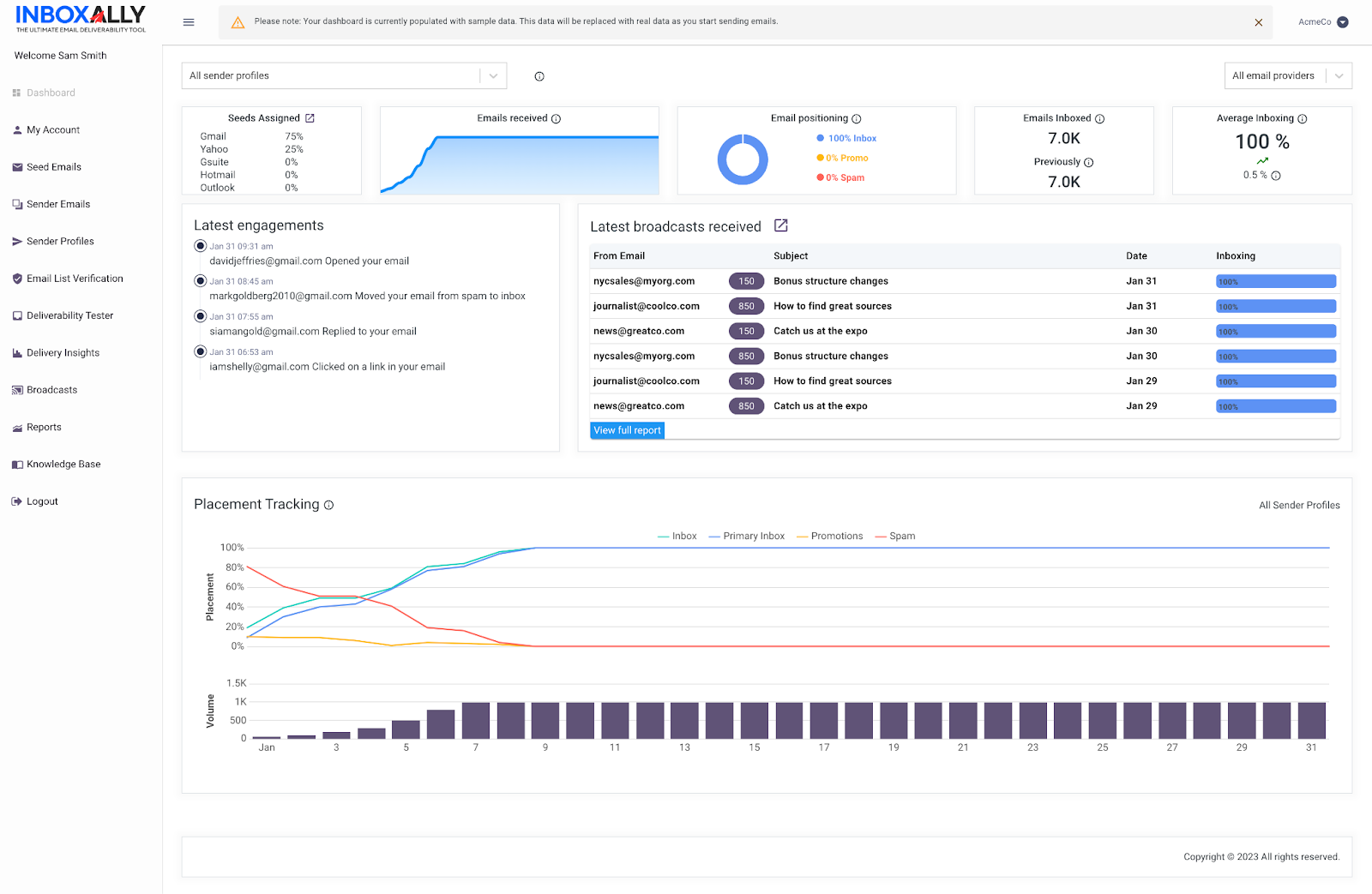
| Average inboxing at end of period | 100% |
| Emails inboxed | 7,000 |
| Email positioning | 100% inbox, 0% promo, 0% spam |
| Inbox trajectory | ~20% at start of month to ~100% by end |
| Spam trajectory | Declining to effectively 0% over 31 days |
| Engagement actions observed | Opens, spam rescues, replies, link clicks |
The placement tracking chart showed the full reputation improvement arc across the month, inbox climbing steadily from around 20% to near 100% while spam dropped to effectively zero.
The latest engagements panel showed the specific actions seed addresses were taking against the campaign content: opening emails, moving messages from spam to inbox, replying, and clicking links.
Each action was timestamped and attributed to a specific seed address, making it possible to verify that the engagement being generated matched the content being sent.
The trajectory chart is the most useful output InboxAlly produces. It makes the direction of reputation change visible day by day, which matters when trying to determine whether a warm-up is progressing or stalling and whether the engagement being generated is the right kind for the content being sent.
What Makes InboxAlly Different
Content-matched engagement is the core differentiator. The reputation signals being built reflect the actual emails you plan to send, not generic warm-up messages. That makes it more effective for programs trying to recover from an existing spam placement, not just warming a cold domain from zero.
| “This tool is very effective for streamlining email deliverability. By verifying email addresses before sending, it helps cut down on bounce rates and increases the likelihood that messages reach the right recipients. I also found it straightforward to upload email lists in CSV or XLSX formats; the extraction is accurate, and I haven’t run into any errors. The option to add multiple emails at once is another plus, since it removes a step that can feel cumbersome on other platforms.”
G2 User Review |
InboxAlly Key Features
- Automated engagement actions (opens, clicks, replies) run against your real content
- Inbox moves from spam and promotions to primary
- Seed inbox network for reputation building
- Inbox placement monitoring and performance dashboard
- Free spam testing tool, no account required
InboxAlly Pricing
Flat rate per plan, not per inbox.
| Plan | Price | Seeds/Day | Sender Profiles |
| Starter | $149/month | 100 | 1 |
| Plus | $645/month | 500 | 5 |
| Premium | $1,190/month | 1,000+ | 10 + weekly strategy sessions |
| Enterprise | Custom | Thousands | Unlimited + advanced support |
InboxAlly: Worth Knowing
The jump from Starter to Plus is steep, and additional profiles cost extra on top of the base plan. InboxAlly fits programs where deliverability problems are actively costing revenue more comfortably than a small operation testing the waters.
Best Email List Validation Tools
7. ZeroBounce
Best for: Email list cleaning and pre-send address validation
In my experience, poor list quality is the root cause of more deliverability problems than any other factor. ZeroBounce is the tool I recommend for solving that specific problem.
It checks every address for spam traps, disposable domains, role-based addresses, and invalid syntax before you send. On top of validation, it includes email scoring, blacklist monitoring, DMARC monitoring, inbox placement testing, and a real-time validation API for high-volume programs.
What our testing showed
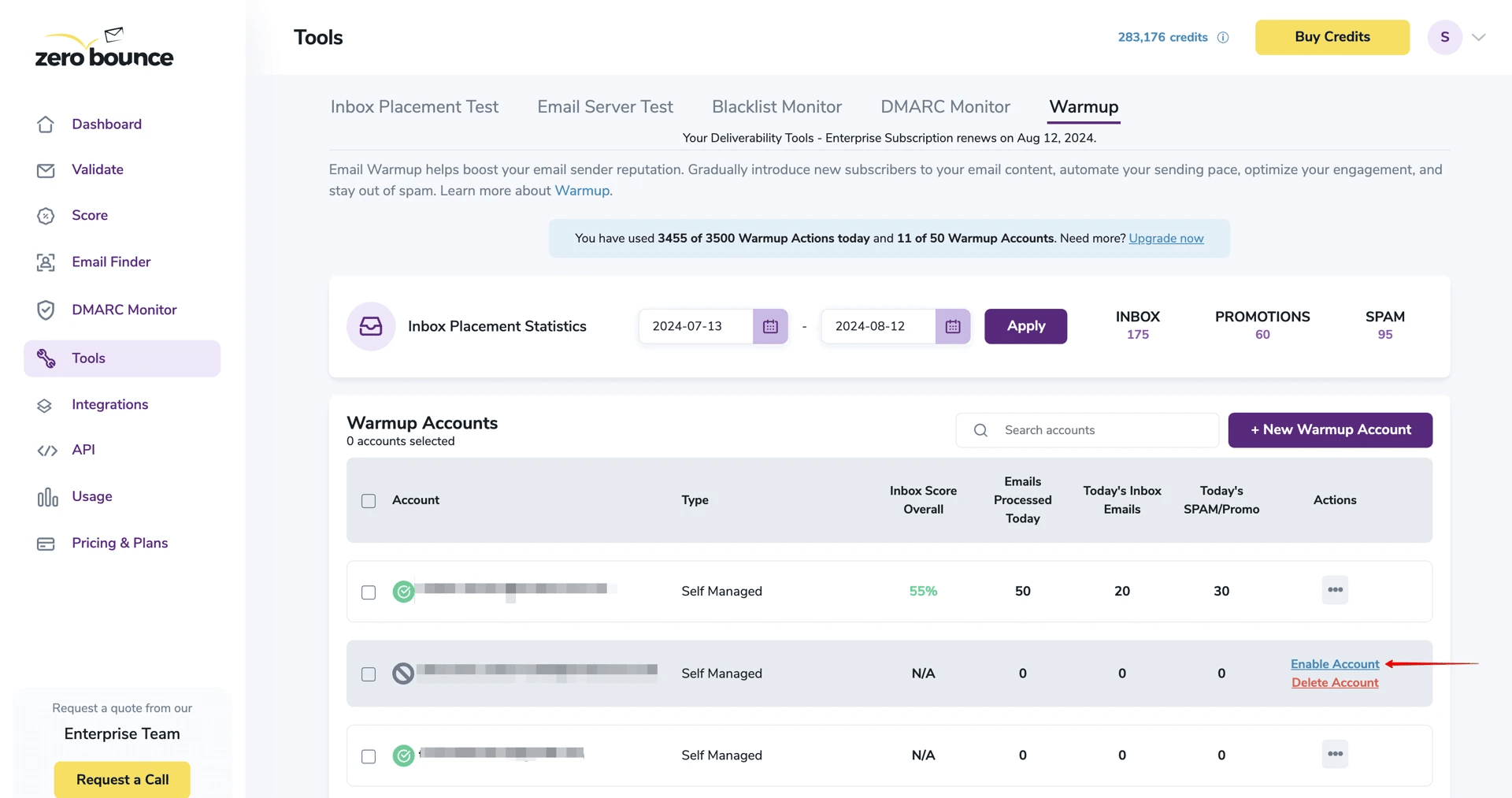
| Inbox (Jul 13 – Aug 12) | 175 |
| Promotions | 60 |
| Spam | 95 |
| Active warmup account inbox score | 55% |
| Emails processed (that day) | 50 — 20 inbox, 30 spam/promo |
The tools dashboard grouped inbox placement testing, email server testing, blacklist monitoring, DMARC monitoring, and warmup into a single interface, with per-account inbox score tracking visible across all active warmup accounts simultaneously.
Placement statistics were filterable by date range rather than fixed as a single snapshot. The practical value of that consolidation: list validation, warmup, and placement testing are visible together, making the relationship between list quality decisions and placement outcomes traceable in one place rather than across separate tools.
What Makes ZeroBounce Different
ZeroBounce is a validation tool first, not a sending platform. It pairs with whatever ESP you are already using and focuses on removing the list quality problems that damage sender reputation before they compound into something harder to fix.
| “It’s great to be able to verify emails before sending, since it reduces the risk of hard bounces and helps protect your domain so you’re less likely to get marked as spam when doing cold outreach, which is wonderful. The main downside for me is that the process feels a little bulky: I have to upload spreadsheets, and it seems like it can only verify either personal or work emails one at a time. That means I end up doing the uploads twice. This may be related to how I’m using it and there could be a better way, but I haven’t found one yet.”
G2 User Review |
ZeroBounce Key Features
- Bulk and real-time email validation
- Detection of spam traps, disposable addresses, and invalid syntax
- Email scoring and activity data
- Blacklist and DMARC monitoring
- Inbox placement and email testing tools
- API-based validation for high-volume senders
ZeroBounce Pricing
| Plan | Price | Includes |
| Free | $0 | 100 validation credits/month, 1 inbox test, 1 email server test, blacklist monitoring |
| Pay-as-you-go | From $69 | 5,000 validation credits, cost per credit drops at volume |
ZeroBounce: Worth Knowing
ZeroBounce advertises accuracy up to 99.6 percent. Independent testing tends to land a few points lower, but it remains among the more accurate validators available. The pay-as-you-go model keeps costs proportional to list size.
Best Email Reputation and Blacklist Monitoring Tools
Once a domain has history, these tools show what that history looks like from the provider side.
8. MXToolbox
Best for: Blacklist monitoring and email infrastructure diagnostics
MXToolbox is what I use when I need to see how a domain’s infrastructure looks from the outside. It offers free diagnostic tools, including blacklist checks, SPF, DKIM, and DMARC verification, email header analysis, and DNS configuration testing.
The paid Delivery Center adds ongoing blacklist monitoring across dozens of lists, automated alerts when your IP or domain appears somewhere it should not, and deeper reporting.
What our testing showed
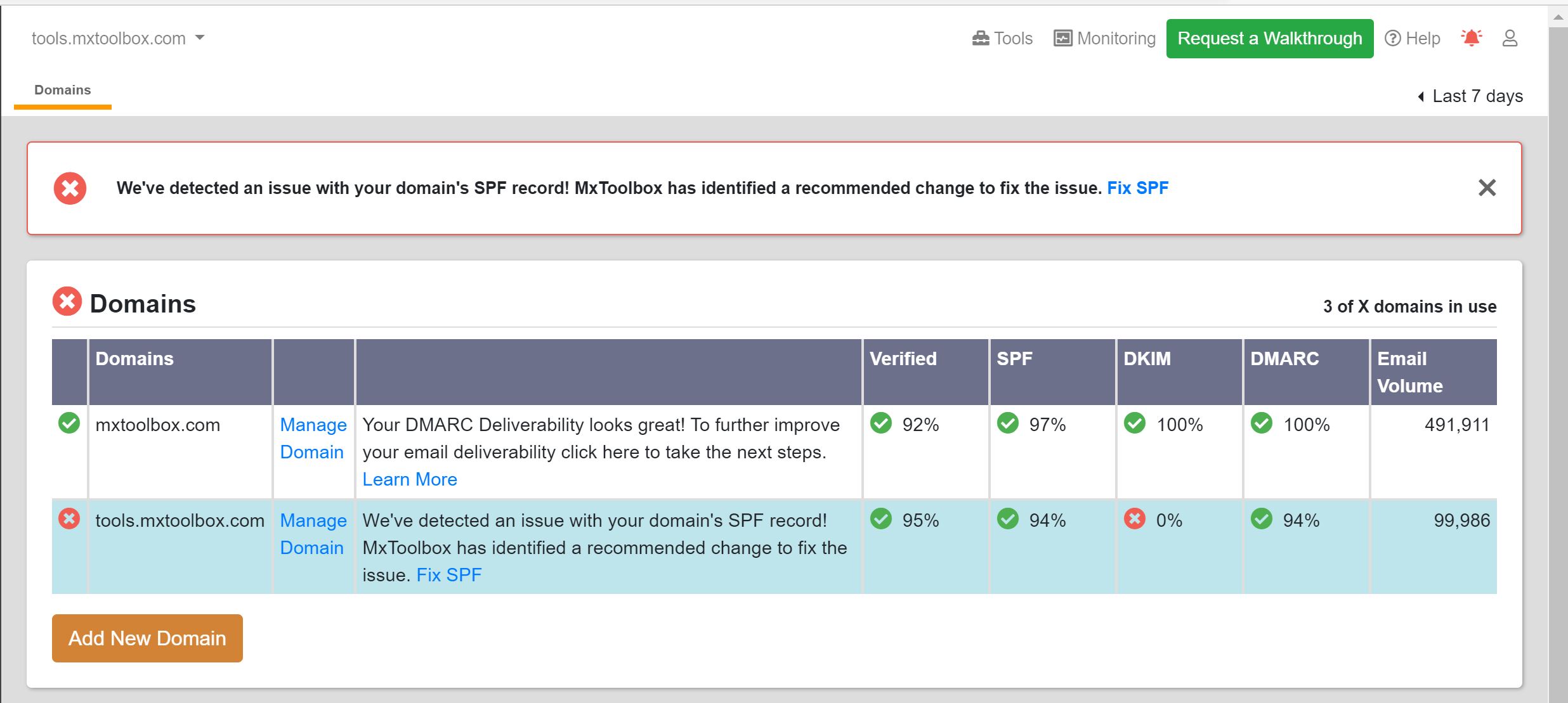
| Domain | Verified | SPF | DKIM | DMARC | Volume |
| Domain A | 92% | 97% | 100% | 100% | 491,911 |
| Domain B | 95% | 94% | 0% ⚠ | 94% | 99,986 |
The dashboard surfaced an active alert for the DKIM failure on Domain B immediately, flagged at the top of the interface with a direct fix link pointing to the specific recommended change rather than a generic troubleshooting page.
Authentication pass rates appeared as percentages per domain rather than binary pass/fail, which means a degrading record shows up as a declining figure before it becomes a full failure. A DKIM failure on a monitored domain does not require logging in and running a manual lookup to discover; the alert is already waiting.
What Makes MXToolbox Different
MXToolbox is diagnostic rather than corrective. It tells you what is wrong and points toward a fix, but the fixing is your responsibility. For technically comfortable teams who need ongoing blacklist surveillance and infrastructure diagnostics without a full platform investment, it is a strong practical choice.
| “Gives complete details of MX records. Has feature called Blacklist Check that helps greatly with domain reputation and finding blacklist. Gives thorough details of email provider as well. Can help diagnose mail deliver problems.”
G2 User Review |
MXToolbox Key Features
- Blacklist monitoring across dozens of blocklists
- SPF, DKIM, and DMARC verification
- Email header analysis and deliverability diagnostics
- DNS and domain configuration testing
- Alerts for reputation and configuration issues
MXToolbox Pricing
| Plan | Price | Includes |
| Free | $0 | Core diagnostic tools, blacklist lookup, and auth checks |
| Delivery Center | $129/month | Ongoing monitoring, header analysis, reputation alerts |
| Higher tiers | Custom | Expanded monitoring limits, deeper reporting |
MXToolbox: Worth Knowing
The interface leans technical. Non-technical users may find the diagnostic output hard to act on without some email infrastructure background. It tells you the problem clearly. It does not hold your hand through fixing it.
9. Google Postmaster Tools
Best for: Gmail sender reputation and spam complaint monitoring
Google Postmaster Tools is free, and it is the only tool on this list pulling data directly from Gmail’s own infrastructure. Once you verify a domain, it shows spam complaint rates, domain and IP reputation as Gmail sees them; authentication pass rates for SPF, DKIM, and DMARC; delivery errors; and encryption reporting.
There is no comparable source of Gmail-specific intelligence available anywhere else, at any price.
What our testing showed
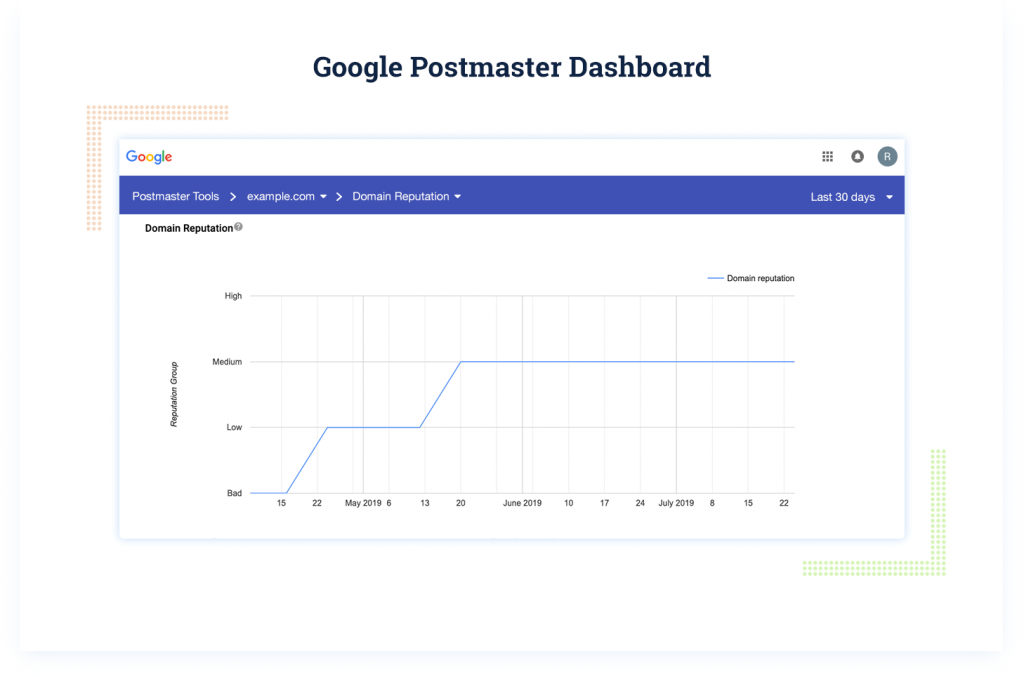
| Period | Reputation tier |
| Mid-April | Bad |
| Late April | Low |
| Late May | Low |
| Mid-June onward | Medium — stabilised |
The domain reputation chart showed the full progression, Bad to Low to Medium, as a continuous line plotted directly from Gmail’s own reputation system.
A sender who checked their sending metrics in mid-July and saw healthy open rates would not indicate from those metrics that their domain had been rated Bad just ten weeks earlier and was still only at Medium with Gmail.
Google Postmaster Tools is the only place where history is visible, and the only source where the reputation tier shown is the one Gmail is actually using to make filtering decisions.
What Makes Google Postmaster Tools Different
The data comes straight from Gmail. No third-party interpretation, no approximation. When I am trying to understand why a client’s Gmail placement has shifted, this is the first place I look. For anyone sending primarily to Gmail addresses, there is no reason not to have it running.
Google Postmaster Tools Key Features
- Domain and IP reputation monitoring as Gmail sees it
- Spam rate tracking based on user complaints
- SPF, DKIM, and DMARC authentication reporting
- Feedback loop data for spam complaints
- Delivery error and encryption reporting
- Gmail-specific deliverability insights
Google Postmaster Tools Pricing
Free. Domain verification through a Gmail or Google Workspace account is required.
Google Postmaster Tools: Worth Knowing
Google Postmaster Tools is Gmail-only. It tells you nothing about how Outlook, Yahoo, or other providers see your mail. It also requires a meaningful send volume before data populates, and it is entirely observational with no corrective tools built in. Use it alongside MXToolbox for broader coverage.
Best Email Sending Infrastructure Tools
Everything above assumes email is already going out. These three tools cover the infrastructure that sends it.
10. Mailgun
Best for: Scalable transactional and marketing email via SMTP or API
Mailgun is built for teams sending transactional or marketing email programmatically. It supports delivery via SMTP relay or RESTful API, which makes it a common default for SaaS platforms that need reliable email at scale.
Beyond sending, it includes an email validation service to catch invalid addresses before they generate bounces, tracking, analytics, webhooks, and a separate Mailgun Optimize product for monitoring placement and performance.
What our testing showed
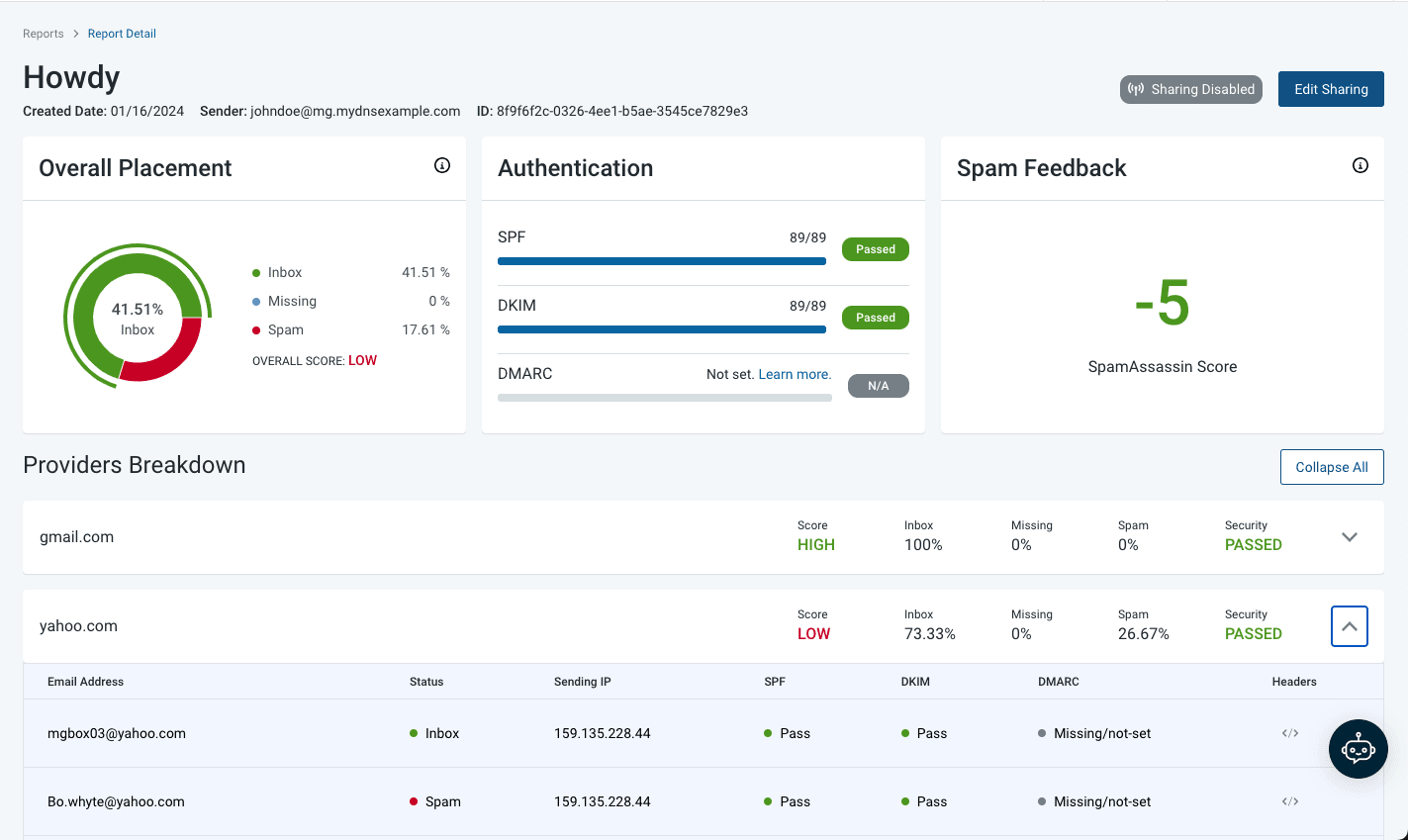
| Overall inbox placement | 41.51% |
| Spam | 17.61% |
| Missing | 0% |
| Overall score | LOW |
| Gmail | Score: HIGH — Inbox 100%, Spam 0%, Security: Passed |
| Yahoo | Score: LOW — Inbox 73.33%, Spam 26.67%, Security: Passed |
| SPF | Passed (89/89) |
| DKIM | Passed (89/89) |
| DMARC | Not set |
| SpamAssassin score | -5 (clean) |
Mailgun’s report detail view broke placement down by individual provider and by individual seed address, showing exactly which addresses landed in the inbox versus spam, from which sending IP, and with which authentication status per message.
Gmail returned 100% inbox with a HIGH score; Yahoo returned 73.33% inbox and 26.67% spam with a LOW score, from the same send, the same IP, the same content. SPF and DKIM both passed cleanly at 89/89, and the SpamAssassin score of -5 confirmed the issue was not in the copy.
The per-address breakdown showed that both Yahoo addresses had DMARC as missing/not set, and one landed in spam while the other reached the inbox from the identical sending IP. That seed-level granularity is what makes the report useful; it isolates the variable causing the divergence rather than leaving you to guess at it.
What Makes Mailgun Different
Mailgun is infrastructure, not a marketing platform. The deeper deliverability tools live in a separate product rather than being bundled into the base plan, so what you are paying for at the base tier is reliable, scalable sending with solid analytics.
| “I use Mailgun for all our automated reports, welcome invites to users, and even password reset emails. What I like most about Mailgun is its simplicity. Their deliverability is incredible, especially when compared to our other more marketing-based email system. The initial setup was very easy and it’s built for easy development. Mailgun handles all of these emails for us, so we don’t have to manually manage them. The logs are also incredibly well done, making it easy to go back and find any issues with why emails aren’t being sent.”
G2 User Review |
Mailgun Key Features
- Email sending via SMTP relay and RESTful API
- Email validation to catch invalid and risky addresses
- Tracking, analytics, and webhooks
- Deliverability optimization via Mailgun Optimize (separate product)
- Email inspection tools pre-send
Mailgun Pricing
| Plan | Price | Volume |
| Free | $0 | ~100 emails/day |
| Basic | $15/month | 10,000 emails |
| Foundation | $35/month | 50,000 emails |
| Scale | $90/month | 100,000 emails + dedicated IPs, send-time optimization, extended analytics |
Mailgun: Worth Knowing
The setup assumes technical comfort. If your team does not have engineering support, Mailtrap or a full ESP may be a better starting point.
11. Mailtrap
Best for: Pre-send email testing and transactional sending with a developer sandbox
Mailtrap covers sending infrastructure via API and SMTP with built-in SPF, DKIM, and DMARC, bounce and complaint tracking, and a deliverability analytics dashboard across mailbox providers.
Its distinguishing feature is the sandbox environment. Before anything reaches a real inbox, developers can preview rendering, check spam scores, and validate headers in a safe staging environment. It catches formatting and technical problems during development rather than after launch.
What our testing showed
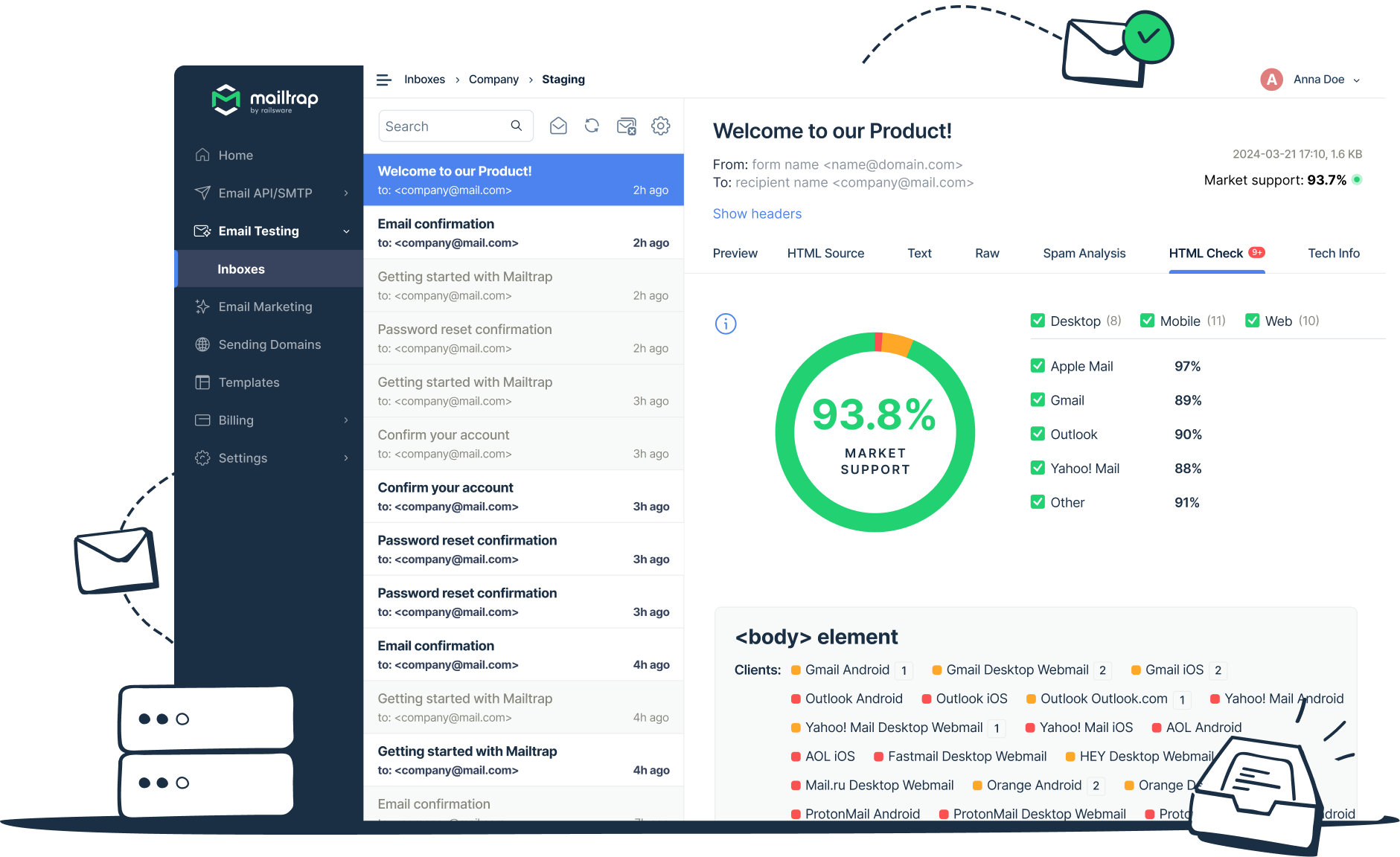
| Overall market support | 93.8% |
| Apple Mail | 97% |
| Gmail | 89% |
| Outlook | 90% |
| Yahoo Mail | 88% |
| Other | 91% |
| Clients tested | 29 across desktop, mobile, and web |
The HTML Check ran across all clients simultaneously, broken down by desktop, mobile, and web, with individual pass/fail status per client shown alongside the overall score.
The sandbox inbox captured multiple transactional email types at the same time, each inspectable across preview, HTML source, plain text, spam analysis, HTML check, and technical info tabs without leaving the interface.
A rendering issue that only affects one mobile client, or a spam score that only flags under specific provider conditions, is discoverable in the sandbox before it reaches a real inbox.
For development teams shipping email features, pre-launch visibility across the full client landscape is what the tool is built around.
What Makes Mailtrap Different
The sandbox is pre-send only and is not a replacement for inbox placement testing. But for catching technical problems before they become deliverability problems, it fills a gap that most sending platforms leave open. For development teams shipping email features, that pre-launch safety net has real value.
| “Mailtrap’s analytics gives me the capability to spot and address email delivery issues quickly. From my developer’s lens, this SMTP service is spot on, especially in-depth analytics. Getting started was fast, and in no time, I got a clear understanding of the sending dynamics.” Capterra User Review |
Mailtrap Key Features
- Email API and SMTP for transactional, bulk, and marketing sends
- Deliverability and engagement analytics dashboard
- Built-in email logs and performance tracking
- SPF, DKIM, and DMARC authentication checks
- Sandbox environment for pre-send testing in staging or development
Mailtrap Pricing
| Plan | Price | Volume |
| Free | $0 | ~4,000 emails/month |
| Basic | $15/month | Higher limits |
| Business | $85/month | Advanced analytics, higher volume |
| Enterprise | $750/month | Full platform, dedicated support |
12. Smartlead
Best for: AI-powered cold outreach with deliverability infrastructure built in
Smartlead is a different category from everything else on this list. It is a cold outreach platform where deliverability is built into the foundation rather than added on top.
- Domain setup, DNS configuration, and SPF, DKIM, and DMARC are handled inside the platform.
- Automated warm-up runs continuously. AI agents assist with prospect research, email personalization, reply classification, and send-time optimization across unlimited connected mailboxes.
- The Master Inbox consolidates replies from all campaigns in one view.
- SmartProspect handles lead discovery, the integrated CRM tracks conversations and campaign activity, and multichannel integrations cover LinkedIn and calling tools alongside email.
What our testing showed
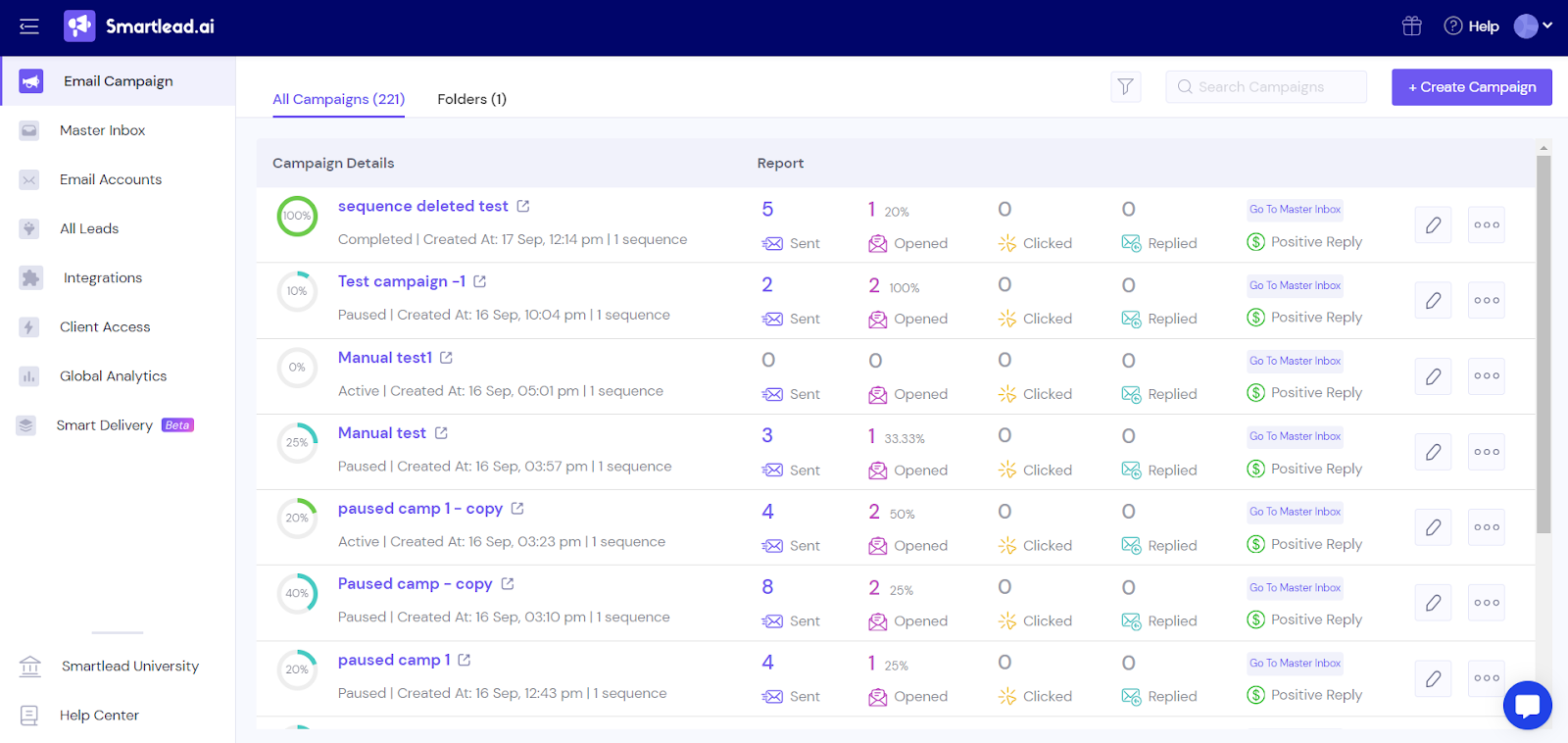
| Campaigns managed | 221 active campaigns in single dashboard view |
| Per-campaign metrics | Sent, opened, clicked, replied, positive reply |
| Deliverability layer | Smart Delivery running across all mailboxes in background |
| Infrastructure | Warm-up, sender rotation, authentication monitoring — no separate tool required |
The campaign dashboard showed all active campaigns in a single view with per-campaign reporting across all key metrics. Smart Delivery, handling warm-up, sender rotation, and authentication monitoring, ran in the background across all connected mailboxes without requiring a separate tool or dashboard.
Campaign management, lead management, and deliverability infrastructure were all accessible from the same interface.
For teams running cold outreach at scale, the operational case is consolidation: deliverability infrastructure that would otherwise require a separate warm-up tool, a sending platform, and a monitoring dashboard is built into the platform the outreach team is already using.
What Makes Smartlead Different
Smartlead combines outbound automation with a dedicated deliverability infrastructure. Teams running cold outreach at scale get both functions in one platform rather than stitching a warm-up tool, a sending platform, and a CRM together separately.
| “The performance and deliverability features are especially valuable for us. Mailbox rotation, sending limits, warm-up, campaign tracking, and reply management help us run email outreach in a more controlled way. For example, when we are targeting different customer segments or testing different messaging angles, Smartlead makes it easy to monitor what is working and adjust quickly. Also, classifying email replies using AI/Intelligence has been a great feature, allowing us to process replies at scale.”
G2 User Review |
Smartlead Key Features
- AI-powered email outreach automation and campaign management
- Built-in deliverability infrastructure with automated warm-up
- Automatic DNS configuration (SPF, DKIM, DMARC)
- Sender rotation and unlimited mailbox management
- SmartProspect leads discovery and verified contact generation
- Master Inbox for replies across all campaigns
- AI agents for research, personalization, and response handling
- Integrated CRM for deal and outreach tracking
- Multichannel integrations, including LinkedIn and calling tools
Smartlead Pricing
| Plan | Price | Includes |
| Base | $39/month | 2,000 contacts, 6,000 emails |
| Pro | $94/month | 30,000 contacts, 150,000 emails, API access |
| Unlimited Smart | $174/month | No volume caps |
| Unlimited Prime | $379/month | Dedicated infrastructure, advanced support |
Smartlead: Worth Knowing
Smartlead is the right fit if outreach is the actual job, not just deliverability monitoring. Teams running traditional marketing campaigns will find most of the automation irrelevant and most of the pricing hard to justify.
Conclusion
None of these tools works in isolation. Most email marketing campaigns at InboxArmy run two or three together.
A common starting stack: ZeroBounce to keep the list clean, GlockApps or Folderly for placement testing, and Google Postmaster Tools for Gmail reputation monitoring. Add a warm-up tool when you are starting something new. Layer in Mailgun or Mailtrap if you are building programmatic sending.
If the problem turns out to be bigger than any tool can diagnose on its own, that is the work our email deliverability agency does directly: audits that look at infrastructure, authentication, list health, and sending behavior together, then fix what is actually broken rather than adding another subscription to the stack.
Email Deliverability Tools FAQs
Why are tools like Litmus, Email on Acid, and Kickbox not on this list?
This list focuses on tools that monitor and improve deliverability: inbox placement testing, reputation monitoring, list validation, and warm-up. Litmus and Email on Acid primarily handle email design and rendering testing. Kickbox specializes in validation rather than broader deliverability monitoring.
How do I check the deliverability of my emails?
Run inbox placement tests using GlockApps or Validity Everest. These send test emails to seed inboxes across providers and report where each one landed, along with spam score, authentication status, and reputation data. For Gmail specifically, Google Postmaster Tools shows how your domain reputation looks directly from Gmail’s infrastructure.
How can I improve my email deliverability?
Start with the fundamentals: clean the list, authenticate the domain with SPF, DKIM, and DMARC, and warm up any new sending infrastructure gradually. From there, monitor sender reputation continuously and segment by engagement rather than blasting the full list. Sudden volume spikes and stale lists are the two fastest ways to lose inbox placement.
How do I know if my domain or IP is blacklisted?
Run your domain and IP through MXToolbox, which scans dozens of blocklists at once and tells you which ones, if any, have flagged you. If you are listed, most blocklists publish their own delisting process. The usual requirement is fixing the underlying issue first (a complaint spike, a compromised account, a spam trap hit) before submitting a removal request. Some review within a day or two. Reputation-based listings typically take longer.
Do I need more than one deliverability tool?
Almost always, yes. A placement testing tool tells you where mail is landing. A validation tool keeps the list clean. A reputation monitor shows how providers see your domain between sends. These are different data sources answering different questions. The tools that try to do everything tend to do none of it as well as the specialized ones.