
Quick Overview
Nonprofit email works best as a lifecycle program. Segment by giving history and engagement, automate the moments that matter most (welcome, thank-you, donation abandonment, recurring-gift upgrades, and re-engagement), and save campaign volume for appeals and updates with a clear reason to send. Judge fundraising emails on revenue per thousand emails and response rate. Protect deliverability with authentication, easy unsubscribes, and regular list cleaning, because an email that lands in spam can’t raise anything.
Why Is Email Marketing Crucial For Nonprofits?
Email marketing gives nonprofits a direct channel to engage supporters, share accomplishments, and improve donations. Our team has watched organizations build donor relationships through email that paid ads and social posts never produced. Email also costs little per send, so small teams can reach thousands of people with a modest budget. Supporters who open a nonprofit’s emails regularly give more often and stay longer.
Supporters prefer emails: According to Neon One’s nonprofit email research, as summarized by Nonprofit Tech for Good, 48% of donors name email as their preferred way to hear updates and appeals, well ahead of direct mail at 21%.
The revenue case holds up too: M+R’s 2026 Benchmarks Study found nonprofits raised an average of $2.40 in email revenue per subscriber in 2025, up from $1.87 the year before, with email revenue rising 16% on average. Every subscriber added is a long-term asset, not a one-time gift.
Strategies For Nonprofit Email Marketing
Nonprofits should segment lists, automate welcome series, write scannable copy, test short subject lines, and balance appeals with stories. Segmentation works because a monthly donor and a first-time volunteer want different messages.
Step 1: Set Goals That Tie to the Mission
A useful email goal names a mission outcome. Each goal decides which emails the team builds first and which numbers it watches. Strong goals include:
- Convert one-time donors into monthly donors
- Grow year-end email revenue
- Fill a spring event
- Recruit 50 new volunteers
Step 2: Grow the List the Right Way
Organic signups build a list that opens, clicks, and gives, while purchased lists damage your sender reputation. Willing subscribers arrive through five places:
- Signup forms on high-intent pages, such as the homepage, mission pages, and footer
- Donation and event forms with a clear opt-in
- A timed or exit intent pop-up shown after visitors learn about the cause
- Offline moments, such as events, volunteer days, and QR codes on printed materials
- A valuable offer, such as an impact report or a practical guide
Short forms with name and email convert best, and a preference center can collect interests later.
Step 3: Segment From Day One
Segmentation gives each supporter a message that fits their relationship with your cause. According to Mailchimp and HubSpot, segmented email sees 100% more click throughs. Our starting segments include:
- New subscribers who have not given
- First-time donors
- Recurring donors
- Lapsed donors with no gift in 12 months or more
- Major and mid-level donors
- Volunteers and event attendees
- Supporters quiet for 90 days or more
Each group needs its own message, ask, and cadence.
Step 4: Build Automations and Campaigns That Work
Automations earn gifts around the clock, so they come before campaigns. The core automations are:
- Welcome email that introduces the mission and offers one next step
- Thank you email that confirms the gift and shows its impact
- Reminder email for abandoned donation forms
- Monthly giving invitation for second-time donors
Campaigns then follow the calendar and the supporter journey:
- Year-end appeals
- Giving Tuesday
- Matching gift challenges
- Event promotion
- Lapsed donor win-backs
Every campaign carries one goal, one segment, one button, and a subject line test before the full send.
Step 5: Deliverability
Deliverability decides whether supporters ever see your emails, so it needs attention before the first send. A healthy program follows these habits:
- Authenticate the sending domain with SPF, DKIM, and DMARC
- Remove hard bounces immediately and suppress unsubscribes everywhere
- Pause sending to contacts who ignore many emails in a row
- Include a one-click unsubscribe link and a clear sender name
- Keep spam complaints under 0.3 percent
- Send on a steady schedule, since sudden volume spikes harm reputation
Step 6: Review and Optimize Nonprofit Emails
After every nonprofit email send, review key performance indicators to establish effectiveness, content quality, list health, and sender reputation. M+R’s annual study reports the following results for nonprofit emails.
| Metric (2025 data) | Fundraising Emails | Advocacy Emails |
|---|---|---|
| Click-through rate | 0.59% | 2.3% |
| Response rate | 0.05% | 1.4% |
| Revenue per 1,000 emails sent | $54 | Not reported |
10 Types Of Emails Nonprofits Can Send
Nonprofits can send welcome, engagement, appeal, thank you, newsletters, and reminder emails to build relationships with supporters and encourage action.
| Nonprofit Emails | Trigger or Schedule | What It Should Do | Measure It By |
|---|---|---|---|
| Onboarding/Welcome email | After the welcome email | Share the origin story, explain how the gifts are used | Click rate, series completion rate |
| Engagement email | Subscriber opens or clicks | Behind the scenes, accomplishments | Click rate, first gift rate |
| Recurring Donation Appeal Email | A set time after the first | Invite them to donate again | Click rate, conversions |
| Thank you Email | Any gift | Thank them immediately, confirm the gift, show what it will do | Delivery, follow-on engagement |
| Mission Moments | Impact report or program milestone | Share credible numbers and proof | Click rate, landing page visits |
| Reminder email | Started a donation form but didn’t finish | A short reminder with a direct link back to the form | Recovered gifts |
| Newsletter | Monthly schedule | Program updates, useful content | Click rate, unsubscribe rate |
| Volunteer recruitment email | A pre-set date, time, or campaign timeline | Encourage past and potential volunteers to sign up | Click rate, sign up rate |
| Holiday message | Set calendar date | Send a warm greeting with specific giving options | Gift rate |
| Event invitation/Fundraising Campaign | Event announced, or registration opens | Share the date, venue, and price, one-click button for booking with deadline | Registrations, click rate |
1. Onboarding/Welcome Email
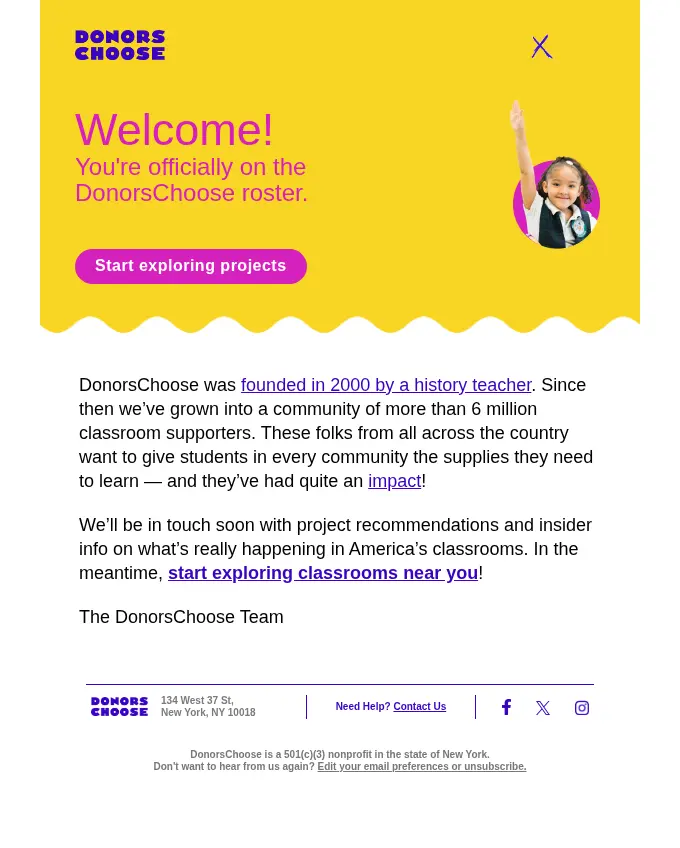
A welcome email works best when it gives new subscribers one action to take. A short origin story, a community number, and a single button give the reader context and direction.
This DonorsChoose welcome email shares the organization’s history, mission, and promises project recommendations soon.
Key takeaways:
- In our experience, a welcome email earns more clicks when it makes one request.
- An origin story gives new subscribers a reason to trust the cause.
- A promise of future content sets expectations for the next send.
Subject Line: Welcome to DonorsChoose!
CTA: Start Exploring Projects
Note: Smaller nonprofits can replace the supporter count with a mission fact, such as meals served or animals adopted.
2. Engagement Emails
Engagement emails keep supporters connected between appeals by handing them something interesting to read. A personal note from a leader gives that content a human voice.
Probable Futures’ email opens with a note from the executive director about a conversation with a coastal city leader.
Key takeaways:
- Direct service nonprofits can feature client stories, volunteer spotlights, or program photos in place of data vignettes.
- A personal note gives data and stories a human voice.
- Visual cards make a long email easy to scan.
- A contribution button turns passive readers into participants.
Subject Line: Explore our climate vignettes
CTA: Suggest a vignette

3. Recurring Donation Appeal Email
An appeal performs best when supporters see a win before they see the ask. A matching gift gives donors a concrete reason to give now.
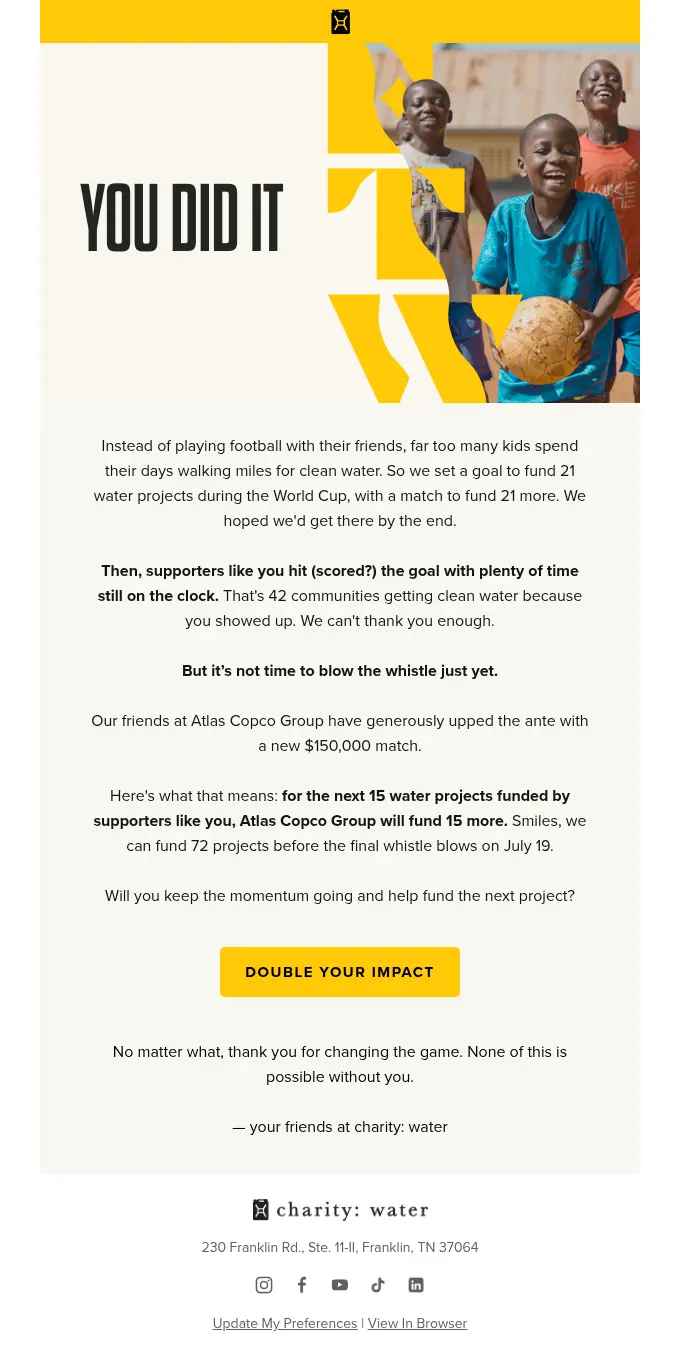
Charity Water reports its previous impacts, then promises 15 more funded projects, and sets a deadline to add urgency.
Key takeaways:
- Smaller nonprofits can secure a match from a board member or a local business.
- We tie the deadline to a real event so the urgency feels honest.
- Gratitude before the ask keeps the tone warm.
- A specific match turns a general request into a specific opportunity.
- One button keeps the donor focused on one decision.
Subject Line: Gooooooooooooal (hit) ⚽
CTA: Double Your Impact
4. Thank You/Follow-Ups Email
A thank-you email deepens loyalty when it shows donors where their gift lands. A quote from a real beneficiary makes that proof feel personal.
City Harvest opens its email with a thank-you from the CEO and a video for engagement. Charity rating badges in the footer reassure donors about financial care.
Key takeaways:
- We send the thank-you email within a day of the gift so the gratitude feels immediate.
- A thank-you email with no ask builds trust.
- A real quote proves where the gift goes.
- Third-party badges reassure donors that the organization manages money well.
Subject Line: Welcome to the City Harvest family
CTA: Please Watch

5. Mission Moments Email
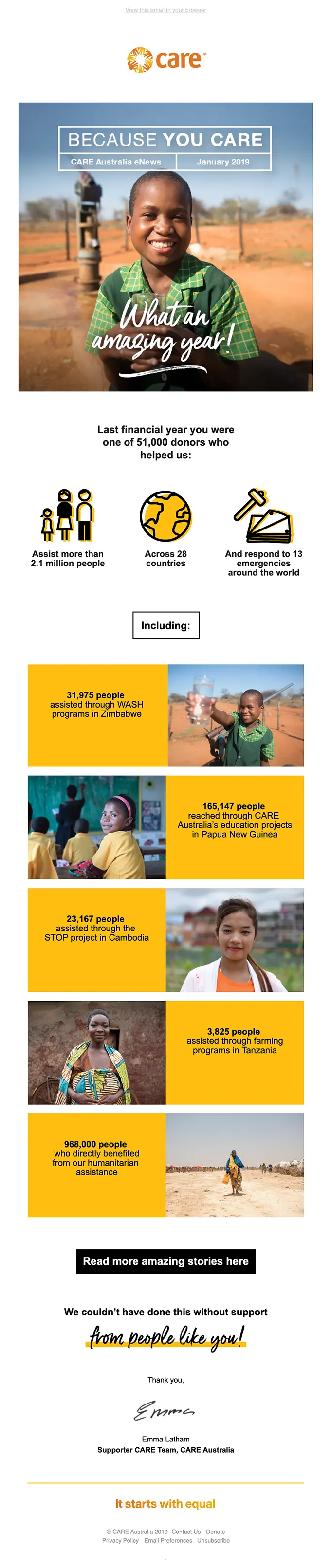
A mission moment email shares nonprofit and charity organizations’ accomplishments and impacts. Large numbers give readers a fast sense of scale.
Australia Care email features their year’s highlights, including donors, countries, and programs.
Key takeaways:
- Celebrate a specific achievement, organizational anniversary, or impact threshold.
- Put the focus on the donor or volunteer community by thanking them for their contribution.
- Use clear, specific numbers to mark the milestone.
Subject Line: What an amazing year!
CTA: Read More Amazing Stories Here
6. Reminder Emails
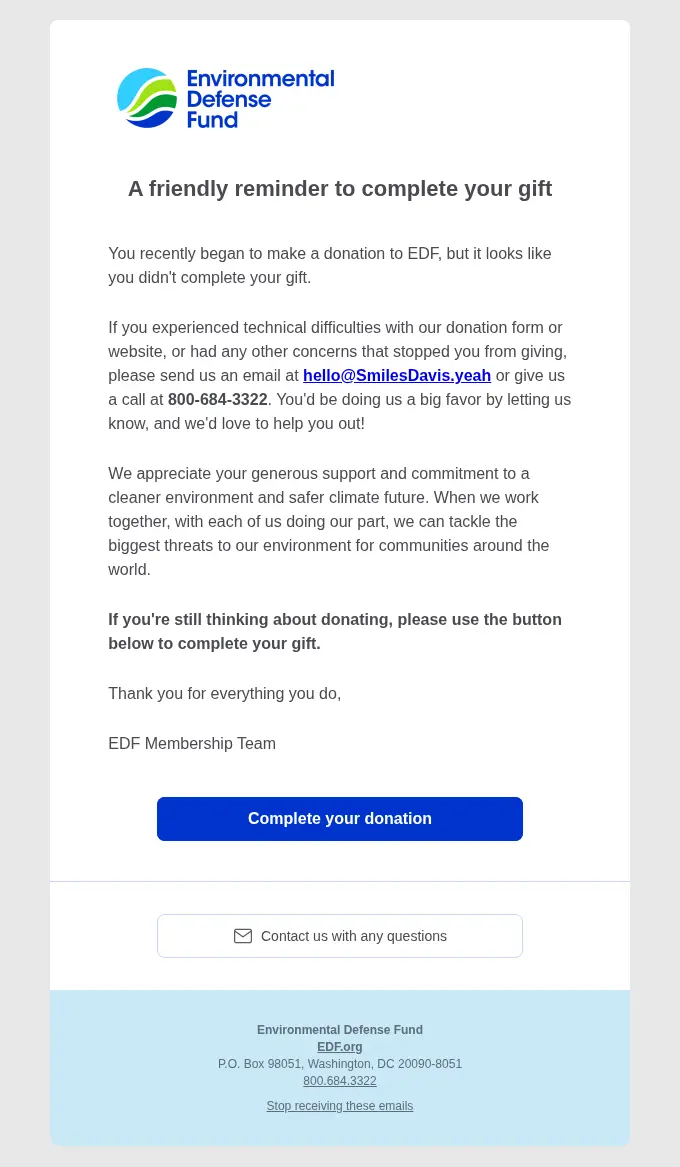
A reminder email recovers gifts when it sounds like help. A short message and one button give the donor an easy way to finish.
This EDF email tells the donor that a gift was left unfinished and offers an email address and a phone number for technical problems.
Key takeaways:
- Nonprofits can trigger this email through automation a few hours after a donor abandons the form.
- We link the button straight to the saved gift form so the donor skips re-entering details.
- A helpful tone keeps the reminder from feeling like pressure.
- Support contact details remove friction.
Subject Line: Still thinking about donating to Environmental Defense Fund?
CTA: Complete your donation
7. Nonprofit Newsletters
A newsletter can feature a story with strong visuals, organization updates, and a human voice.
NCAIDS Action Network’s newsletter shares the latest news, events, and blogs with its subscribers.
Key takeaways:
- Maintain a consistent weekly or monthly schedule
- Keep the layout clean and responsive for mobile
- Share the latest updates, news, and events relevant to the subscribers.
Subject Line: We’re back! Check out this month’s newsletter from NCAAN
CTA: Read More, Watch Now

8. Non-Profit Volunteer Recruitment
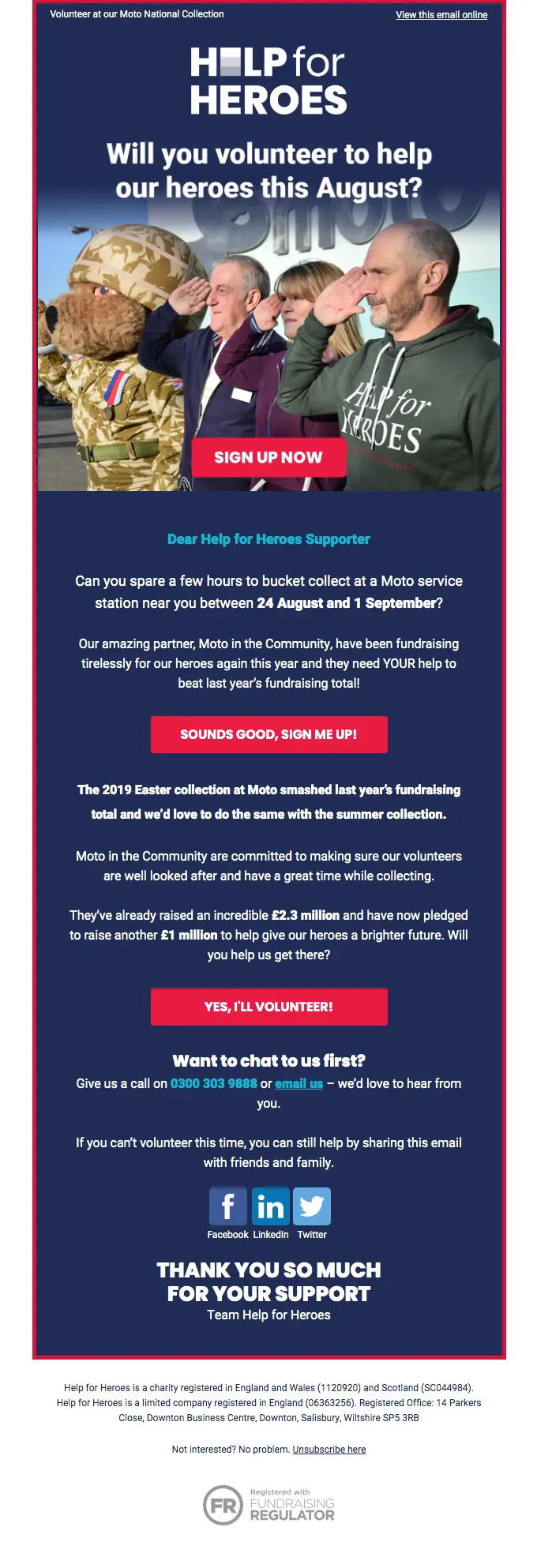
A volunteer recruitment email states the mission and the exact time commitment required and includes a single direct call to action.
Key takeaways:
- Explain volunteer requirements, time commitment, and location.
- Previous impacts and results can help convince volunteers.
- All CTAs should encourage a common action.
Subject Line: Will you volunteer to help our heroes, Smiles Davis
CTA: Sign Me Up, Yes, I’ll Volunteer
9. Holiday Message
We reached out to supporters with an Eid message for a donation appeal. The email ends on a thank-you note and a straightforward CTA.
Key takeaways:
- A named amount makes the gift feel concrete.
- Separate cards keep the choices clear on mobile.
- A closing thank-you keeps the tone warm after several asks.
Subject Line: Make this Eid Meaningful with Your Zakat
CTA: Give Zakat Now

10. Event/Fundraising Campaign Emails
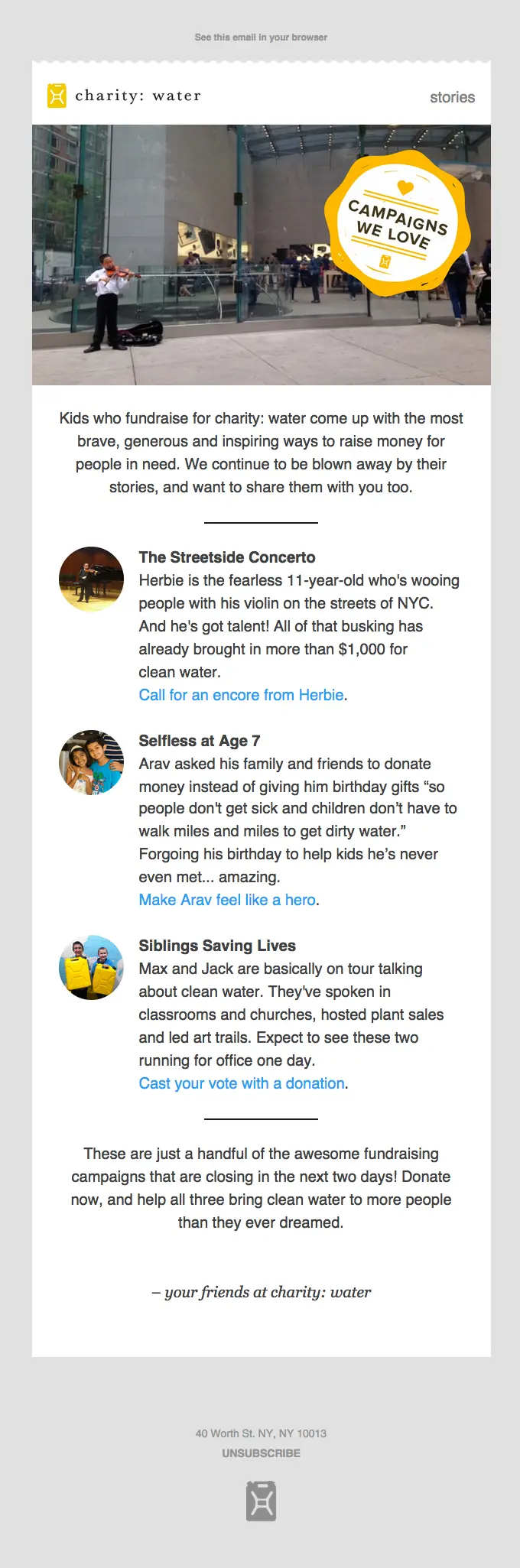
Event invitations and fundraising campaigns work best when they give readers the date, venue, price, and one button to book.
Charity Water’s email shares charity campaigns and tailored CTAs with clear deadlines.
Key takeaways:
- A limited-time offer with a visible deadline gives supporters a reason to act now.
- Tie the event or donations to specific outcomes.
Subject Line: Three amazing fundraisers under the age of 11
CTA: Call for an Encore from Herbie
Nonprofit Email Subject Lines and Preview Text
Strong nonprofit email subject lines and preview text must combine clarity, curiosity, and urgency to improve open rates. InboxArmy offers an Email Subject Line Tester and an Email Subject Line Generator to tailor subject lines that fit your campaign, audience, and brand.
Here are a few catchy nonprofit email subject lines we’ve created and analyzed using InboxArmy’s free tools. It scores subject lines from 1 to 100% based on text length, clarity, urgency, engagement, and spam risk.
What impact can you make today, {{firstName}}? 78%
Find out how your involvement can create positive change.
Your support inspires hope and change 77%
Your ongoing support fuels our efforts to make an impact.
Almost there! Complete your donation now! 78%
Your generosity can help us achieve more. Finish your donation now.
Save the Date: Community Impact Event 75%
Together, we can create lasting change. Don’t miss out.
We’ve reached a new chapter — thank you! 76%
Your partnership has been essential to our success.
How to Choose an Email Marketing Platform for Your Nonprofit
The right platform is one your team will use well, that connects to the donor data that powers your segments, and that
fits your budget.
How to Choose an Email Marketing Platform for Your Nonprofit
The right platform is one your team will use well, that connects to the donor data that powers your segments, and that
fits your budget.
CRM and donation platform integration:
Your email platform should pull donation history, gift frequency, and donor status from
the systems where that data lives. A reliable connection lets you separate first-time donors, recurring donors, and
non-donors without exporting lists by hand.
Automation:
The platform should trigger emails when someone subscribes, donates, abandons a form, or
goes quiet. Those triggers power welcome series, thank you emails, and lapsed donor campaigns, and signup forms that
feed the welcome series bring list growth into the same workflow.
Revenue reporting:
Open and click rates describe engagement, and fundraising teams also need to see which
campaigns and segments produce gifts. We favor platforms that connect each email to donations and revenue.
Deliverability and list management:
The platform should handle bounces, unsubscribes, and inactive contacts and support
domain authentication. A h3 campaign earns nothing when it lands in spam.
Pricing as your list grows:
Introductory prices reveal little, so we check how costs change as contacts, send volume,
and automation needs increase. Nonprofit discounts and free tiers also carry restrictions that deserve a close read.
Ease of use and support:
The people who run campaigns usually split their time between fundraising and
communications, so the editor, workflow builder, and support team need to fit their skills.
Which Email Marketing Platform Fits Nonprofits
Mailchimp:
gives small teams templates, segmentation, and basic automation in one platform.
MailerLite:
gives small teams an easy editor, signup forms, and landing pages without a technical
setup.
Constant Contact:
offers event-heavy programs, invitations, and registrations alongside email.
Brevo:
gives teams that add SMS one hub for email and text.
Salesforce Marketing Cloud:
and nonprofit CRMs give complex donor journeys deep personalization and h3 CRM connectivity.
Nonprofit Email Marketing Best Practices
Successful nonprofit emails depend on sending relevant, mobile friendly messages to supporters who agreed to hear from you, and then testing what works.
Personalisation:
Personalisation makes a supporter feel known, so we go beyond first names and use gift history, program interest, and donor status. A recurring donor and a new subscriber should receive different messages.
Re-engage lapsed-donor sequence:
A short sequence of two or three emails wins back donors with no gift in 12 months or more. We open with an impact update, follow with a story, close with a simple ask, and pause sending to anyone who stays silent.
Fundraising email copywriting:
h3 fundraising copy tells one story, names a specific need, and asks once with a clear button. We make the donor the hero and keep the ask amount concrete.
Mobile optimisation:
Many supporters read on a phone, so we design single column layouts with short paragraphs and large tappable buttons. We preview every send on a phone before it goes out.
Consent and Opt-in:
Every subscriber should have clearly agreed to hear from you. We make opt in explicit on forms, honor unsubscribe requests immediately, and follow rules such as GDPR, CAN-SPAM, and CASL where they apply.
Optimize Send Frequency:
Two to four emails per month works as a starting point for most nonprofits. We adjust by segment, since active donors tolerate more email than casual subscribers, and we watch unsubscribe rates.
A/B Test Regularly:
Regular testing shows what your audience responds to. We test one variable at a time, such as the subject line, send time, or button text, and apply the winner to the next campaign.
How to Measure Nonprofit Email Performance
Nonprofit organizations can measure their email performance by monitoring response rate, click rate, revenue per email, unsubscribe rate, and gift rate.
| Email Type | Primary Metric | Supporting Metrics |
|---|---|---|
| Recurring Donation Appeal | Revenue per 1,000 emails sent | Response rate, average gift, click-through rate |
| Newsletter | Click rate by content type | Unsubscribes, engagement by segment |
| Onboarding/Welcome series | First action or first gift rate | Click rate, unsubscribes |
| Volunteer Recruitment | Click rate | Sign up rate, unsubscribes |
| Event Invitation/Fundraising Campaign | Registrations | Click-to-registration rate |
| Engagement | Click rate | First gift rate, unsubscribe rate |
| Thank You/Follow-up | Delivery rate | Follow-on engagement, second gift rate |
| Reminder | Recovered gifts | Click rate, revenue recovered |
| Mission Moments | Landing page visits, report download | Click rate, donation rate |
| Holiday Messages | Gift rate | Average gift, revenue per email sent |
Nonprofit Email Marketing Mistakes We See Most Often
Asking before giving value:
A donation pop-up the second someone lands, or an appeal as the first email a new subscriber receives, asks for commitment before trust exists.
Sending everything to everyone:
One newsletter and one appeal for the whole list ignores the difference between a monthly donor, a lapsed donor, and someone who signed up yesterday.
Treating the thank-you as a receipt:
A transactional confirmation isn’t stewardship. The thank-you and the follow-up showing impact are what bring donors back for a second gift.
Never asking for a monthly gift:
Recurring donors are the most predictable revenue a nonprofit has, yet many programs never send a dedicated upgrade ask.
Judging appeals by open rate:
Opens are inflated and say nothing about whether anyone gave. Revenue per thousand emails and response rate tell the real story.
Holding onto every contact forever:
Mailing long-inactive subscribers damages deliverability for everyone else on the list.
Ignoring mobile:
Most email is read on a phone. Tiny buttons, heavy images and long donation
forms all cost gifts. Our guide to building a fully mobile-optimized email campaign covers the fundamentals.
FAQs
What is nonprofit email marketing?
Nonprofit email marketing is the practice of sending planned emails to supporters to build relationships, raise funds, and drive action. These emails include welcome messages, appeals, thank you notes, impact updates, and newsletters.
How do you do email marketing in a nonprofit?
We start by choosing one goal, such as recurring donations, event signups, or volunteer recruitment. Then we segment the email list around that goal and map the emails each segment needs. Our team builds the welcome, engagement, appeal, thank you, and reminder emails first because they cover the full supporter journey. After launch, we review results monthly and adjust the messages that underperform.
What are the benefits of nonprofit email marketing?
Nonprofit email marketing raises donations, strengthens donor loyalty, and lowers the cost of reaching supporters. Email also gives teams clear data on who opens, clicks, and gives. That data helps staff refine future campaigns with real evidence. Automated emails save staff hours because welcome and thank-you messages send automatically.
What are some key strategies for nonprofit email marketing?
Segmentation, automation, storytelling, and testing form the core strategy. Segmentation sends the right message to the right group. Automation delivers timely welcome and thank-you emails. Storytelling shows supporters the results of their gifts. Testing subject lines and call-to-action buttons improves results over time.
How can a nonprofit ensure its emails reach supporters’ inboxes?
A nonprofit reaches the inbox by authenticating its sending domain and keeping its list clean. We set up SPF, DKIM, and DMARC records with the platform. Our marketing specialists remove invalid addresses and pause sending to people who haven’t engaged in months. Consistent sending to engaged subscribers builds a sender reputation that mailbox providers reward.
How can a nonprofit use data to improve its email marketing?
Nonprofits can improve their email program by tracking clicks, conversions, and unsubscribes by segment. Click-through rate and donation conversion tell you more than open rate. We run simple A/B tests on subject lines, send times, and buttons. Each test result should guide the next campaign.
How often should nonprofits send emails?
Most nonprofits should start with two to four emails per month. Teams can raise that number during giving seasons or urgent campaigns. Engagement metrics and unsubscribe rates will tell you whether your audience wants more or fewer messages. Our team adjusts frequency by segment, since active donors tolerate more email than casual subscribers.