

Quick Answer
Email programs must measure the deliverability rate, which signifies whether the email reached the subscriber’s inbox. Anything below 85% means a meaningful share of your mail is landing in spam rather than in front of a subscriber. Getting above that threshold and staying there comes down to four fundamentals: authenticate your domain with SPF, DKIM, and DMARC; build and maintain a clean, opted-in list; keep your sending volume consistent and your cadence predictable; and monitor inbox placement directly rather than inferring it from open rates.
Intro
You can spend hours on a subject line and days on the copy and get the design exactly right. None of your email marketing efforts matter if the email never reaches an inbox.
Campaign performance that drops without an obvious cause is rarely a content problem. It is usually a deliverability problem, and it is the kind of problem that compounds quietly before it becomes visible in your numbers.
Before diagnosing it, it helps to understand what deliverability actually means and what is working against it.
What Is Email Deliverability?
Email deliverability denotes the number of emails that actually reach your subscriber’s inbox rather than spam or getting blocked. Mailbox providers watch how you send, who opens what you send, and how often people complain. That behavior, tracked over time, decides whether your next email lands in the inbox or goes straight to spam.
Delivery vs. Deliverability: Is It the Same?
Delivery and deliverability describe different things, and confusing them is how email programs develop a false sense of security that in the end effects their engagement and conversions.
Delivery rate measures whether your email was accepted by the recipient’s mail server. It just means your email didn’t bounce.
Deliverability rate measures where the delivered email actually ended up: the primary inbox, spam folder, or another tab.
Email programs that gauge success by high delivery rates forget that emails can be delivered and yet never seen by a human. They could be rotting in the spam folder for all you know from the delivery rate alone.
Even with a healthy delivery metric, your engagement numbers might be quietly eroding if you don’t factor in deliverability.
What Does a Good Email Deliverability Rate Look Like?
Emails are meant to engage subscribers, build healthy relationships with them, and eventually get them to convert. All this is only possible if they actually see your email, and that’s where knowing what a good deliverability rate is matters. At InboxArmy we assess our email programs against the following industry benchmarks:
95% & above—Excellent. Your email program is in good health and reaches the inbox consistently.
85–94%—Acceptable, but there is room for improvement because some of your emails still end up in spam.
80–84%—Needs urgent attention. A meaningful share of your email ends up in the spam folder; this will likely affect your engagement and sender reputation.
Below 80%—A serious problem. At this level deliverability issues are actively quashing your email revenue and need immediate attention.
What Affects Email Deliverability
Email deliverability is a matter of trust for individual subscribers and the mailbox providers. Google, Outlook, Yahoo, and other mailbox providers aren’t actively trying to block legitimate senders. But they owe their users a seamless experience, and that means filtering out unwanted emails.
If they let through an email and the user deletes it unread, marks it as spam, or ignores it entirely, it signals the incompetency of their filtering process. That’s why they take it seriously and assess every email across several dimensions.
Mailbox providers evaluate the following:
- Whether your domain is authenticated
- Sending behavior
- User engagement
- Long-term reputation of your IP address
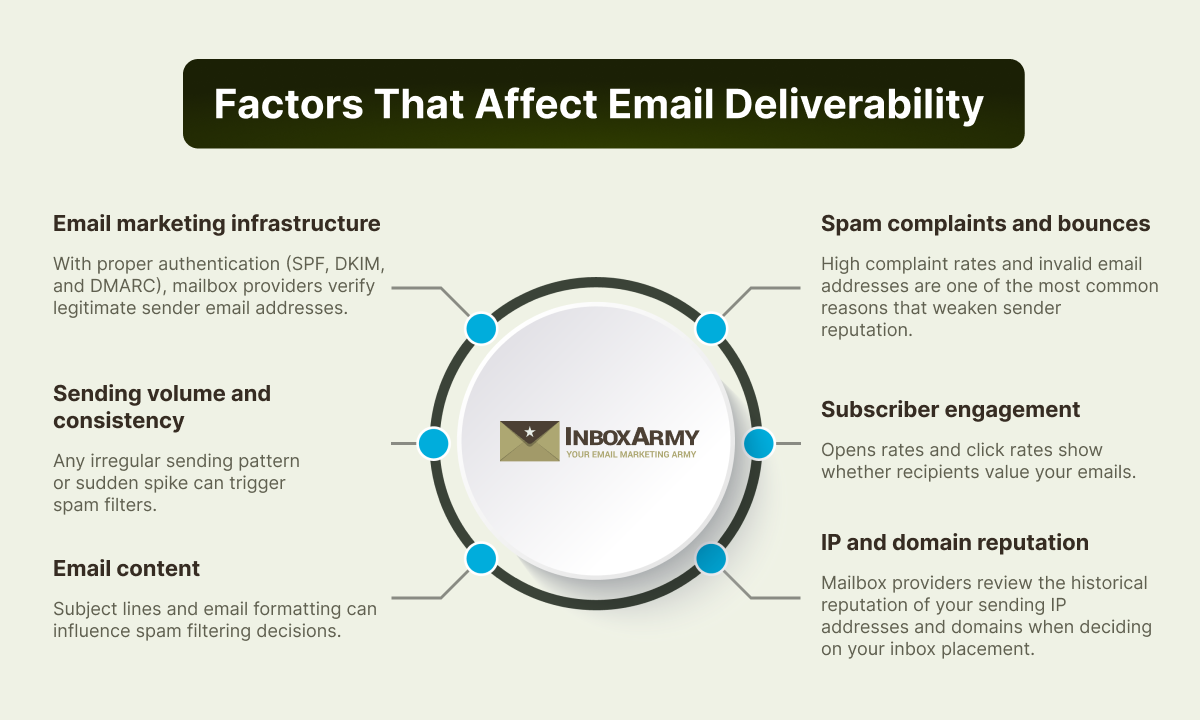
Authentication
SPF, DKIM, and DMARC tell a mailbox provider you’re authorized to send from that domain. Without them, nothing else gets evaluated fairly.
Sending Behavior
From there, it’s behavior. Sending volume that jumps around, a sudden spike after weeks of quiet, subject lines that oversell, and formatting that looks templated. Each of these gets read as a signal, and mailbox providers add them up.
Bounces and Spam Complaints
Bounces and spam complaints do the most damage. A high complaint rate or a list full of dead addresses tells a provider your program isn’t wanted, and that verdict sticks. Open rates and click rates work the other way, showing a provider that real people are engaging with what you send.
Engagement
Opens, clicks, replies, and subscribers moving messages to the primary inbox are all positive signals. They tell providers that real people want what you are sending and over time, that matters as much as avoiding negative signals.
IP and Domain Reputation
All of this rolls up into IP and domain reputation, the long memory mailbox providers keep on every sender. Good behavior builds it slowly. Bad behavior can undo months of it in a week.
Email Deliverability Best Practices to Improve Inbox Placement
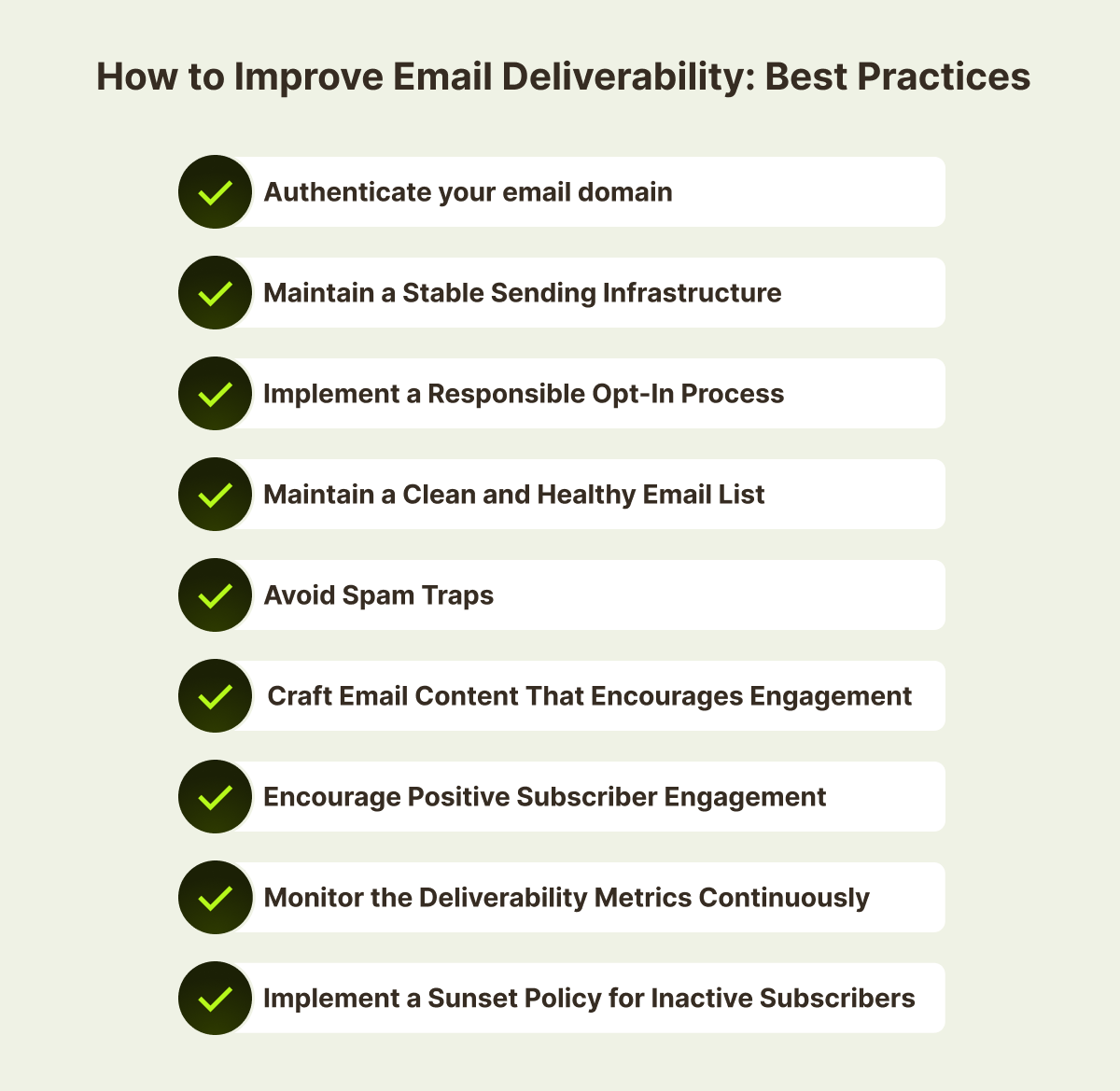
Mailbox providers make the final call, but senders aren’t just along for the ride. Get the fundamentals right, consistently, and most delivery failures never happen in the first place.
Here’s what that looks like in practice.
1. Authenticate Your Email Domain
Three authentication methods do the heavy lifting here.
SPF (Sender Policy Framework): It tells mailbox providers which servers are allowed to send mail for your domain, and they check incoming messages against that list.
DKIM (DomainKeys Identified Mail): attaches a cryptographic signature to each email, proving the message wasn’t altered in transit.
DMARC (Domain-based Message Authentication, Reporting and Conformance): sits on top of both, telling providers what to do when a message fails SPF or DKIM and giving you reporting data so you can catch spoofing attempts before they become a problem. It’s also the one most teams skip, and usually the one that matters most when something goes wrong.
When we audited The Escape Game’s programme, authentication gaps were part of the problem: header alignment, SPF alignment, and DKIM alignment all required correction, and the unsubscribe header configuration needed improvement. These are fixable in hours, but they were contributing to the inbox placement, which had fallen to 28%.
Get these wrong or skip them, and providers filter or reject your mail before evaluating anything else about your reputation.
If you would like to explore authentication methods in detail, check out our SPF, DKIM, & DMARC blog.
2. Maintain a Stable Sending Infrastructure
High-volume senders prefer a dedicated IP rather than a shared pool because a dedicated IP builds its own reputation rather than inheriting someone else’s mistakes.
New IPs have no history, so they need to be warmed up. Start small, gradually increase volume, and let mailbox providers see engagement hold steady as the numbers climb.
Skip the warm-up and send a large volume from a brand-new IP, and providers read it as spam behavior. They’ll throttle or block delivery until the sender builds a track record that matches the authentication on file.
3. Maintain List Hygiene
Even a well-built list decays over time. Addresses bounce, people stop opening anything, and contacts who signed up for a promotion three years ago forget you exist. Keep emailing them, and engagement drops while bounce rate climbs, and a mailbox provider reads both as a sign nobody wants what you’re sending.
Left unmanaged long enough, a decaying list starts overlapping with spam traps, addresses ISPs and anti-spam groups plant specifically to catch senders who aren’t being careful. They don’t belong to real people. Hit one repeatedly, and a provider takes it as proof you’re working from a purchased list, a scraped database, or contacts nobody’s touched in years, and your reputation takes the hit.
Learn all about top email list cleaning services that can help you control the quality of your list as it evolves.
4. Implement a Sunset Policy for Inactive Subscribers
Not every subscriber who’s gone quiet is invalid or a spam trap risk. Some are just inactive, and a sunset policy is the more deliberate way to handle them:
- Set a threshold. Six months with no opens or clicks is typical.
- Send a re-engagement email asking if they still want to hear from you.
- If there’s still nothing, suppress them from future sends.
What’s left is a smaller list that performs better and a clearer signal to every mailbox provider deciding what to do with your next send.
5. Offer a Preference Centre
If a subscriber wants out of everything you have to offer, then the unsubscribe link can handle this all-or-nothing scenario. However, if the subscriber wants to hear from you less often or only about something particular, then a preference centre can help you out.
A preference centre gives subscribers control over frequency and content type of emails. Without a preference centre, those subscribers either unsubscribe from you entirely or they do nothing and start ignoring your mail. Both outcomes hurt you. Unsubscribes shrink the list; inactivity accumulates as a negative engagement signal over time.
At minimum, a preference centre should let subscribers control how often they hear from you and which content categories are relevant to them. Make it accessible from every email and make it easy to use; if it requires more effort than clicking unsubscribe, most people will take the easier path.
6. Get Your Opt-In Process Right
Where an email address comes from shapes everything that follows. People who ask to hear from you open, click, and rarely complain. People who don’t tend to mark messages as spam, unsubscribe, or just go quiet, and mailbox providers notice the difference fast.
Double opt-in adds friction on purpose. A subscriber confirms their address through a follow-up email before they’re added to the list. Fewer people make it through, but the ones who do are real, intentional, and far less likely to bounce, get flagged as a bot, or sign up by mistake and complain a week later. Slower growth, better list.
7. Avoid Email Subject Line Malpractices
Filters are trained to catch a specific pattern, and certain subject line habits walk right into it:
- Exclamation marks or all caps
- Spam trigger words like “free,” “guarantee,” or “act now”
- A fake Re: or Fwd: prefix on a cold send, designed to look like a reply
- A promise the email itself doesn’t deliver on
People notice that last one even when filters don’t. The moment someone feels tricked, or the email doesn’t match what they expected when they signed up, they’re done. Ignore, delete, or worse, spam.
The fix is almost boring. Write a subject line that says what’s actually inside. Send the thing people signed up for. Respect costs nothing, and it shows up in every metric that matters.
8. Be Mindful of Email Body Malpractices
The body matters just as much, and a few habits do most of the damage:
- One large image with barely any text
- Links where the visible text doesn’t match the destination, or that route through a URL shortener
- An unsubscribe link that’s buried, in tiny grey text, or doesn’t work
- No plain-text version alongside the HTML
All four read as an attempt to dodge filters, even when that’s not the intent. Mailbox providers check for all of it, and so do the people receiving the email.
9. Encourage Positive Subscriber Engagement
Every interaction tells a mailbox provider something. Opening, clicking, replying, moving a message out of spam, and adding a sender to contacts: these all read as a vote of confidence.
Ignoring or deleting unread emails does the opposite, quietly, over time, until the pattern is clear enough that future emails start landing in spam by default.
Technical setup gets you to the inbox once. What people do after that decides whether you stay there.
10. Monitor Deliverability Metrics Continuously
Four numbers tell most of the story, and they’re worth checking against each other rather than in isolation:
- Bounce rate: It depicts that the list has addresses that don’t exist anymore or haven’t for a while.
- Spam complaint rate: It can be due to irrelevant content or unengaged subscribers.
- Open and click rate: This metric shows whether the people who do receive your emails find them worth the time.
- Inbox placement rate: It’s the percentage that actually makes it to the inbox instead of getting filtered out before anyone sees it.
Watch these together, and they tell you where to look. Bounce rate up, complaints flat? Clean the list. Complaints up, bounce rate flat? Look at what you’re sending and to whom.
Email Deliverability Case Studies: What Fixing These Problems Actually Looks Like
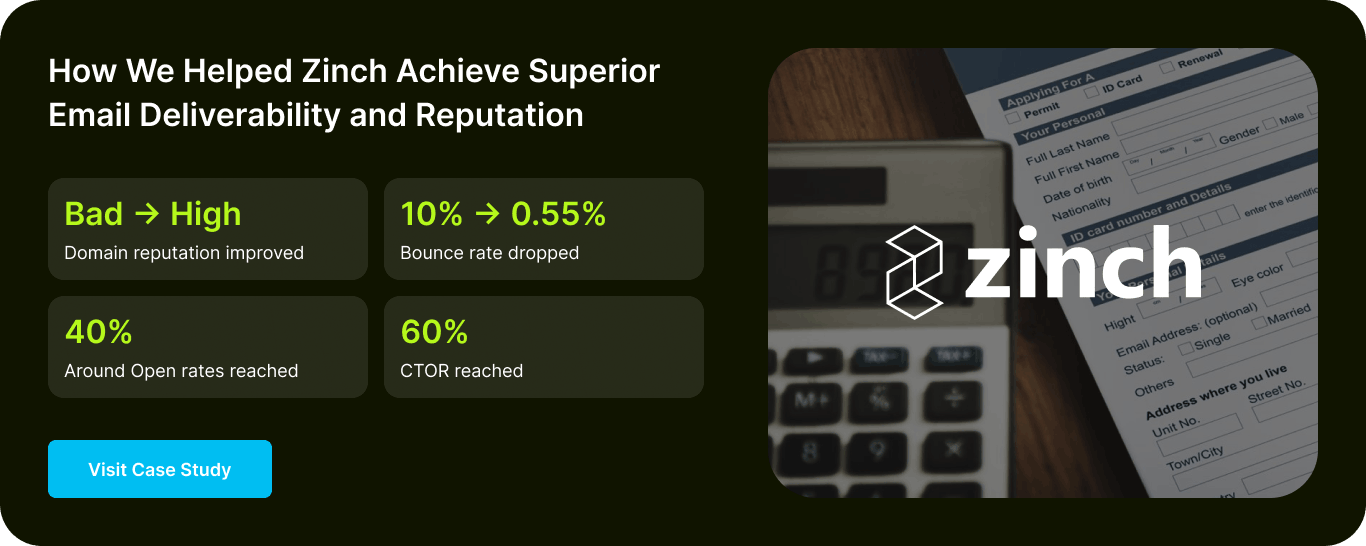
Real-World Example of Rebuilding Domain Reputation for Zinch
Challenge
When Zinch came to us, its domain reputation was already struggling. They had a sizable list, over 81,000 records, but no clear picture of how healthy that data actually was.
Solution
The first move was to slow down and diagnose. Small test sends turned up bounce rates between 2 and 6 percent, well above healthy levels. Digging into the data, we found Yahoo addresses were the main culprit. A lot of inactive accounts were returning false “valid mailbox” signals, so every send to them counted as a bounce.
Once those addresses were stripped out and the list cleaned, we ran a structured warm-up. Sends went to the highest-quality contacts first, and the audience grew only as engagement held steady.
Result
Five months later:
Domain reputation: Bad to High
Bounce rate: 10% to 0.55%
Open rate: around 40%
CTOR: 60%
Clean data and a proper warm-up did almost all the work.
Read more: The Complete Zinch Case Study
Real-World Example of The Escape Game Restoring Deliverability
The Escape Game operates more than 60 escape-room locations across the US, running simultaneous campaigns for location launches, regional promotions, and national sends.
Challenge
When they came to us, weighted inbox placement had dropped to approximately 28% against an industry standard of 85–95%. Campaigns were jumping to over 1 million recipients without ramp-up; authentication had gaps in header, SPF, and DKIM alignment; and the list included a significant volume of inactive and unengaged subscribers.
Solution
The remediation covered all of it: authentication corrected first, then a structured volume ramp starting at 15,000 recipients per campaign and scaling in controlled steps to 280,000 per send, with coordinated timing across campaigns to eliminate send clustering.
Result
- Inbox placement stabilised
- Open rates recovered to 25–35%
- Close to 2x year-over-year revenue growth
Read more: Complete The Escape Room Case Study
Conclusion
None of the rest of the email marketing matters if the email doesn’t arrive. Deliverability isn’t something you configure once and forget. It behaves more like a credit score, built slowly through consistent behavior and just as easily dented by one bad stretch.
Most deliverability problems are fixable once you know what’s actually broken. That’s the part InboxArmy does for a living. Schedule a free consultation with our email marketing agency, and we’ll find out what’s working against you.
Email Deliverability Best Practices FAQs
What is the best way to improve email deliverability?
Get SPF, DKIM, and DMARC set up correctly, send only to people who opted in, and keep the list clean. Everything else that mailbox providers look at builds on those three.
How long does it take to improve email deliverability?
Authentication fixes can show results within days. Reputation recovery and domain warm-up take longer, usually a few weeks to a few months, because mailbox providers need to see consistent behavior before they adjust their view of a domain.
Can I fix poor deliverability by switching email service providers?
No. Domain reputation and sending behavior travel with you. A new ESP doesn’t reset either one, so whatever caused the problem on the old platform shows up again on the new one.
How often should I clean my email list?
Build it into the calendar rather than treating it as a one-time fix. Most programs run a cleanup or re-engagement check every few months: remove invalid addresses, suppress the long-term inactive, and keep going.
What is a good email deliverability rate?
Target 95% inbox placement rate or above. Between 85% and 94% is acceptable; 80–84% is acceptable but worth investigating; below 80% needs urgent attention and is actively costing you revenue.
What’s the difference between delivery rate and deliverability rate?
Delivery rate measures whether an email was accepted by the recipient’s mail server, the opposite of a bounce. A 99% delivery rate just means 99% of emails didn’t bounce. Deliverability, often called inbox placement rate, measures where those delivered emails actually ended up: inbox, spam, or another tab. An email can have a 99% delivery rate and a 40% inbox placement rate if most of what gets accepted lands in spam. The delivery rate tells you the server took the email. Deliverability tells you whether a person will ever see it.