
Table of Contents
Email design is the process of creating aesthetically pleasing emails that communicate effectively with your audience. But it is also much more than that. It also involves crafting optimized emails for all devices and ensuring a consistent brand experience across your entire email ecosystem.
This detailed blog post will walk you through the various aspects of effective email design and help you create stunning designs that get your desired results.
What is Email Design?
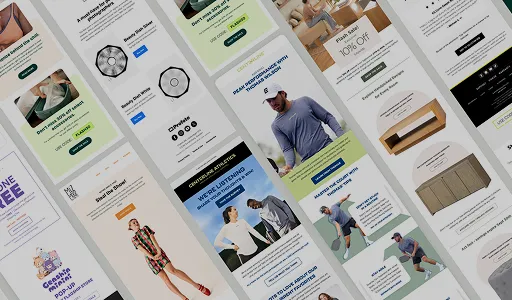
Email Design is about creating aesthetically pleasing and strategically designed emails that communicate effectively. It is the process of creating visually attractive, engaging, and personalized emails that capture your readers’ attention and encourage them to take the desired action of your campaign.
Email design maximizes engagement by ensuring your emails are visually appealing and reader-friendly. This means understanding and following principles from basic design to advanced layout and navigation techniques to create emails that look great on any device and any email client.
Why Does The Design of An Email Matter?
Writing an email is one thing. Having the email perceived by the reader as the writer intended is another. This is where the design of the email comes in.
Designing emails for maximum impact involves structuring and formatting your emails for clarity and composure, such as creating easy-to-scan email content, using visuals strategically, choosing the right fonts and colors, and much more.
A befitting design captures the reader’s attention within microseconds. It appeals to the right psyche of the reader to stick around, engage with the email, and take the desired action. Different elements of a well-structured email design have been scientifically proven to influence user experience and engagement in various ways.
For instance, there’s a 70% chance that a reader will delete an email within 3 seconds if it is not displayed as intended. Moreover, about 66% of surveyed readers prefer emails that primarily consist of images.
Main Types of Email Design
The final design you opt for will depend on the type of email that you are targeting. Different email designs work best for various email campaigns.
For example, transactional emails should be written in a neutral tone and contain only necessary information with a minimal design philosophy. On the other hand, promotional emails should be designed to capture the reader’s attention and draw them in with visuals, colorful images, bold fonts, and other eye-catching design elements.
Here are the main types of email designs that you should know about:
- Plain Text Emails
These emails are designed for short messages and contain only text-based content. Naturally, they have a straightforward format with no graphics, including logos, images, and buttons.
Use Cases For Plain Text Emails:
- Newsletter sign-up confirmations
- Password resets or account verification emails
- Quick, automated notifications
Use Cases For NOT Using Plain Text Emails:
- Promotional emails
- Product launch announcements
- Critical customer service messages
Learn More about Plain Text Emails here.
-
HTML Emails
As the name suggests, these emails are designed with HTML code and contain both text-based and graphical elements. These emails have a much more attractive design than plain text emails but are comparatively time-consuming to roll out. With a unique blend of typography, images, and color, HTML emails help you create an eye-catching design that stands out in inboxes.
Use Cases For HTML Emails:
- Newsletter Design
- Announcements
- Promotional campaigns
- Event invitations
- Product releases
- Company updates
Use Cases For NOT Using HTML Emails:
- Sensitive Information
- Time-Sensitive Communications
- Long Emails
- Quick Replies
-
Interactive Emails
Also known as dynamic emails, these emails are designed using HTML and include interactive elements that are JavaScript-based and in the form of animations, scroll bars, carousels, and video. These elements are designed to entice the reader and make them engage with the email content as if they are a web app.
Use Cases For Interactive Emails:
- Holiday emails
- Event registrations
- Product launch announcements
- Education emails
Key Elements of Email Design
Any great email design should have the following elements:
1.Subject Line
- The subject line of an email should be brief, catchy, and to the point. It’s designed to get the reader’s attention, so make sure it is compelling and entices the reader to open the email.
Example:
- Certain powerful words like “Hurry!” and “Limited Time Offers” are proven to have a higher response rate.
2. Pre-header
- This is a short line of text that appears after the subject line when an email is viewed in the inbox. It should add context to the email and provide more value to the reader.
Example:
- You could summarize the email content in the pre-header.
3. Body Content
- The body content should be easy to read, concise, and well-structured. Consider using visuals such as images and videos to tell your story in an engaging format, especially if you opt for HTML or interactive videos.
Example:
- Use GIFs to explain complex concepts or introduce a product in a visually attractive way.
4. Logo/Brand Design
- Your logo and brand name must be prominent and indispensable elements of the design throughout all emails you send. Using it at the start and end of the email can help create a cohesive design and make it easier for readers to recognize your brand.
Example:
- Add a logo to the top of the email and at the bottom in your signature.
5. Images
- Adding images in emails helps to engage the reader and makes the content more comprehensible. Depending on your goal, use images to promote your products, services, or ideas.
Example:
- If you are sending out emails for an event promotion, consider adding photos from past events to appeal to readers and make them more likely to attend.
6. Call to Action (CTA)
- The purpose of any email design should be to drive an action or response from the reader. To achieve this, you ensure that your Call to action in emails is prominently placed and clearly visible.
Example:
- Keep your CTA brief, concise, and easy to spot with the right color and positioning
7. Footer
- The footer should contain information about the sender and provide links to other contact points, such as your website and social media profiles. This helps to create a connection between emails and other channels and builds your brand.
Example:
- Use a footer to include links to frequently asked questions, contact information, and policy details.
8. Links
- Depending on the conversion goal, you can also include links to your website, products, or services in your emails. This helps to direct the reader and provide more information about the topic or product.
Example:
- If you are promoting a product, include links to its product page or demo video.
These are some key elements to include in an email design that will help make it effective and engaging for readers.
Email Design Trends For Evergreen Campaigns
In the rapidly changing digital landscape, keeping up with the latest trends is essential to ensure your emails stand out. Here are some of the trends that help ensure that your emails remain evergreen and relevant:
1. Minimal Elegance Through White Spaces
- Clutter is always a turn-off for readers. Keeping your design clean and elegant by incorporating white spaces can help emphasize certain email elements when used effectively. And it makes sense why.
- More than half the readers today access emails through hand-held devices. Cluttered or visual-heavy designs are challenging to navigate on small screens, making the message lose its impact in the noise.
Reasons That Make White Spaces An Excellent Email Marketing Design Trend Include:
- Visual Simplicity – White spaces help to keep the email design simple and easy-to-read
- Enhanced Focus – Focus on the critical elements of an email is increased.
- Increased Engagement – White spaces create a pleasant visual experience, which helps to reduce drop-offs.
2. Responsive Design
Email design is not just about desktops anymore. Handheld devices are now the primary platform for emails. Understanding the importance of mobile-friendly design and ensuring your emails are responsive and look great across all devices is essential.
Responsive design helps achieve a good user experience as it caters to different screen sizes. It also ensures your email content remains consistent even when opened on different platforms, which is vital for brand identity and recognition.
Types of Responsive Email Designs Include:
- Single-Column – This design offers a clean, simple look that works well on any device.
- Multi-Column – This type of design uses fluid grids to optimize content for different sizes.
- Hybrid – This is a mix of single-column and multi-column designs that use media queries to adjust the layout.
- Adaptive – This design is more complex and uses more pre-defined breakpoints, which are set up for specific devices.
3. Neon Colors
Adding a bit of a lively flair to emails, neon colors are a great way to grab attention and entice readers. Neon can highlight important information or CTA and draw attention to some aspects of an email.
Using neon colors with caution is essential, as they can also be overwhelming if misused.
Some Precautions To Consider While Using Neon Colors In Email Design Include:
- Incorporating neutral colors to create a balance
- Keeping the background simple
- Using neon colors sparingly and strategically
- Using neon as an accent color rather than a background color
4. Animated Portable Network Graphics (APNGs)
Animated Portable Network Graphics (APNGs) are a great way to add movement and life to emails without relying on GIFs. These images consist of several frames that can be played in a loop.
It is a great way to show off product features, explain a process or highlight different aspects of the email. APNGs have better quality and resolution than GIFs and support 8-bit alpha transparency along with 24-bit colors.
Currently, the only disadvantage with APNGs is that Outlook and Gmail do not support them.
5. Animated CTAs
A head turner for email marketing in 2023, animated CTAs go the length to entice readers to take action on your emails. Marrying the CTA with a GIF or a CSS animation can help to add more impact and make it stand out from the rest of the content.
Animated CTAs work best with single-column email designs, as they can cause clutter in multi-column layouts. Additionally, it is crucial to monitor the file size of these animated CTAs, as large files can impact loading time.
6. Gamification
Gamification elements in emails can help to engage readers and build a stronger relationship with ingredients such as leaderboards, progress bars, quizzes, surveys, and more. These elements can be used to spark curiosity and encourage users to interact with the email.
It is important to remember that gamification should add value and not be intrusive and distracting. Additionally, these elements must work on all platforms, including mobile devices, as more than 60% of emails are now opened on mobile devices.
Here Are Some Gamification Ideas For Your Next Email:
- Spin the wheel to unlock exciting giveaways or discounts
- Scratch cards that reveal hidden rewards
- Trivia quizzes with amazing prizes or discounts
- Progress bars that show users their loyalty points and rewards
7. Duotone
Often used in retro-styled emails, duotone is an excellent design trend that can help to set the tone for your message. This technique uses two colors, usually shades of the same hue, to create an eye-catching and aesthetically pleasing look. Duotone images are also trendy in in-app designs and marketing campaigns.
When Selecting Colors For Duotone Images, It Is Essential To:
- Create a contrast that works well together
- Avoid pairing bold colors so as not to make it overwhelming
- Opting for lighter shades that don’t overpower the message
- Using these visuals sparingly and strategically to avoid making emails look cluttered
8. Tangible Products Photography
Tangible product photography is a great way to showcase product features in emails. This technique uses high-resolution images and close-up shots of products to showcase details that customers usually miss out on.
This trend works best with brand-centric emails, such as launch campaigns and product announcements.
The key Here Is To Ensure That:
- Product images are high-quality
- There is enough white space to create a visually appealing layout
- The file size is small enough not to slow down loading times.
9. Long Scroll Email Designs
Long scroll designs are becoming increasingly popular as more users prefer to access emails on their smartphones. This trend involves creating emails containing all the necessary information without breaking them into multiple segments.
When Using A Long Scroll Design, It Is Important To:
- Organize content in a logical sequence
- Include visuals and different elements like graphics, illustrations, and videos
- Have call-to-action buttons visible at all times
- Ensure that the email looks good on all devices.
10. Bold Typography
Using bold and big fonts can help draw readers’ attention to important email messages. However, this trend works best with minimal designs, as it allows the text to stand out from the rest of the content, encouraging readers to stop scrolling and actually read the email.
When Using Bold Typography, It Is Vital To Ensure That:
- The font size used is legible and easy to read on all devices
- The font is appropriately aligned so as not to look cluttered
- The font is used sparingly and strategically to make sure that the message stands out
Email Design Best Practices
Email design trends may come and go, but certain best practices should always be followed when designing emails. Well-crafted emails can be a great way to reach out to your target audience and build relationships with them. Keep these email design best practices in mind for creating emails that will grab your reader’s attention and convince them to take action.
1.First Impressions And Subject Lines:
The subject line and the preheader are the first things readers notice even before they open an email. They should be short, catchy, and convey what the email is about. Consider this your chance to grab attention in a sea of emails.
As per ReturnPath, an ideal email subject line must be under 55 characters and preferably 30 characters (as per the limit on some mobile devices). However, in case you go overboard, using power words at the start of the subject line to grab attention can help.
Moreover, as per a report by Experian, including an emoji in the subject line of emails results in a 56% higher open rate. Thus, consider using them to make your subject lines catchy and stand out in the inbox.
To know more about Subject lines Read our blog on 200+ Welcome Email Subject Lines That Actually Convert
2. Concise Communication:
Every email should be concise and to-the-point, as emails that are too long often get ignored. Use bullet points, images, or graphics to break up text and make it easier to read.
Hubspot analyzed more than 40 million emails in 2018 and found that emails between 50 and 125 words had the best response rate (more than 50%). Moreover, emails that were around 200 words long had the best Click-Through-Rate (CTR).
This indicates that your communication strategy must focus on your readers’ needs and deliver value to them. Therefore, keep it simple and focus on one main message at a time.
3. Maintaining Brand Consistency:
Ensure all your emails reflect the same design and style to ensure consistency. Your customer should be able to identify an email as yours in a single glance.
Ensure that the colors, logos, and fonts used in your emails are consistent with those used in all other communication channels. Create templates for all your emails and ensure that the email templates remains the same, no matter how often you send out emails.
4. Personalization Options:
Personalizing an email for the intended recipient makes it feel more thoughtful and professional, increasing the chances that your recipient will open it.
Email Personalization can include anything from adding their name to the email’s subject line or body, to using their purchase history or location to create a more personalized message. Use the available data to craft emails matching the recipient’s needs and interests.
Also, make sure that the personalization is not too obvious or intrusive. For example, ‘Karl, we noticed that you were looking at this product…’ could be seen as intrusive and creepy, especially in certain demographics.
5. Backgrounds:
Backgrounds can be used to draw attention to an email’s main content or headline. A bright background color, pattern, or image can help make your message stand out from other emails in the inbox.
However, use backgrounds sparingly and make sure that the text is clear and legible on all devices. Background images should also not be too large as they can slow down the loading time and make it difficult for readers to view the email.
6. CTA Alignment And Optimization:
CTAs are the holy grail of email marketing design as they convert leads and drive sales. Ensure that the CTA is placed in a prominent area of the email to be easily visible.
Moreover, ensure that the size and color of the CTA stand out from the rest of the email. In some cases, using words such as ‘FREE’ or ‘NOW’ in the CTA can help increase the conversion rate. You can also consider testing your CTA placement and design to see which variation works best for your audience.
7. Templates:
Email template designs are precomposed and easily customized for different campaigns and messages. They help reduce the time spent creating emails and ensure that they are consistent with your brand guidelines.
Email template designs can also optimize the user experience across different devices, as they automatically adjust their size according to the device being used. In addition, they can be both free or paid, depending on their complexity. Check our latest email marketing templates samples here
By following these design tips, you can create visually appealing emails and help drive conversions. Keep in mind that the key is to focus on providing value to your audience and ensuring that their needs are met.
8. Unsubscribe Buttons:
Make sure to include an unsubscribe button in all your emails. This helps ensure you comply with the CAN-SPAM Act and avoid legal issues. Moreover, it allows users to easily opt-out of receiving future emails if they are no longer interested or have lost interest in your content.
By including an unsubscribe button, you also show your readers that you respect their privacy and understand their needs. Make sure to make the unsubscribe process as simple and straightforward as possible.
9. A/B Testing:
A/B testing is a great way to improve the performance of your emails. It allows you to test variables such as subject line, content, CTA button, etc., and see which works best for your audience.
By running multiple A/B tests, you can gain valuable insights into what resonates with your target audience and create more effective and engaging emails in the future. In addition, it gives you a detailed overview of how each variable affects your conversion rate.
For example, variables you can test for your subject lines include Length, Topic, Tone, Emojis, Personalization, and more.
10. Dark mode:
With the increasing popularity of mobile devices, many users are now opting for the dark mode feature instead of light mode. Dark mode helps save battery life and makes reading text in low-light conditions easier.
Ensure that your emails support both dark and light modes so they can be viewed clearly on any device.
11. Design optimal footer:
The footer is the last thing readers see in an email and is often overlooked. However, it provides a great way to include additional content such as contact information, unsubscribe options, social share button, privacy policy, brand address, etc.
Therefore, ensure to design the footer section carefully, as it plays a vital role in setting user expectations regarding easy navigation.
12. Optimize Email Design To Be Responsive:
Responsive design ensures that emails look great and render appropriately on any device. Make sure to use HTML and media queries so that your emails automatically adjust to the size of the user’s screen.
You should also consider using responsive email frameworks such as MJML or Foundation for Emails to create high-quality responsive designs quickly.
13. Email Copy:
The email copy should be concise and to the point. Think about what you want to communicate and ensure that your message is clear and easy to understand. Avoid using too much jargon or complex language, as it can be challenging for readers to comprehend.
This is especially important if you are targeting multiple demographic groups. Readers can easily understand a simple and engaging copy from different backgrounds.
These are some of the most essential tips for designing effective emails to help you engage with your audience more effectively and drive better results. Consider using these tips to create emails that look great, deliver value, and convert. With the right strategy, you can create emails tailored to your audience and help boost conversions.
10 Email Design Mistakes to Avoid
When designing emails, it’s vital to keep in mind the mistakes that will ruin your design & render your emails ineffective.
Some of the most common email design mistakes to avoid include:
1. Not Optimizing For Mobile
The best email designs should be optimized for desktop and mobile devices so they can be easily viewed across different platforms. Not doing this can lead to a poor user experience and lower engagement rates. Learn more about mobile optimized emails here
2. Ignoring Accessibility
Make sure to include images with alternative text and ensure your design is accessible to all users. Otherwise, you could be excluding an essential part of your audience.
3. Not Using The Right Colors
Be mindful of the colors you use in your emails, as they can significantly impact how readers perceive your emails. Complex color schemes can be overwhelming and may not look good on all devices.
4. Cluttering The Layout
It’s important to ensure that the email layout design is simple and easy to understand. Ensure enough white spaces between your design elements and include relevant visual cues to guide the reader throughout the email.
5. Using Too Much Text OR Too Little
Too much text can lead to reader fatigue, while not enough text can make your message unclear. Aim to strike a balance between the two and focus on using concise and compelling copy.
6. Relying Solely On Images
While images are great for conveying messages quickly and effectively, they should be used in conjunction with text. The ideal approach is to use visuals that complement the copy, so your message can be easily understood.
7. Not Testing Before Sending
Testing your email design is an essential part of the process. Make sure to test the design on different devices & browsers and review the email for any mistakes.
8. Not Considering Readability
Font selection, font size, and line length are all important factors to consider when designing emails. Make sure the text is legible and not too small; otherwise it can be difficult for readers to comprehend the message. Learn more about web fonts in email here.
9. Ignoring Personalization
Personalizing your emails is a great way to show that you care about the reader and make the experience more engaging. Using dynamic content and personalization tokens can help create emails tailored to each individual.
10. Not Optimizing For Deliverability
Email design mistakes can affect your email deliverability rate and lead to emails ending in the spam folder. Use a reputable email service provider, avoid triggering words, and test the design before sending.
By avoiding these common email design mistakes, you can create engaging and effective emails conveying your message. When used in conjunction with the right copy & visuals, you can ensure that emails are successful at driving conversions.
Conclusion
Now what makes a great email design, start experimenting with different elements to create compelling emails. Include visuals, Play with different font styles and sizes, Use whitespaces to break up large chunks of information & Add a clear CTA to help readers take action.